Change Sprite Color Unity Best Easiest Way To Change Color Of Certain Pixels In A Single Sprite Unity Tutorial How To Change Gameobjects Sprite Color With C Script Change Sprite Color To Different Grades Of Another Color Unity Game How To Change Sprite S Color In Scratch YouTube C Change The Opacity Of Gameobject Unity And Change The Look Of A To change a Sprite from a script in Unity create a reference variable to hold the new Sprite Then set the Sprite property of the Sprite Renderer Component on the Game Object you wish to change to match the new replacement Sprite In scripting it looks like this
Directly extracted from the Unity Scripting API Color struct in UnityEngine Description Representation of RGBA colors This structure is used throughout Unity to pass colors around Each color component is a floating point value with a range from 0 to 1 Here is the Link to the Documentation Unity Scripting API If we want to swap this color then in the swap texture we need to set the pixel at index 25 to the color we want the outline to be blue The swap texture with the color at index 25 set to blue Now when the shader encounters a color with a red value of 25 it will replace it with the blue color from the swap texture
C Change The Opacity Of Gameobject Unity And Change The Look Of A 8 Streiche Die Dein Verstand Dir Spielt Love Your Enemies Bad Posture Visual Scripting Components Part 3 Timing Unity Tutorial NotSlot How To Change Sprite Color In Scratch YouTube Covid 19 Medikament Wollen Sich Die USA Bei Roche Einen Vorteil How To Change Sprite Color With Alpha Mask Unity Answers Kommentar Zu Sarkozys Verurteilung Ein Historischer Augenblick F r Shade S1 Stehleuchte Wei Messing Kostenlose Lieferung Scratch 3 0 Make A Sprite Change Color YouTube
Change Sprite Color Unity
 Change Sprite Color Unity
https://i.pinimg.com/736x/15/52/3b/15523b7707652ecf8efbe3d576c5ddaa--game-design-sprites.jpg
Welcome to my brand new game dev channel In this tutorial I will be showing how to change the color of a 2d sprite image color back and forth in a simple w
Pre-crafted templates provide a time-saving solution for producing a diverse variety of files and files. These pre-designed formats and layouts can be used for numerous individual and professional jobs, consisting of resumes, invitations, flyers, newsletters, reports, presentations, and more, simplifying the content development procedure.
Change Sprite Color Unity

Sprite Animation Tutorial Unity 2021

8 Streiche Die Dein Verstand Dir Spielt Love Your Enemies Bad Posture
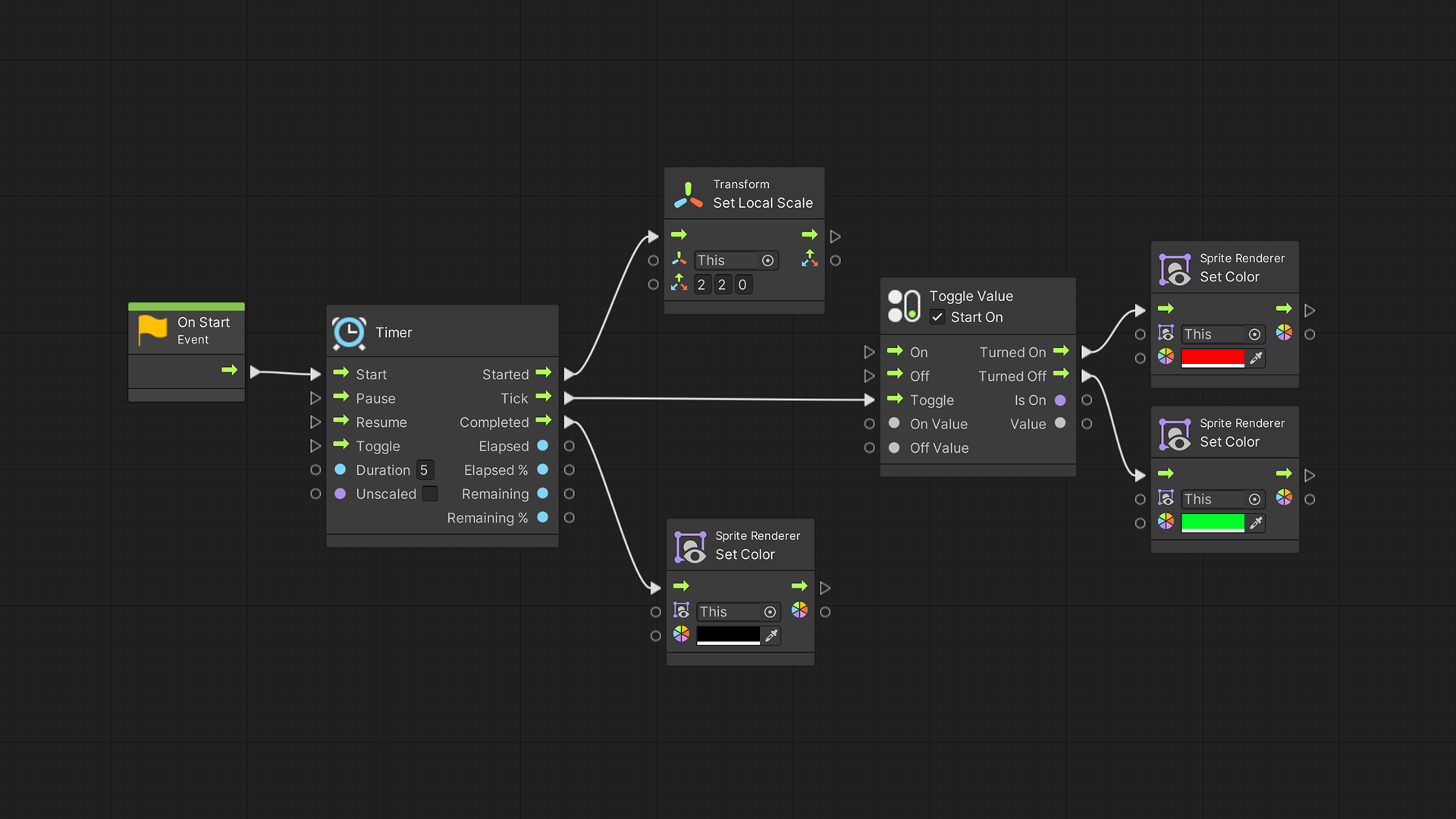
Visual Scripting Components Part 3 Timing Unity Tutorial NotSlot

How To Change Sprite Color In Scratch YouTube

How To Change Sprite Color With Alpha Mask Unity Answers

Kommentar Zu Sarkozys Verurteilung Ein Historischer Augenblick F r

Now if you click on Color you can manually change the sprites transparency in the colour changer by turning alpha down to 0 or tint the sprite by modifying how much red blue and green is in the image Confusingly if it s set to all white the sprite is its normal colour while all black will make the sprite black

How do you change a color in Spriterenderer with script Thanks in advance Ilingis Nov 14 2013 1 jquave Joined Oct 3 2009 Posts 21 renderer material SetColor Color Color red jquave Nov 14 2013 2 GabiBulat likes this XGundam05 Joined Mar 29 2012 Posts 473 Or rather you can probably just use SpriteRenderer color Code csharp

To change a Sprite s opacity change the value of its Color property s Alpha A channel Left The original Sprite Right The Sprite with its RGB colors set to red Material Use a Material s Material and Shader settings to control how Unity renders it Refer to Materials Shaders Textures for further information on these settings

In this Tutorial I ll show you how to change the color of 2D Sprites in Unity using C scripting Learn how to Create your own

1 Answer Sorted by 2 Step 1 Go to the Unity Download Archive and navigate to the version you re using Hit the drop down and download the built in shaders for that version Step 2 Make a copy of the default sprite shader found under DefaultResourcesExtra Sprites Default shader in that download
0 You can change the sprite by just assigning the new sprite to the sprite Property on the image like this public class SpriteChange MonoBehaviour SerializeField Sprite newSprite public void ChangeSprite var image GetComponent Image image sprite newSprite for this you obviously need a reference to the sprite you want After doing this I was able to set the color of Unity U2D Entities SpriteRenderer Color field in my system as follow Code CSharp SpriteRenderer brickSpriteRenderer EntityManager GetComponentData SpriteRenderer brickEntity brickSpriteRenderer Color brickColor EntityManager SetComponentData brickEntity brickSpriteRenderer What
1 My platform is QNX Unity version 2021 3 15f1 The official s explation is Force SRGB blit Enable this to use Force SRGB blit for Linear color space If your graphics drivers don t support the linear color space selecting this option will convert Linear colorspace to Gamma SRGB colorspace