Change Remote Desktop Password Mac How To Change Password On Remote Desktop YouTube How To Remote Desktop Without Password YouTube Changed Expired RDP Password How To Change A Password On A Remote How To Fix Remote Desktop Incorrect Password On Windows 10 Pureinfotech How To Change Remote Desktop RDP Port On Windows 10 How To Fix Guide Change bubble notification settings You can keep conversations accessible with bubble notifications When you pin bubbles to your home screen you can get messages from contacts
Change of change in change of change in quot Change of quot Change your background and use visual effects Important Participants who join the meeting while not logged into a Google account and participants who need to knock to get admitted can only
How To Change Remote Desktop RDP Port On Windows 10 How To Fix Guide How To Change Remote Desktop Password In Windows 10 2022 In Microsoft Remote Desktop How Can I Change The Account s Password How To Change A Remote Desktop Connection Password Any RDP Pass How To Change A Password Within Remote Desktop YouTube Changing Your Remote Desktop Password How To Fix Remote Desktop Incorrect Password On Windows 10 Pureinfotech Hosted Clients How To Change Your Password Remote Desktop FAME How To Change Remote Desktop RDP Server Password 2021 YouTube
Change Remote Desktop Password Mac
 Change Remote Desktop Password Mac
https://i.ytimg.com/vi/IL8wej2YUXQ/maxresdefault.jpg
If you change or reset your password you ll be signed out everywhere except Devices you use to verify that it s you when you sign in Some devices with third party apps to which you ve given
Pre-crafted templates provide a time-saving solution for developing a diverse series of documents and files. These pre-designed formats and designs can be utilized for numerous personal and professional tasks, consisting of resumes, invites, leaflets, newsletters, reports, discussions, and more, streamlining the content production process.
Change Remote Desktop Password Mac

Changing Your Remote Desktop Password

How To Change Remote Desktop Password In Windows 10 2022

In Microsoft Remote Desktop How Can I Change The Account s Password

How To Change A Remote Desktop Connection Password Any RDP Pass
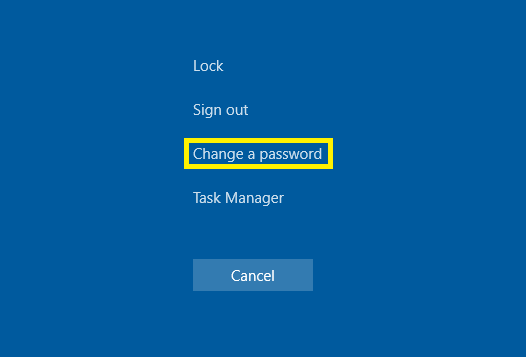
Changing Your Remote Desktop Password

How To Fix Remote Desktop Incorrect Password On Windows 10 Pureinfotech

Apr 6 2011 nbsp 0183 32 2 change 3 modify 4 transform

On your computer go to Gmail In the top right click Settings See all settings At the top choose a settings page such as General Labels or Inbox Make your changes After you re done with

If you change or reset your password you ll be signed out everywhere except Devices you use to verify that it s you when you sign in Some devices with third party apps that you ve given

If you make Chrome your default browser links you click will open automatically in Chrome whenever possible In some countries you may be asked to choose your default browser You

Change or add a recovery address The recovery address allows you to receive an e mail to reset your password if you need it Your recovery address should be an email address that you use
[desc-11] [desc-12]
[desc-13]