Change Open Pdf Settings Settings Sbuzz Editing SEO Settings Readymag Help Second Order Static Analysis Settings For Design Situations Change Open With Settings Molinude Change PDF Settings YouTube Web Mar 30 2022 nbsp 0183 32 Click Settings gt Apps gt Default apps gt Choose default app by file type Locate the PDF file type select it and change the program you wish to use I went to open an email attachment from a company I ve received email from for years But this time it asked me how I wanted to open it and several things were listed
Web Jul 31 2022 nbsp 0183 32 Click the menu icon in the top right corner of the browser window Select Settings from the drop down menu On the Settings window under Privacy and security click the Site Settings option Under Privacy and security click the Site Settings selector Web Oct 31 2023 nbsp 0183 32 Step 1 Open Control Panel Open your PC s Control Panel and click on quot Default Programs quot Proceed with accessing the quot Associate a file type or protocol with a program quot settings It will take some time for your PC to load all your file formats Step 2 Change Default Program Find the pdf entry
Change PDF Settings YouTube Dribbble Site settings jpg By Kyle Ruane Change Someone s Mind By Showing The Big Picture How To Open PDF Files On Android Easy To Follow UPDF Change Open With Settings Molinude Change Default Program To Open Pdf In Internet Explorer Fymserl Settings Openclipart Clipping Culture Sequence Settings Premiere Pro Cc Easysiteexplore
Change Open Pdf Settings
 Change Open Pdf Settings
https://www.sbuzz.com/images/global/seo/ogimage.png
Web Feb 4 2020 nbsp 0183 32 Launch Reader by double click the Reader icon on your desktop 2 Go to Edit gt Preferences 3 In the Preferences dialog go to General category 4 Scroll to the bottom of the dialog 5 Uncheck the option quot Always open PDFs in Adobe Acrobat DC quot
Templates are pre-designed files or files that can be used for various purposes. They can save time and effort by supplying a ready-made format and layout for producing different kinds of material. Templates can be used for individual or professional projects, such as resumes, invitations, leaflets, newsletters, reports, discussions, and more.
Change Open Pdf Settings

Setting Icon Png 342399 Free Icons Library

Dribbble Site settings jpg By Kyle Ruane

Change Someone s Mind By Showing The Big Picture
How To Open PDF Files On Android Easy To Follow UPDF
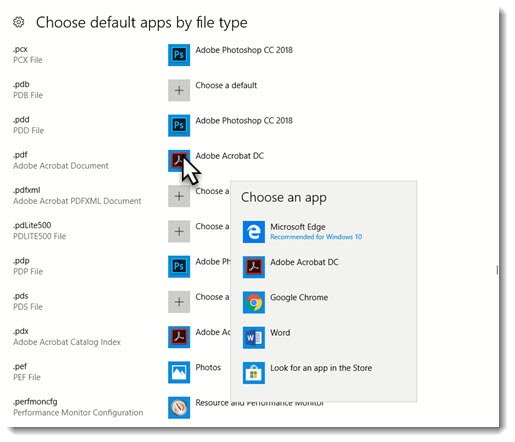
Change Default Program To Open Pdf In Internet Explorer Fymserl

Settings

Web Sep 5 2023 nbsp 0183 32 You can change the default PDF reader through the Settings app File Explorer or Control Panel Press Windows i to open the Settings app then navigate to Apps gt Default Apps gt Choose Default App By File Type and locate PDF Click the icon to change the default app
Web On the menu click Properties A new dialog box will appear In the first subsection the text Opens with indicates which PDF viewer is set as your default Click the Change button Select Adobe Acrobat DC or Reader from the list as your default Click OK to save and apply changes Change from Preview to the Acrobat PDF viewer

Web May 23 2023 nbsp 0183 32 Do one of the following If you have Acrobat or both Acrobat and Acrobat Reader choose Adobe Acrobat and click OK If you have only Acrobat Reader choose Adobe Acrobat Reader and click OK In the Properties dialog box click OK Now the PDF files open in Acrobat Reader or Acrobat Frequently asked questions
Web Oct 30 2023 nbsp 0183 32 A PDF creator can set a PDF to open in Full Screen mode or you can set the view yourself Full Screen mode is often used for presentations sometimes with automatic page advancement and transitions The pointer remains active in Full Screen mode so that you can select links and open notes

Web Apr 9 2022 nbsp 0183 32 To change the default PDF viewer this way first head to the directory in which the PDF file you wish to open is located You can open File Explorer to navigate by clicking on the This PC icon present on your desktop or you press the Windows E keys together on your keyboard to do so
Web Apr 12 2019 nbsp 0183 32 Step 1 Open the Recent apps screen Then tap and hold the app icon that is launching your PDF files Tap on the App info option Step 2 You will be taken to the App info screen Hit Advanced Web Select Start gt Settings gt Apps gt Default apps To change the default app you can do either of the following Set a default for a file type or link type In the search bar enter the file type or link type you want then select it from the list of results You can choose which app can open that file or link type Set defaults for applications
Web Aug 14 2020 nbsp 0183 32 Method 2 Stop opening PDF file if you are using New Edge Chromium Click on the three dots from the right top corner Select Settings from the drop down and click on Site permissions from the left pane Scroll down and click on PDF documents Toggle the switch to On for Always open PDF files externally Notes If the Always open