Change Nginx Config In Docker NGINX Ingress Controller DigitalOcean Documentation Configuring Nginx For PERN App Docker Compose DevOps Office Hours Ep Traefik Tutorial Traefik Reverse Proxy With LetsEncrypt For Docker NGINX qu Es Y En Qu Se Distingue De Apache Building Loadcat A Simple NGINX Configuration Tool Toptal Web Nov 18 2017 nbsp 0183 32 If you want to change the port nginx starts up on inside the container you have to modify the etc nginx nginx conf file inside the container For example to start on port 9080 Dockerfile FROM nginx 1 17 alpine COPY lt your static content gt usr share nginx html COPY nginx conf etc nginx EXPOSE 9080 CMD quot nginx quot quot g quot
Web Jan 15 2019 nbsp 0183 32 I tried to add some kind of redirect to nginx conf just to see if it overrides default conf but it doesn t work These are my files Dockerfile FROM nginx alpine COPY nginx default conf etc nginx conf d default conf COPY from build app build usr share nginx html EXPOSE 80 CMD quot nginx quot quot g quot quot daemon off quot Web Mar 5 2017 nbsp 0183 32 A script is implemented to update the config file of Nginx whenever new service deploys on docker cloud or if service gets new url on docker cloud The Nginx and the script have been run in a docker container separately The Nginx config file is mounted in Host ECS After updating the config file using script it needs to reload the Nginx in
Building Loadcat A Simple NGINX Configuration Tool Toptal Fixing Nginx upstream Sent Too Big Header Error When Running An Nginx Config Explained By Example AtulHost How To Configure Nginx Server And Location Blocks Explained How To Change Docker Data Path On Windows 10 Tutorials24x7 Systemctl Status Nginx Service Package Nautobot GitHub Simple NGINX With Docker For Beginners YouTube Working Nginx Config For A Subdirectory Install Issue 2747
Change Nginx Config In Docker
 Change Nginx Config In Docker
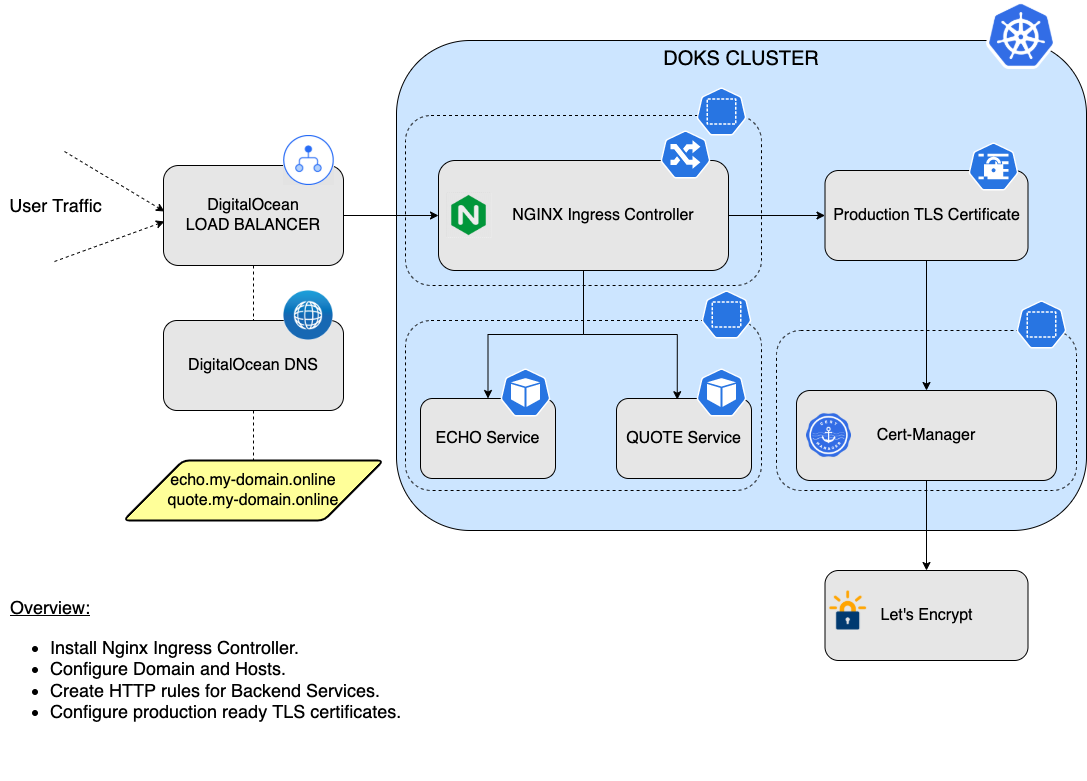
https://raw.githubusercontent.com/digitalocean/marketplace-kubernetes/master/stacks/ingress-nginx/assets/images/arch_nginx.png
Web Nov 2 2017 nbsp 0183 32 I suggest you to put your config file in a volume so you can edit the file on the host and it will be changed inside the container as well To do that you can run your container with docker run d v path to changes nginx conf etc nginx conf d nginx conf IMAGE NAME
Templates are pre-designed files or files that can be used for numerous purposes. They can conserve time and effort by supplying a ready-made format and layout for producing various kinds of content. Templates can be used for personal or expert jobs, such as resumes, invitations, leaflets, newsletters, reports, presentations, and more.
Change Nginx Config In Docker
How To Deploy An NGINX Image With Docker NGINX

Fixing Nginx upstream Sent Too Big Header Error When Running An

Nginx Config Explained By Example AtulHost
How To Configure Nginx Server And Location Blocks Explained

Systemctl Status Nginx Service
Package Nautobot GitHub
Web Nov 11 2021 nbsp 0183 32 I ve made a simple example that will help you configure or investigate your NGINX docker container with configuration change on the fly Don t do this in your production environment For the beginning we need to understand how our NGINX docker image looks like

Web Launch an instance of NGINX running in a container and using the default NGINX configuration with the following command docker run name mynginx1 p 80 80 d nginx is the name of the created container based on the NGINX image

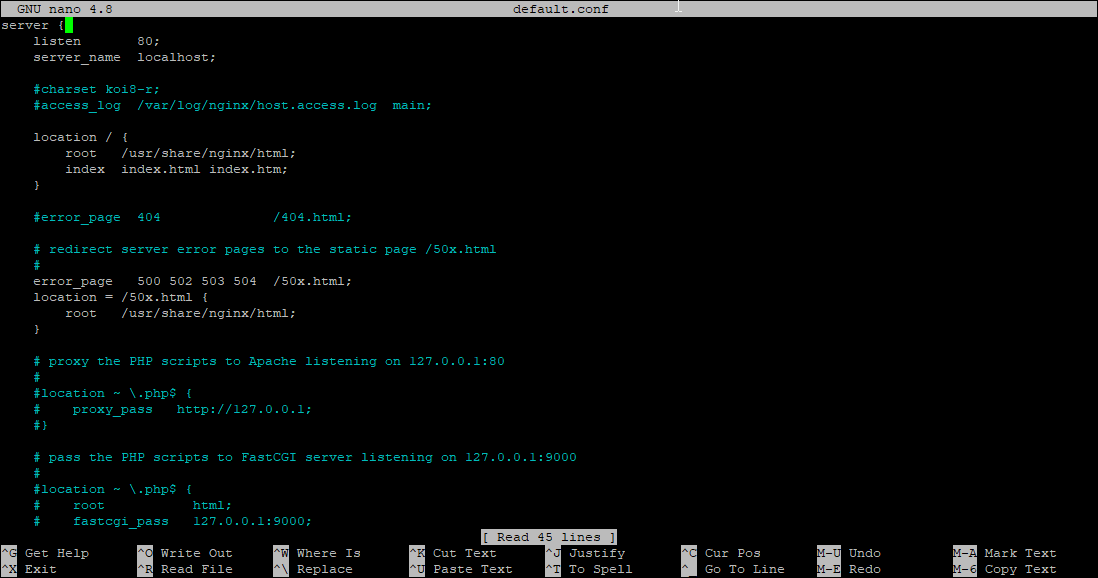
Web Aug 31 2019 nbsp 0183 32 The Docker tooling installs its own nginx conf file If you want to directly override it you can replace it in your own Dockerfile or via volume bind mounting For the Linux images that nginx conf has the directive include etc nginx conf d conf so all nginx configurations in that directory will be included

Web May 10 2015 nbsp 0183 32 You either need to use c etc nginx nginx conf or make a small wrapper like the above block and nginx c it In case of Docker you can see different options with abevoelker docker nginx docker run v tmp foo foo abevoelker nginx nginx c foo nginx conf For a default nginx conf check your CMD CMD quot nginx quot quot c quot

Web Oct 28 2022 nbsp 0183 32 cd docker nginx Copy the Nginx config directory into your project folder by using the Docker copy command docker cp docker nginx etc nginx conf d default conf default conf Since you ll be using a custom conf file for Nginx you will need to rebuild the container
Web commands 01 get nginx conf file command aws s3 cp s3 lt bucket name gt custom nginx conf home ec2 user container commands 01 replace default nginx config command mv f home ec2 user custom nginx conf tmp deployment config etc nginx conf d 00 elastic beanstalk proxy conf Share Web Nov 2 2016 nbsp 0183 32 Viewed 7k times 1 Nginx config has a daemon off directive set in root nginx conf I am trying to run it under docker using this command sudo docker run name nginx redirect p 3128 3128 v root nginx conf etc nginx nginx conf ro d nginx
Web Aug 13 2020 nbsp 0183 32 Run the following command to start the container docker run it rm d p 8080 80 name web nginx With the above command you started running the container as a daemon d and published port 8080 on the host network You also named the container web using the name option