Change Mysql Root Password Skill Rifle Retreat Set Password For Root Mysql Identity Messenger Background How To Set The Mysql Root Password In Localhost Using Wamp Henry Sanchez Vrogue How To Change MySQL Root Password Easily In 2020 Mysql Drop Database Bidtyred How To Change MySQL Root Password YouTube Syntax mysqladmin u root password newpassword mysqladmin u root h host name password newpassword Example mysqladmin u root password ws8dr8as3 mysqladmin u root h localhost password ws8dr8as3 You will also want to restart the database server after running this command sudo etc init d mysql restart The
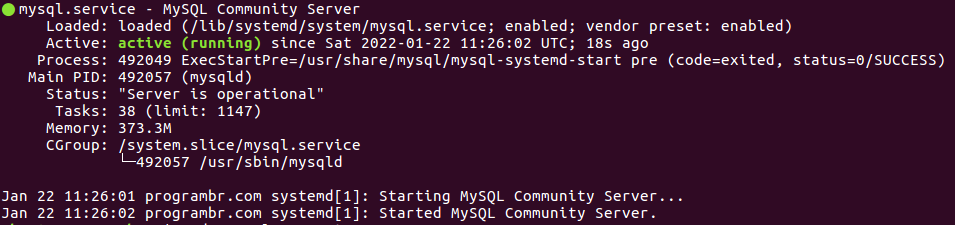
How to Change MySQL User Root Password in Linux Step 1 Log in as the MySQL User Step 2 Find the pid File for the MySQL Service Step 3 Kill the mysqld Process Step 4 Create the Password File Step 5 Restart the MySQL Server and Apply the New Password Step 6 Cleaning Up How to Reset MySQL Root Password in Step 1 Identifying the Database Version Most modern Linux distributions ship with either MySQL or MariaDB a popular drop in replacement which is fully compatible with MySQL Depending on the database used and its version you ll need to use different commands to recover the root password You can check your version with the following
How To Change MySQL Root Password YouTube How To Reset Change The MySQL Root Password On Ubuntu 20 04 22 04 How To Change MySQL Root Password Easily In 2020 How To Change MySQL Root Password Linux Windows Tutorial StrongDM Change Mysql Root Password Ubuntu 18 04 By Irfan Babar Medium How To Change MySQL Root Password Without Using Old Password YouTube Change MySQL Root Password In Linux Or Windows Step By Step Display Default MySQL Root Password LEMP Stack How To Reset Change Mysql Root Password Cloudbooklet Vrogue
Change Mysql Root Password
 Change Mysql Root Password
https://www.tecmint.com/wp-content/uploads/2017/03/Change-MySQL-Password.png
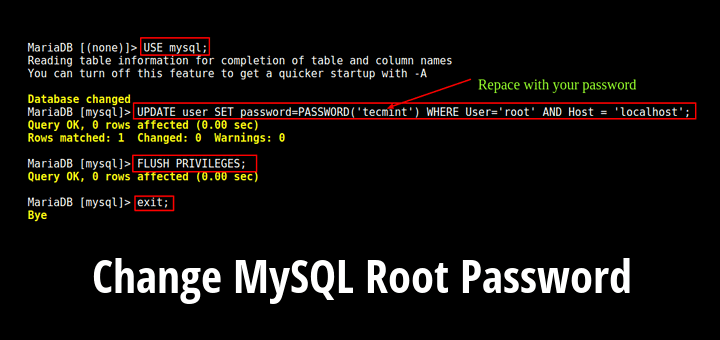
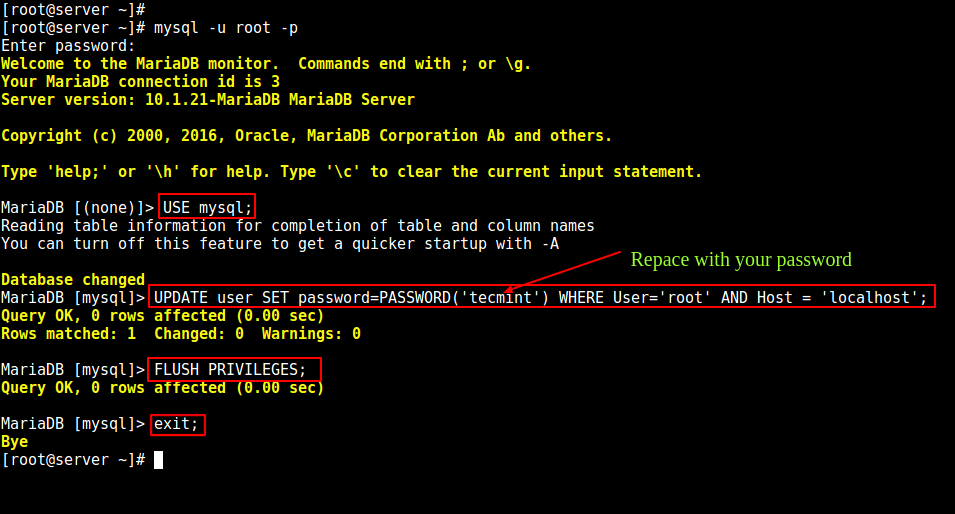
Access the MySQL shell by typing the following command and enter your MySQL root user password when prompted mysql u root p If you haven t set a password for the MySQL root user you can log in with
Pre-crafted templates use a time-saving solution for producing a varied variety of documents and files. These pre-designed formats and layouts can be used for different individual and professional projects, consisting of resumes, invitations, leaflets, newsletters, reports, discussions, and more, streamlining the content development procedure.
Change Mysql Root Password

How To Change MySQL Root Password In CyberPanel PC 3
How To Reset Change The MySQL Root Password On Ubuntu 20 04 22 04

How To Change MySQL Root Password Easily In 2020

How To Change MySQL Root Password Linux Windows Tutorial StrongDM

How To Change MySQL Root Password Without Using Old Password YouTube
Change MySQL Root Password In Linux Or Windows Step By Step

Mysql FLUSH PRIVILEGES Then change the root localhost account password Replace the password with the password that you want to use To change the password for a root account with a different host name part modify the instructions to

To do that open up a terminal window and issue the following command mysqladmin u root password NEWPASSWORD Where NEWPASSWORD is the password to be used Now when you log into MySQL

On your server machine execute the following command to change its MySQL root password replace myhash with your password s hash as printed by the first command mysql u root p
Step 1 Stop the MySQL server process Step 2 Start the MySQL mysqld server daemon process with the skip grant tables option so that it will not prompt for a password Step 3 Connect to the MySQL server as the root user

Changing the Root User s Password on Linux Step 1 Log on to your target system with SSH or other remote shell Step 2 Step 3 Step 4 Step 5
Prerequisites To recover your MySQL or MariaDB root password you will need Access to the Ubuntu 20 04 server running MySQL or MariaDB with a sudo user or other way of accessing the server with root privileges Method 1 Set up a root password for the first time If you have never set a root password for MySQL the server does not require a password at all for connecting as root To set up a root password for the first time use the mysqladmin command at the shell prompt as follows mysqladmin u root password newpass
Chapter 4 Resetting the Root Password Windows Systems Log on to your system as Administrator Stop the MySQL server if it is running For a server that is running as a Windows service go to the Services manager From the Start menu select Create a text file containing the