Change List Bullet Size Css Change Your List Bullet To A Custom Character In CSS Finally It Will Be Easy To Change The Color Of List Bullets CSS Tricks Change The Bullet Color Of A List Item With CSS Lockedown SEO Master How To Change List Bullet Color In CSS Easily How To Change List Bullet Color In Css Ireland Veronica Web Nov 28 2023 nbsp 0183 32 The list style CSS shorthand property allows you to set all the list style properties at once Try it The values of this property are applied to list items including lt li gt elements and elements with display list item
Web Jan 9 2021 nbsp 0183 32 3 Ways to Remove amp Replace Bullets from an HTML List and Create Custom Bullets Using CSS Tutorial Chris Love Last Updated Sat Jan 09 2021 Customize HTML Bulleted Lists With CSS HTML has two types of lists order OL and unordered UL By default each list item as a circle placed to the left of the item Web The marker pseudo element lets us change the style of the list marker bullet number using a subset of CSS properties The allowed properties are All font properties font size font family etc color animation and transition properties direction text combine upright unicode bidi and content Let s see what it can do
How To Change List Bullet Color In Css Ireland Veronica Master How To Change List Bullet Color In CSS Easily How To Change List Bullet Color In Css Ireland Veronica Create An HTML List And Change Bullet Style Using CSS YouTube How To Remove Replace Bullets From An HTML List Using CSS Tutorial How To Change Button Size In CSS TheSassWay Change And Create Custom Bullet Points In WordPress 2022 CSS Background Size Property Scaler Topics Changing Text Size In CSS HTML Webpage Angularfix
Change List Bullet Size Css
 Change List Bullet Size Css
https://ryansechrest.com/content/images/2022/08/change-your-list-bullet-to-a-custom-character-in-css.jpg
Web To set the bullet appearance you can use CSS list style or list style type list style type is the exact property we are changing here but you can also use list style to change multiple properties which we will come to shortly
Pre-crafted templates use a time-saving service for developing a diverse series of documents and files. These pre-designed formats and layouts can be used for numerous personal and expert jobs, including resumes, invites, flyers, newsletters, reports, discussions, and more, simplifying the content development procedure.
Change List Bullet Size Css

Comparison Chart Guns Ammo Pinterest Bullet Guns And Chart

Master How To Change List Bullet Color In CSS Easily

How To Change List Bullet Color In Css Ireland Veronica
Create An HTML List And Change Bullet Style Using CSS YouTube

How To Change Button Size In CSS TheSassWay
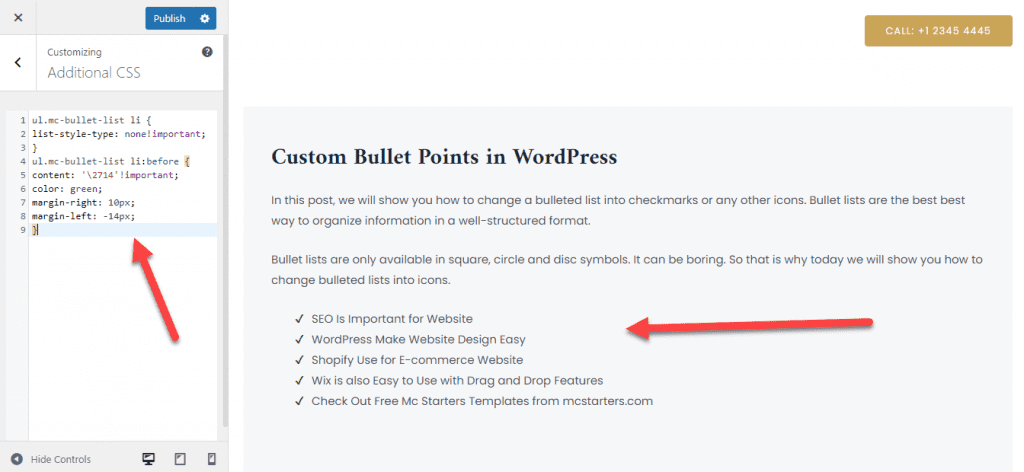
Change And Create Custom Bullet Points In WordPress 2022
Web IE8 does scale the bullets but not for every font size My fix is based on the fact the bullets for Verdana are larger than for Arial I use css to set Verdana for li at the same time I add extra spans around li s contents to keep the original font

Web The list style position property specifies the position of the list item markers bullet points quot list style position outside quot means that the bullet points will be outside the list item The start of each line of a list item will be aligned vertically This is default Coffee A brewed drink prepared from roasted coffee beans Tea Coca cola

Web Dec 9 2011 nbsp 0183 32 To increase the size of the bullet you can use li marker font size 2rem font weight bolder and to change bullet character the content property will work li marker content 2746 font size 2rem font weight bolder

Web Jan 1 2024 nbsp 0183 32 Overview CSS styling text Next Lists behave like any other text for the most part but there are some CSS properties specific to lists that you need to know about as well as some best practices to consider This article explains all A simple list example To begin with let s look at a simple list example

Web Sep 5 2011 nbsp 0183 32 The list style type property defines the type of list by setting the content of each marker or bullet on the list Acceptable keyword values for list style type include disc circle square decimal leading zero lower roman upper roman lower greek lower latin upper latin armenian georgian lower alpha upper alpha none
Web Nov 21 2016 nbsp 0183 32 Style List Markers in CSS Chris Coyier on Nov 21 2016 Updated on May 19 2018 It s a perfectly reasonable to want to style the marker of list items You know blue bullets with black text in an unordered list Or red counters with knockout white numbers in an ordered list Web Sep 2 2020 nbsp 0183 32 CSS marker lets you change the content and some of the styles of bullets and numbers in HTML lists Examples of bullet styles View Source Introduction to pseudo elements A pseudo element represents a part in the document that isn t represented in
Web Dec 29 2023 nbsp 0183 32 This step by step guide will walk you through different methods to implement custom bullet points using CSS and HTML including basic list styling custom images CSS pseudo elements and utilizing icon libraries like FontAwesome Basic List Styling with CSS We ll begin by styling your lists with basic CSS properties