Change Iphone 12 Screen Resolution What Is Change Management And Why Is It Important What Are The 5 Key Principles Of Change Management Zeda io What Is The Change Management Process Motion Motion What Is Transformational Change HR Glossary AIHR 6 Steps To Develop An Effective Change Management Plan 1 First of all you need to have the Cydia app on your iPhone and that will only come up when your device is Jailbreak 2 Now open the Cydia app and search for Upscale Upscale is a module that will allow you to customize your screen resolution 3
Learn more info about iPhone 12 Pro https www hardreset info devices apple apple iphone 12 pro In the enclosed video guide we explain to you how to smooth 1 Brightness Let s start with the obvious brightness Swipe up from the bottom edge or down from the top right corner on an iPhone X to access the Control Center Here you can use the
6 Steps To Develop An Effective Change Management Plan Causes Of Resistance To Change GeeksforGeeks Change Curve Management Model Explained with HD Diagram Download The Stages Of Change In Therapy Wellness Road Psychology Psychologists Understanding The Change Management Process A Comprehensive Guide PMTI Lewin s Change Model Digital Leadership Theory Of Change Grantmakers Concerned With Immigrants And Refugees What Is Change Management Strategies For Successful Organizational ITIL Change Management Qualtrics
Change Iphone 12 Screen Resolution
Change Iphone 12 Screen Resolution
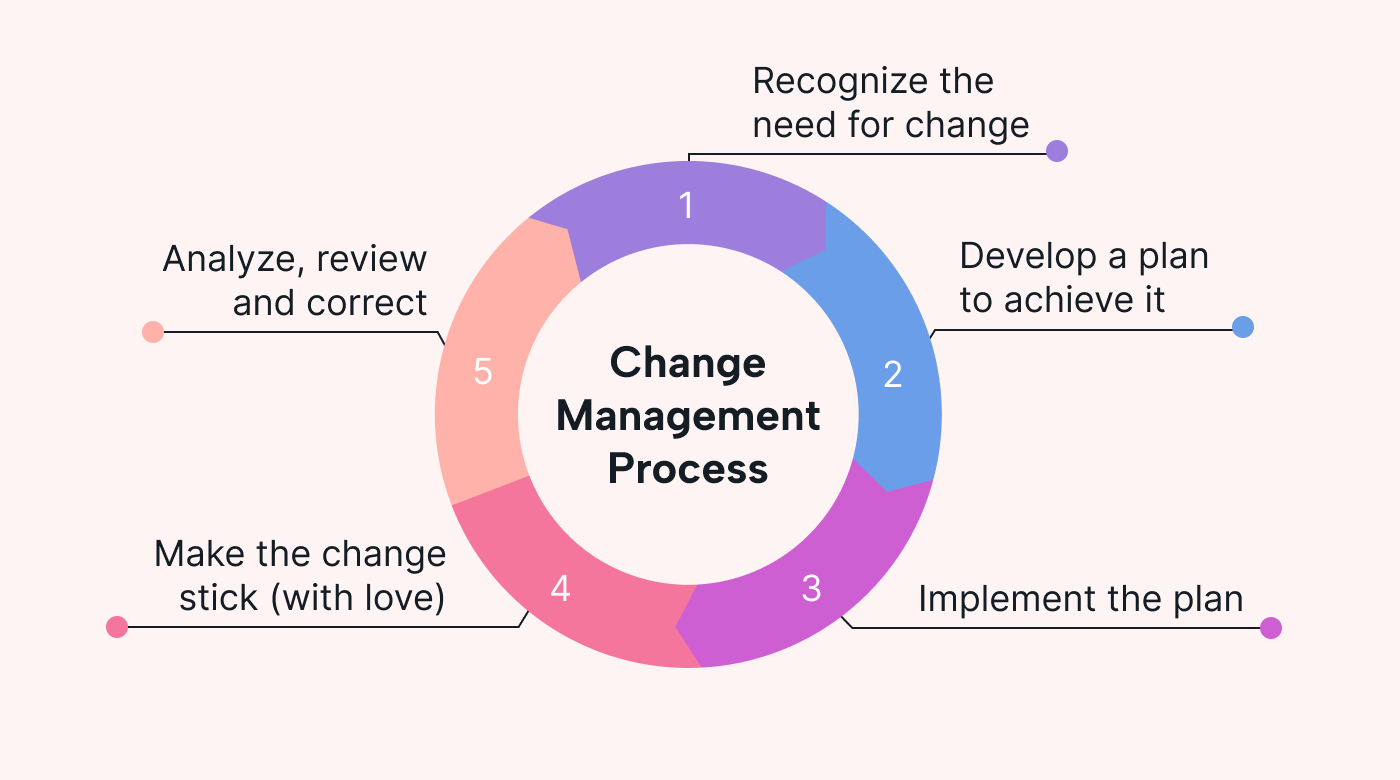
https://www.smestrategy.net/hubfs/Change Management Steps .png
To change the photo resolution using the camera settings on your iPhone 12 start by opening the Camera app and tapping on the Settings icon typically located in the top or side menu Within the settings look for the Camera or Photo options where you can adjust the resolution settings to your preference
Templates are pre-designed documents or files that can be used for different purposes. They can conserve effort and time by offering a ready-made format and layout for producing various sort of material. Templates can be used for individual or professional projects, such as resumes, invitations, leaflets, newsletters, reports, presentations, and more.
Change Iphone 12 Screen Resolution

Emotional Intelligence Unleashed Mastering Each Stage Of Change In

Causes Of Resistance To Change GeeksforGeeks

Change Curve Management Model Explained with HD Diagram Download

The Stages Of Change In Therapy Wellness Road Psychology Psychologists

Lewin s Change Model Digital Leadership
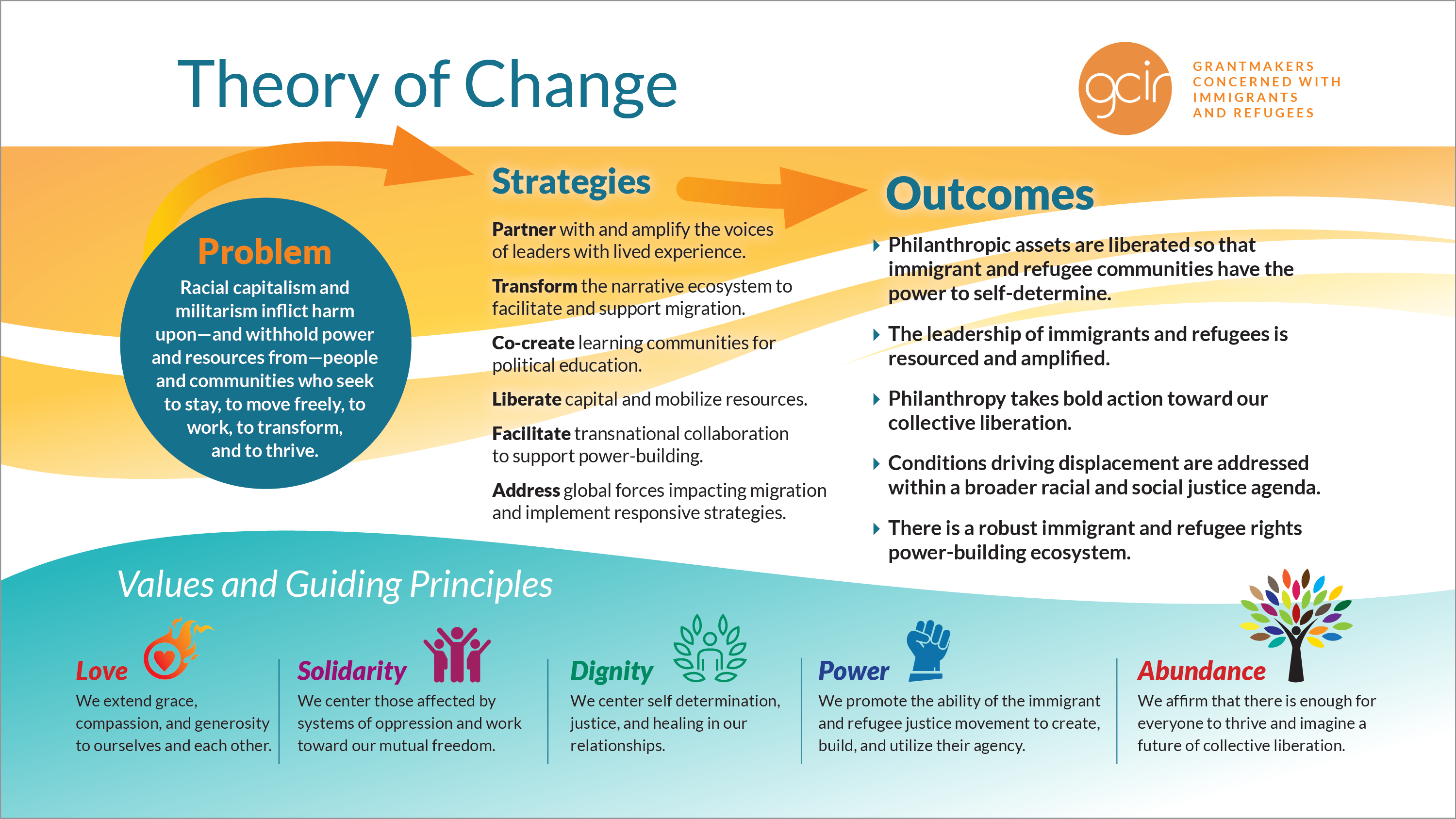
Theory Of Change Grantmakers Concerned With Immigrants And Refugees
How to Change Image Quality on iPhone 12 Photo Resolution HardReset Info 1 13M subscribers Subscribe Subscribed 85K views 3 years ago Check out more info about iPhone 12
.png?w=186 "What Are The 5 Key Principles Of Change Management Zeda io")
Launch Settings from Spotlight or the home screen Tap on Display Brightness Tap on Display Zoom in the DISPLAY section Select your preferred resolution or zoom level Tap Done Tap your selected zoom level again to confirm Tap Done again to exit remove a beta profile on an iPhone or iPad
iOS Tweak iPhone iMobieAnyFixGet iMobie AnyFix to Fix 130 iOS System Issues https bit ly 3g1vCT0 Today I got an awesome tweak to share to you how to

Go to Settings Camera Formats Photo Mode then choose 12 MP or 24 MP To capture resolution at 48 MP go to Settings Camera Formats then turn on Resolution Control or ProRAW Resolution Control depending on your model

Once installed Upscale adds a preference pane to the Settings app where you can customize it to your liking Here you can Pick between any of the following iPhone resolutions iPhone 4 4s iPhone 5 5s SE iPhone 6 6s 7 8 iPhone 6 Plus 6s Plus 7 Plus 8 Plus iPhone X XS Enter custom resolution X Y values
On April 20 2021 Apple introduced a new color to complement its previous color offerings purple Figure A The company from Cupertino said that the color accentuated the flat aluminum edges 8 points iPhone 12 Screen Recording at 1080p Hi how can I record my iPhone s screen at 1080p If I simply record my iPhone with the recorder in the control center it save my video in 888x1920 and if I load it in YouTube it become 480p Please help me to record my iPhone at 1080p without PC if it is possible iPhone 12 iOS 15
Just learn more about the best method to change the resolution of iPhone photos with the following process Step 1 Go to the Settings app on your iPhone As for iPhone with iOS 10 3 or higher choose your name go to iCloud and then tap the Photos option If your iPhone is still using iOS 10 2 or lower tap on the iCloud and select the Photos