Change Header Height Word How To Adjust Header Margins In Word YouTube How To EXACTLY Change The Table Size In Word row Height Column Width In 1 MINUTE YouTube Wordpress 2020 Theme How To Change The Header Height Business Website Web Design Cpanel Vb VB ListView Change Header Height ITecNote Change Header Height On Scroll BillionAnswers Web Configure headers and footers for different sections of a document Word for Microsoft 365 Word 2021 Word 2019 Word 2016 Word 2013 Word 2010 Click or tap the page at the beginning of a section Select Layout gt Breaks gt Next Page Double click the header or footer on the first page of the new section
Web Step 1 In a new document click quot View quot Video of the Day Step 2 Click on quot Header and Footer quot in the drop down menu The header mini menu will pop up in your document Step 3 Click on the icon that looks like an open book to take you to the Page Setup Once there click on the tab for Margins We Recommend Tech Support Web Select Different First Page Content of the header or footer on the first page is removed Note Different First Page is a toggle so be sure you re turning it on Add your new content into the header or footer Select Close Header and Footer or press Esc to exit Change or delete a header or footer from another single page
Change Header Height On Scroll BillionAnswers How To Change Header Height WordPress Como Alterar A Altura Do Cabe alho Ou Rodap Para Maior Ou Menor No Excel How To Change Header Height On WordPress Website Astra Theme Dieno Digital Marketing Services Changing Genesis Custom Header Size How To Change Header In Word Press Workshopholoser Css CSS Change Header Height Based On Width Change Header Height On Scroll With Framer Motion Codesandbox Change Header Height On Scroll BillionAnswers
Change Header Height Word
 Change Header Height Word
https://i.ytimg.com/vi/Wb8CnqX6Ta4/maxresdefault.jpg
Web Sep 12 2022 nbsp 0183 32 In this tutorial I ll show you how to change the margins in a Word document s header without changing the margins in the main body I ll be working in the header but this solution also
Templates are pre-designed files or files that can be used for various purposes. They can conserve time and effort by providing a ready-made format and layout for creating various kinds of material. Templates can be utilized for personal or expert tasks, such as resumes, invites, flyers, newsletters, reports, presentations, and more.
Change Header Height Word

WordPress Theme Twenty Seventeen Writenowediting

How To Change Header Height WordPress

Como Alterar A Altura Do Cabe alho Ou Rodap Para Maior Ou Menor No Excel

How To Change Header Height On WordPress Website Astra Theme Dieno Digital Marketing Services

How To Change Header In Word Press Workshopholoser

Css CSS Change Header Height Based On Width
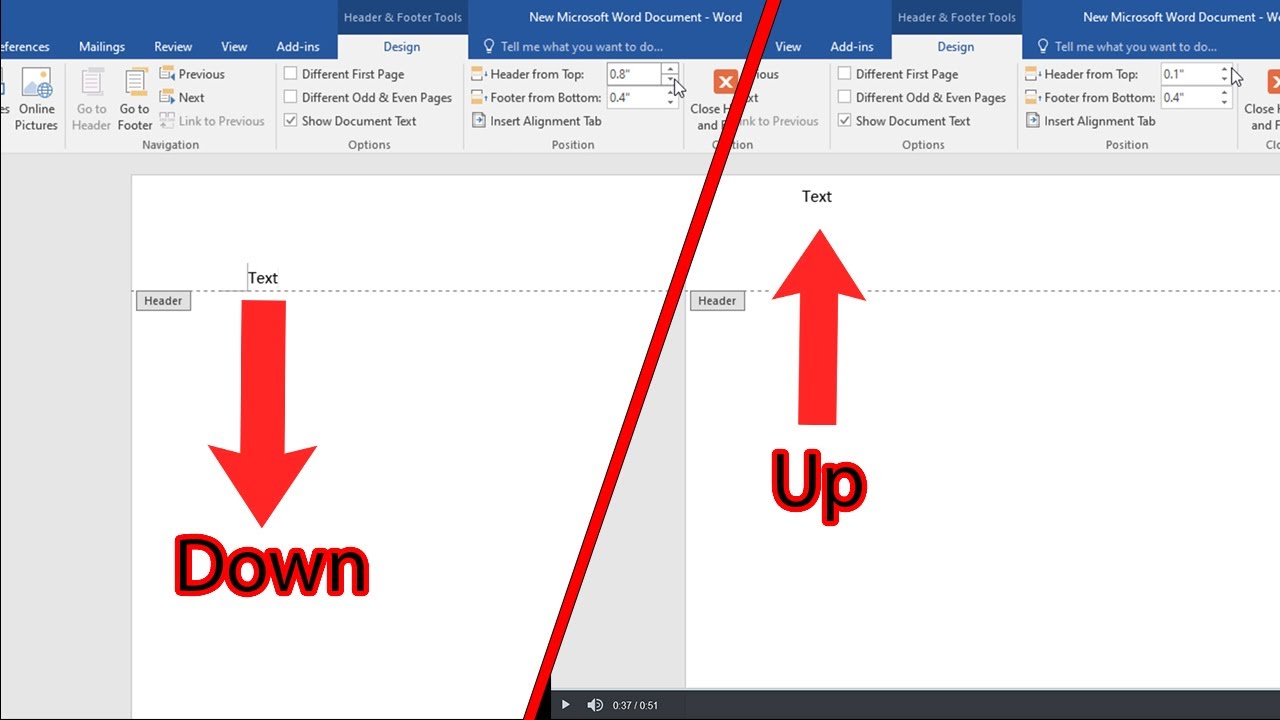
Web Jun 24 2021 nbsp 0183 32 The Header and footer on my documents take up too much vertical space Is it possible to reduce the vertical size of the header and footer Adjusting the quot From Top quot and quot From Bottom quot only changes the position of the text w o actually reducing the amount of space being taken by the header footer
Web Double click the header or footer you want to edit or select Header or Footer and then select Edit Header or Edit Footer Add or change text for the header or footer or do any of the following To remove the first page header or footer Select Different First Page

Web May 10 2019 nbsp 0183 32 Modified 1 year 8 months ago Viewed 25k times 0 I have a problem using Microsoft Word I can increase the size of the header by placing some text or images inside but then it s impossible to reduce it later I have tried reducing the margins but it only moves the text and don t reduce the size of the header

Web Jun 18 2010 nbsp 0183 32 if you need to adjust the height of your header then click into header and use vertical ruler on your right By pulling it up and down you can increase or decrease its size mike www mswordhelp

Web May 4 2023 nbsp 0183 32 How to Change the Header in Word 1 Double click inside the header or footer area 2 Select the text you want to change and type your new header or footer in its place 3 Select Close Header and Footer or double click anywhere outside of the header or footer area to exit See More
Web Sep 1 2020 nbsp 0183 32 As you can see the size of the header has changed In today s tutorial you will learn how to reduce the header size in Microsoft Word Open Microsoft Word or the Word file you need Go to Layout Web Aug 18 2017 nbsp 0183 32 1 year ago How to reduce the size of the header in Microsoft WordThe header size can be adjusted by going to Page Layout Margins and selecting Custom Margins Alte
Web Mar 11 2016 nbsp 0183 32 You can make significant savings over a large document by reducing the space a header or footer takes up The distance between the edge of the paper and the top of a header and the edge of the page and the bottom of the footer is controlled using File Page Setup and the Margins tab