Change Default Pdf Reader Ipad How To Change Default PDF Reader In Windows 11 YouTube How To Change Default PDF Reader In Windows 11 YouTube Samsung Change Default App For Pdf Verassets How To Change Default Pdf Viewer Tribuntech How To Set Preview As Default Pdf Viewer Mac Leaguesadeba Foxit is a full featured PDF reader that puts iBooks to shame Aside from giving you the ability to change brightness and search for text Foxit also has a wide range of view modes Best of all many of these views can be used together
How to change your default web browser or email app Go to Settings and scroll down until you find the browser app or the email app Tap the app then tap Default Browser App or Default Mail App Select a web browser or email app to set it as the default A checkmark appears to confirm it s the default Go to your device s settings screen Tap Acrobat Select a setting to modify Enable cellular data usage The option to control cellular data usage only appears on devices that provide cellular access By default cellular data usage is enabled To disable cellular data Go to your device s settings screen Tap Acrobat Disable Cellular Data
How To Set Preview As Default Pdf Viewer Mac Leaguesadeba Make Adobe Acrobat Reader The Default PDF Viewer On Mac How To Change Default PDF Viewer On Android Set Adobe Reader As Default PDF Program In Windows Ask Dave Taylor Kdan Mobile s PDF Reader And PDF Connoisseur Apps Updated For IOS 7 How To Change Default PDF Viewer On Android How To Change Default PDF Viewer In Windows 10 Set Adobe As Default How To Change Default PDF Viewer On Windows 10 Set Default Pdf Reader Mac Software Review RT
Change Default Pdf Reader Ipad
 Change Default Pdf Reader Ipad
https://i.ytimg.com/vi/lltAd5SSiXE/maxresdefault.jpg
Change Default PDF Viewer on iPad Software Bmosbacker December 14 2020 4 45pm 1 After just completing MacSparky s Paperless Field Guide 2 0 I decided to give PDFPen Pro a second chance having moved to PDF Expert several years ago However on my iPad I can t figure out how to change the default Open In on my iPad
Pre-crafted templates offer a time-saving solution for developing a varied range of files and files. These pre-designed formats and layouts can be used for numerous personal and professional projects, including resumes, invitations, leaflets, newsletters, reports, discussions, and more, improving the content creation procedure.
Change Default Pdf Reader Ipad

Windows 10 Change Default Pdf Reader Australia Guide Step by step Guide
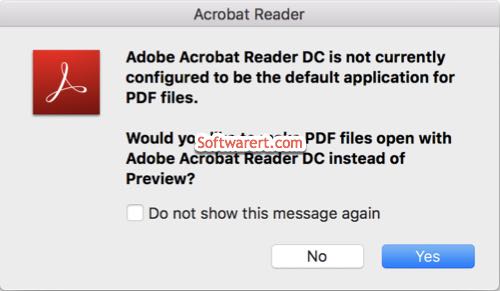
Make Adobe Acrobat Reader The Default PDF Viewer On Mac
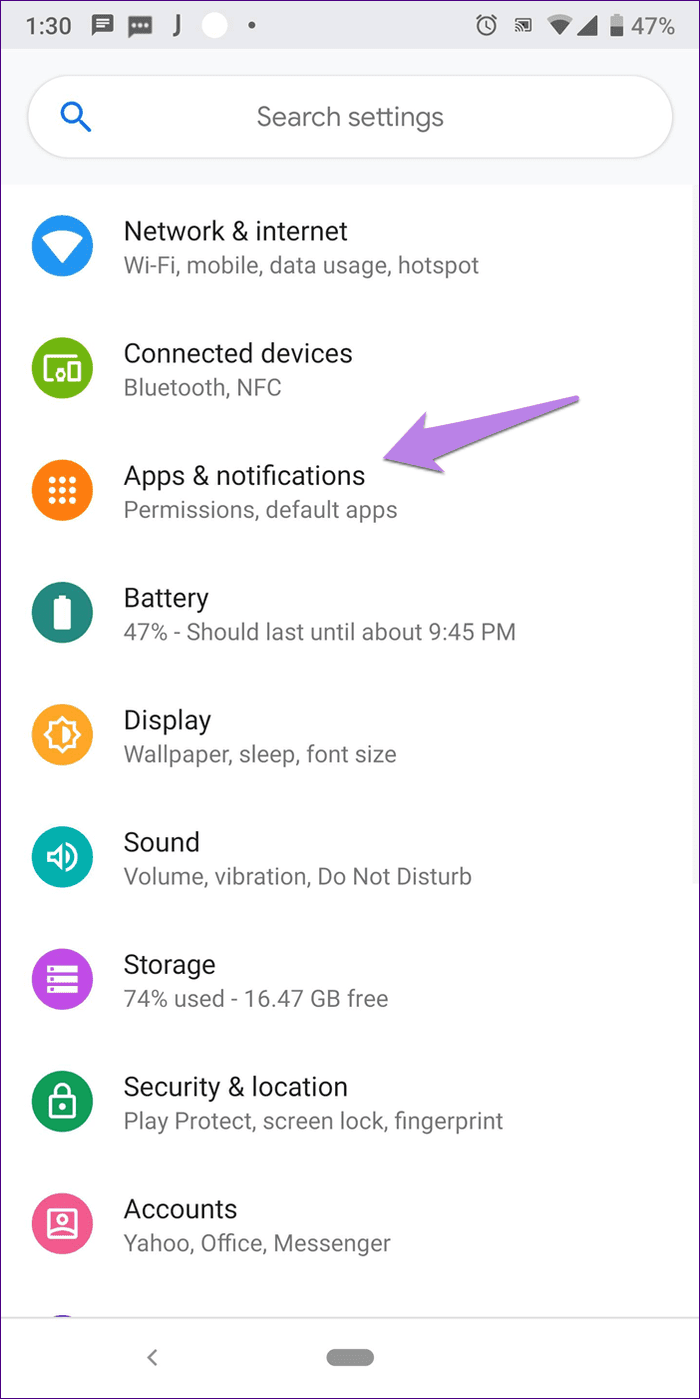
How To Change Default PDF Viewer On Android
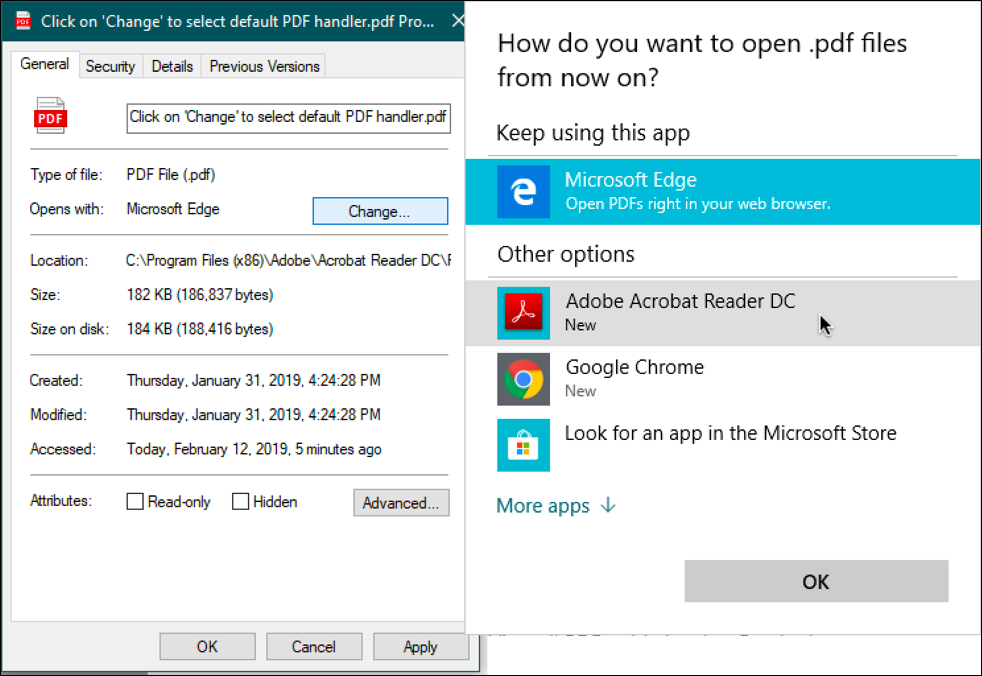
Set Adobe Reader As Default PDF Program In Windows Ask Dave Taylor

How To Change Default PDF Viewer On Android

How To Change Default PDF Viewer In Windows 10 Set Adobe As Default

1 reply SixFour391 Level 4 1 496 points Feb 28 2023 12 45 PM in response to fitusnik The closest thing you can you is long press or tap with two fingers if using a Magic Keyboard the PDF file and choose which app to open the file with I don t think you can change the default apps on a mobile device Reply Helpful 15 of 1

Dec 26 2016 Hi lyndonp2424367 Unfortunately Apple does not provide a mechanism for iOS users to set a default app for a given file type examples pdf docx on iPhone iPad You just need to continue using Open in or Copy to to open PDF documents in Acrobat Reader on iOS

On the menu click Properties A new dialog box will appear In the first subsection the text Opens with indicates which PDF viewer is set as your default Click the Change button Select Adobe Acrobat DC or Reader from the list as your default Click OK to save and apply changes Change from Preview to the Acrobat PDF viewer

Tap Open or Open in New Page Tap the page and choose Open In Choose Adobe Reader If you are accessing the PDF from Safari or another app tap to choose Open In Choose Adobe Reader Set Acrobat Reader as the default to open PDFs automatically You can now read your PDF and adjust the view and scroll settings to your preferences

Changing your default PDF viewer to Adobe is easy just follow these simple steps 1 Right click a PDF In your PC find a PDF file and right click it then select Properties 2 Click Change in Properties Dialogue Box In the pop up box click the Change button 3 Set Adobe Reader as default
Follow the article given below to change the default PDF viewer Option 1 Change default apps due jailbreaking To edit who default iOS apps on your smartphone so is your chosen apps are automatically used to open web links street addresses calendar invites and so on you requirement to jailbreak your iPhone which we don t recommend William Gallagher Nov 16 2022 4 Reddit PDFs and the iPad were made for each other yet Apple s own built in PDF readers are limited Here s what you need to make reading and editing PDFs
Download for free PDF Expert Made by Readdle PDF Expert is a strong and free PDF reader that offers viewing of documents in various ways as well as text to speech for an audio experience