Change Default Paper Size Epson Printer How Do I Change The Default Paper Size In Word YouTube Bedienungsanleitung HP Tango 102 Seiten Manual HP DeskJet 3764 120 P ginas Change The Default Paper Size Detected By Printer Tion See Change How To Change The Default Paper Size In print Adobe Support 21K views 3 years ago WTF In this video we ll see how to change the default paper size in the Epson L3150 printer by using the control panel present in the printer front panel
You can change the default paper size for each source in Windows Do one of the following Windows 7 Click and select Devices and Printers Right click your product name and select Printer properties Windows Vista Click and select Control Panel Click Printer under Hardware and Sound right click your product name and select Properties Before entering the default setting mode you need to load A4 or letter size single sheet paper or continuous paper that is at least 297 mm 11 inches long and 210 mm 8 27 inches wide If you use single sheets you need to load a new sheet of paper each time the printer ejects a printed sheet
How To Change The Default Paper Size In print Adobe Support How To Get Creative Writing On Chivalry For 10 Changing The Default Paper Size HP Deskjet 3630 Manual How To Change Size Of Image Mac Voicever Changing The Default Paper Size How To Change The Default Paper Size In Word How To Change Paper Size On Epson Canon Change Default Paper Source YouTube
Change Default Paper Size Epson Printer
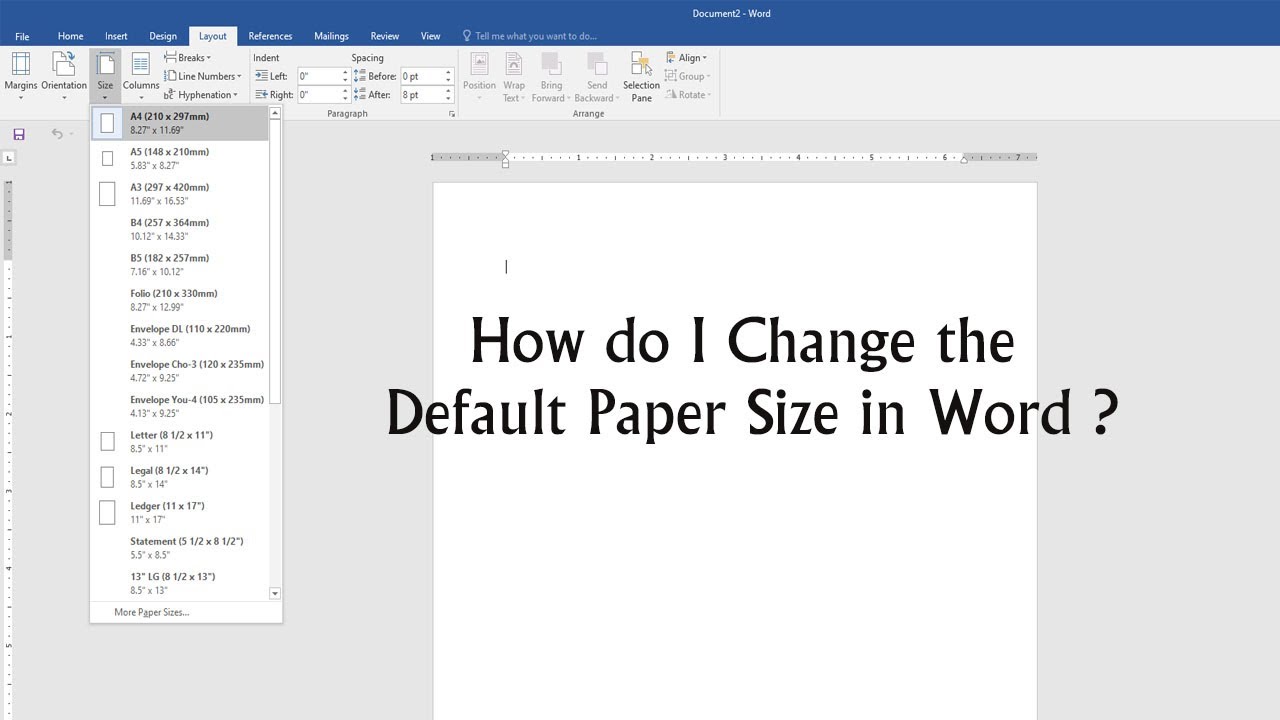 Change Default Paper Size Epson Printer
https://i.ytimg.com/vi/ux55N0DKjn8/maxresdefault.jpg
Set each item The displayed items may vary by the situation Paper source name Display the target paper source name such as paper tray Cassette 1 Paper Size Select the paper size you want to set from the pull down menu Unit Select the unit of the user defined size You can select it when User defined is selected on Paper Size Width
Pre-crafted templates use a time-saving service for creating a varied range of files and files. These pre-designed formats and layouts can be utilized for different personal and professional tasks, including resumes, invites, flyers, newsletters, reports, presentations, and more, simplifying the material production procedure.
Change Default Paper Size Epson Printer

Why Your Printer Might Not Be Able To Print On A4 Paper Electronic
How To Get Creative Writing On Chivalry For 10

Changing The Default Paper Size

HP Deskjet 3630 Manual

Changing The Default Paper Size
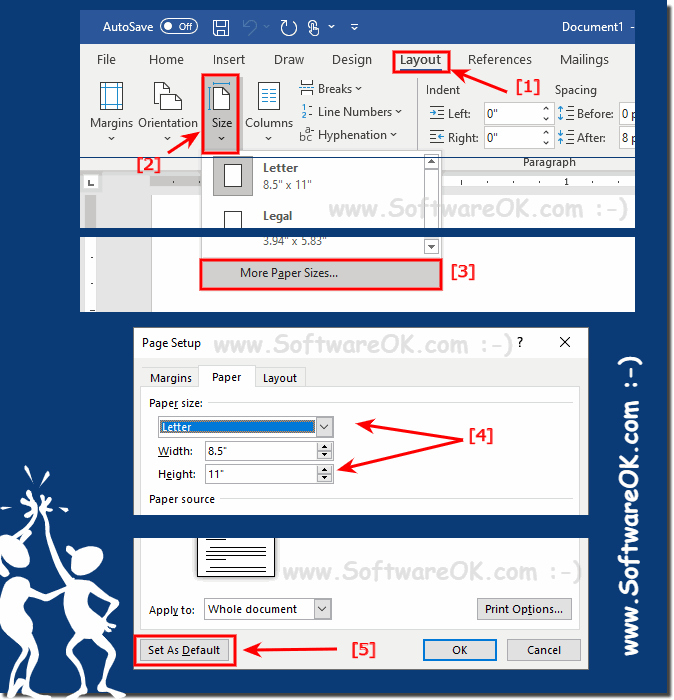
How To Change The Default Paper Size In Word
Depending on your region the default paper size for copies is either A4 8 3 11 7 inches 210 297 mm or Letter 8 5 11 inches 216 279 mm To change the default paper size to A4 8 3 11 7 inches 210 297 mm make sure the product is turned off then hold down the color copy button and press the power button to turn the

You can change the default paper size and paper type using the control panel on the product Press the home button if necessary Select Settings Printer Settings Paper Source Settings You see a screen like this Make sure the Paper Configuration setting is

You can change the default paper size and paper type using the control panel on the product Note These settings appear automatically when paper is inserted when you have set the Paper Setup Auto Display setting to On Press the home button if necessary

Changing the Default Paper Size using the Control Panel Depending on your region the default paper size for copies is either A4 8 3 11 7 inches 210 297 mm or Letter 8 5 11 inches 216 279 mm

You can change default paper source settings using the control panel on the product Note These settings can be locked by an administrator If you cannot access these settings contact your administrator for assistance Press the home button if necessary
Click Start point to Settings and the click Printers Right click the appropriate printer and then click Properties Click the Paper tab and then click the paper size you want to use in the Paper Size box Click OK and then close the Printers folder To print the default setting mode instructions you need one page of 6 inch wide continuous paper or 5 inch wide roll paper Turn on the printer Hold down the LF FF and Load Eject buttons
You can check or change the paper size and type on the screen displayed when you insert the paper cassette If you register the paper size and type the printer informs you when the registered information and print settings differ