Centos 7 Systemctl List Running Services Linux Centos 7 Systemctl firewalld How To List All Running Services From Systemd On Linux Debian Ubuntu Systemctl List All Possible including Disabled Services 2 Solutions Linux Centos 7 Systemctl firewalld RHEL 7 systemctl service chkconfig WEB Nov 16 2023 nbsp 0183 32 To list all loaded services on your system whether active running exited or failed use the list units subcommand and type switch with a value of service systemctl list units type service OR systemctl type service
WEB May 17 2022 nbsp 0183 32 Learn how to start stop enable disable and mask a system service with the systemctl command Suppose you re making configuration changes to a Linux server Perhaps you just fired up Vim and made edits to the etc ssh sshd config file and it s time to test your new settings WEB Oct 12 2019 nbsp 0183 32 If you want to list all running services in CentOS 7 or CentOS 8 system and you can use the below systemctl command type systemctl list units type service Outputs
RHEL 7 systemctl service chkconfig RHEL CentOS 7 x systemctl Analyzing Boot init Process Using Systemd On Linux OpenTori Linux Panda Li How To List Running Services In Linux ByteXD Teach You To Learn Dapr 3 Use Dapr To Run The First Net Program Linux List Running Services On Linux Ubuntu Debian CentOS Cloudzy List Running Services Linux HeelpBook
Centos 7 Systemctl List Running Services
 Centos 7 Systemctl List Running Services
https://img-blog.csdnimg.cn/20191217204017625.png?x-oss-process=image/watermark,type_ZmFuZ3poZW5naGVpdGk,shadow_10,text_aHR0cHM6Ly9ibG9nLmNzZG4ubmV0L3poYW5nbGVpeWVzMTIz,size_16,color_FFFFFF,t_70
WEB Run the following command and take a look at the output systemctl You can use the list units subcommand along with the type option with the type set to service to list all the services loaded on your machine systemctl list units type service You can also use systemctl to list all the active loaded services with the state option
Pre-crafted templates provide a time-saving option for producing a varied variety of files and files. These pre-designed formats and designs can be used for different individual and professional tasks, consisting of resumes, invites, flyers, newsletters, reports, discussions, and more, enhancing the material development process.
Centos 7 Systemctl List Running Services

List Running Services On Linux Ubuntu Debian CentOS Cloudzy

RHEL CentOS 7 x systemctl

Analyzing Boot init Process Using Systemd On Linux OpenTori
Linux Panda Li

Teach You To Learn Dapr 3 Use Dapr To Run The First Net Program
Linux

WEB Aug 19 2023 nbsp 0183 32 Use quot systemctl type service state running quot to see all running services on a Linux system with systemd It provides details like name load sub state and description Systemd is a system and service manager in Linux that launches services

WEB Jul 27 2024 nbsp 0183 32 To check if a service is enabled disabled static indirect you must use list unit files with systemctl while to check if a service is running active failed dead etc then you must use systemctl list units To get complete list of supported options with list units and state use systemctl state help

WEB Apr 26 2023 nbsp 0183 32 To list all the services on your Linux system run this command in the terminal sudo systemctl list units type service This will show you a table with five columns UNIT LOAD ACTIVE SUB and DESCRIPTION The UNIT column shows the name of the service unit file which is the service s configuration and definition file

WEB Mar 18 2024 nbsp 0183 32 This tutorial discusses how to list all enabled services using systemctl the systemd control system and service manager We talk about the list unit files subcommand and a few other handy systemctl subcommands and options
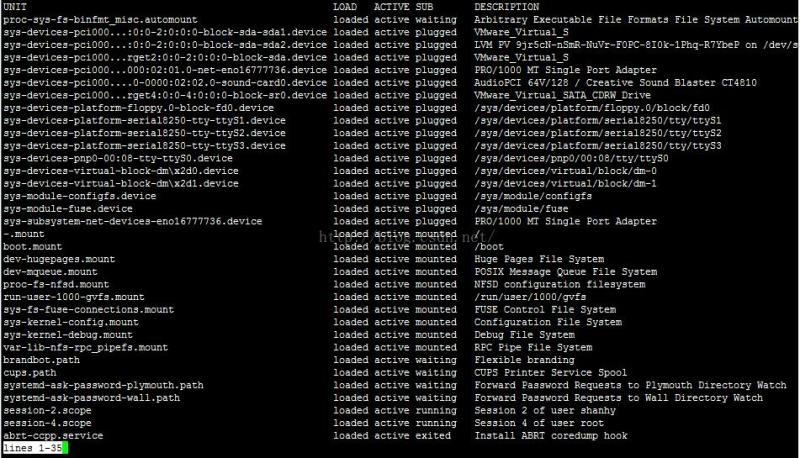
WEB Feb 5 2020 nbsp 0183 32 Generally programs that execute tasks in the background are normally known as services and daemons We can use quot service quot or quot systemctl quot to manage these servcies Example service service name start systemctl start service name
WEB Mar 13 2024 nbsp 0183 32 List all the running systemd services The active state can also have a sub status like running exited etc You can use the same state flag with the sub state To list the running systemd services use the state running flag like this systemctl list units type service state running WEB Aug 18 2020 nbsp 0183 32 List services in systemd To see every loaded service on the system open a command line terminal and execute the following command systemctl list units type service List of all services marked as active
WEB Sep 9 2022 nbsp 0183 32 Use the following command to list all services on your Linux system including active inactive running or stopped services sudo service status all The and symbols before each service name denotes the service status