Azure Virtual Machine Change Disk Size About Azure VM Backup Azure Backup Microsoft Learn Change AVD Disk Size Based On The Azure Compute Gallery Image Automated How To Rename The OS Disk For An Azure Virtual Machine CHARBEL NEMNOM Virtual Machine Change Disk Type In Azure Storage Account Stack Vmware Mac Address Scope Hromtutor Navigate to the Azure Resource Manager Virtual Machine that you want to resize the disk s Shutdown the Virtual Machine from the Azure portal Wait untill it s completely shutdown de allocated Select Disks in the Settings blade As in the below image Disks settings blade Select the OS or Data disk that you would like to resize
Azure managed disks are block level storage volumes that are managed by Azure and used with Azure Virtual Machines Managed disks are like a physical disk in an on premises server but virtualized With managed disks all you have to do is specify the disk size the disk type and provision the disk Azure managed disks currently offers five disk types each intended to address a specific customer scenario Ultra disks Premium SSD v2 Premium SSDs solid state drives Standard SSDs Standard HDDs hard disk drives Disk type comparison The following table provides a comparison of the five disk types to help you decide which to use Expand table
Vmware Mac Address Scope Hromtutor Change MAC Address Of Virtual Machine 3 Microsoft Azure Virtual Machine Tutorial Web Development Tutorial Creating Local WordPress Sandbox Importing Site Pushing Changes Back Change Disk Number Windows 10 Awgera Unable To Locate Ubuntu Packages During Docker Build Stack Overflow Step5 Create A VM For SBC Server Clipart Virtual Machine Azure Vm Png Download 1020337 How To Change 250G Disk Size Limit Where Is It Configured defined
Azure Virtual Machine Change Disk Size
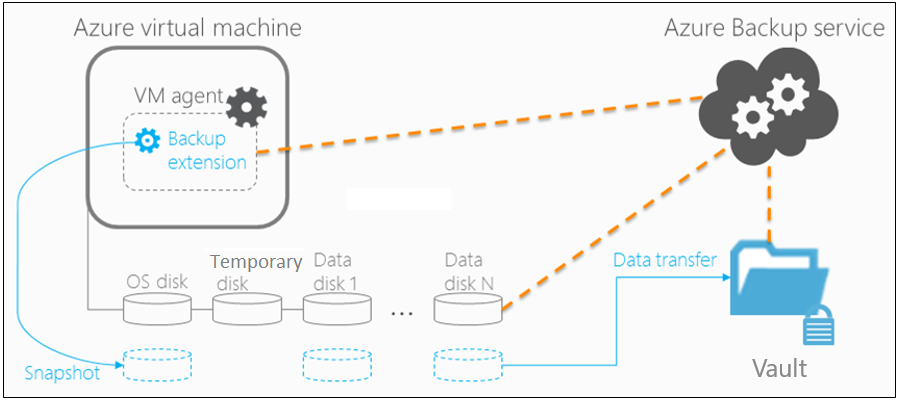 Azure Virtual Machine Change Disk Size
https://learn.microsoft.com/en-us/azure/backup/media/backup-azure-vms-introduction/vmbackup-architecture.png
You create a snapshot of the VM with no local temp disk create a disk from the snapshot create VM from the disk with appropriate a href MicrosoftDocs azure docs blob main articles virtual machines sizes md VM size a that supports VMs with a local temp disk p n h2 tabindex 1 dir auto a id user content next steps class
Templates are pre-designed files or files that can be utilized for different functions. They can save effort and time by providing a ready-made format and layout for producing various type of content. Templates can be used for individual or expert projects, such as resumes, invites, flyers, newsletters, reports, discussions, and more.
Azure Virtual Machine Change Disk Size

Does Anyone Know How To Change Disk Size Of Nextcloudpi On Docker R

Change MAC Address Of Virtual Machine

3 Microsoft Azure Virtual Machine Tutorial Web Development Tutorial

Creating Local WordPress Sandbox Importing Site Pushing Changes Back

Unable To Locate Ubuntu Packages During Docker Build Stack Overflow
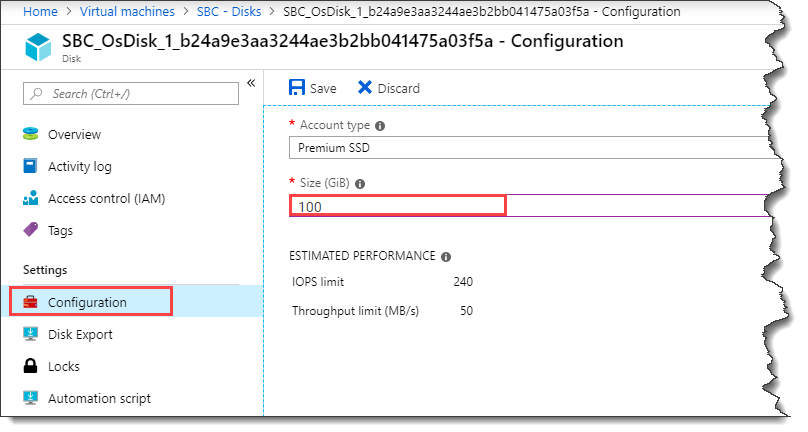
Step5 Create A VM For SBC

Portal CLI PowerShell Terraform Open the Azure portal Open the page for the virtual machine In the left menu select Size Pick a new size from the list of available sizes and then select Resize Note If the virtual machine is currently running changing its size will cause it to restart

One of the great benefits of Azure VMs is the ability to change the size of your VM based on the needs for CPU Network or disk performance In this blog post I will outline the process of changing the size of a virtual machine using either Azure Classic Compute VMs or the newer Azure Resource Manager VMs
Change the type of an individual managed disk Show 2 more Applies to Linux VMs Windows There are five disk types of Azure managed disks Azure Ultra Disks Premium SSD v2 premium SSD Standard SSD and Standard HDD You can easily switch between Premium SSD Standard SSD and Standard HDD based on your performance needs

1 Create a new data disk To create a new data disk within the Azure portal follow these steps In the Azure portal search for and select Virtual machines In the list of virtual machines VMs select the Name value of the VM to which you want to attach a new data disk
Change disk size To change the operating system disk size you have to shut down the Azure VM Once the VM is stopped you can click on Disks in the left menu of the VM Then click on the disk you want to change In the disk blade select size performance
On the Azure portal navigate to Virtual Machines Select the VM you want to resize and in the toolbar click Stop Once the machine is stopped navigate to the Settings section and click Disks You will see the list of attached disks to your VM Click on the one you want to resize In the disk overview page you can see Start Virtual Machine Remote onto Virtual Machine Intialize disks in Disk Manager
List available virtual machine sizes in an availability set ACU Learn more about how Azure compute units ACU can help you compare compute performance across Azure SKUs Benchmark scores Learn more about compute performance for Linux VMs using the CoreMark benchmark scores