Azure Password Complexity Settings Empty Password In Windows Or Password Complexity Rules Codeget Create And Use Password Policies In Azure AD Domain Services Microsoft Learn Digital ai Documentation Intelligent Value Stream Management Platform Enforcing Strong Complex Passwords Disable Password Complexity In Windows Server 2003 Default password policy When using Azure Active Directory on its own no on premises AD with Azure AD Connect you automatically make use of the Azure AD password policy Look at the requirements below or take a look at the Microsoft documentation On top of the requirements above all Azure AD tenants use Azure AD Password Protection
1 Login to the member server 2 Locate and run the AzureADPasswordProtectionProxySetup msi installer you downloaded 3 On the Azure AD Password Protection Proxy Setup check the I accept the terms in the License Agreement box and click Install Accept the license agreement How to configure Azure AD password complexity settings Azure AD provides options to configure password complexity settings ensuring that the organization s specific needs are met You can alter these settings via Azure AD or through the 365 Admin Center
Disable Password Complexity In Windows Server 2003 HTT Product Design And Development SaaS And Enterprise Implementing Modern Security Tools Part 1 Azure AD Password Protection MSEndpointMgr Windows Server Disable Password Complexity PeteNetLive Active Directory Keep Getting The Password Complexity Error For A OU That Should Have It Set Up A New Password Policy Gpo Seattlelopas Audit Findings Office Of The Auditor General Azure Ad U2f Ghostjas Windows 11 Remove Password Complexity Requirements 2023
Azure Password Complexity Settings
 Azure Password Complexity Settings
https://codeget.files.wordpress.com/2013/06/gpedit.png?w=600&h=334
Azure AD B2C also supports configuration options to control the complexity of passwords that customers can use p n h2 tabindex 1 dir auto a id user content prerequisites class anchor aria hidden true tabindex 1 href prerequisites svg class octicon octicon link viewBox 0 0 16 16 version 1 1 width
Templates are pre-designed documents or files that can be used for various functions. They can conserve effort and time by offering a ready-made format and layout for creating various sort of material. Templates can be used for personal or expert jobs, such as resumes, invites, flyers, newsletters, reports, discussions, and more.
Azure Password Complexity Settings
Azure AD B2C Now Has JavaScript Customization And Many More New Features Microsoft Community Hub

HTT Product Design And Development SaaS And Enterprise

Implementing Modern Security Tools Part 1 Azure AD Password Protection MSEndpointMgr
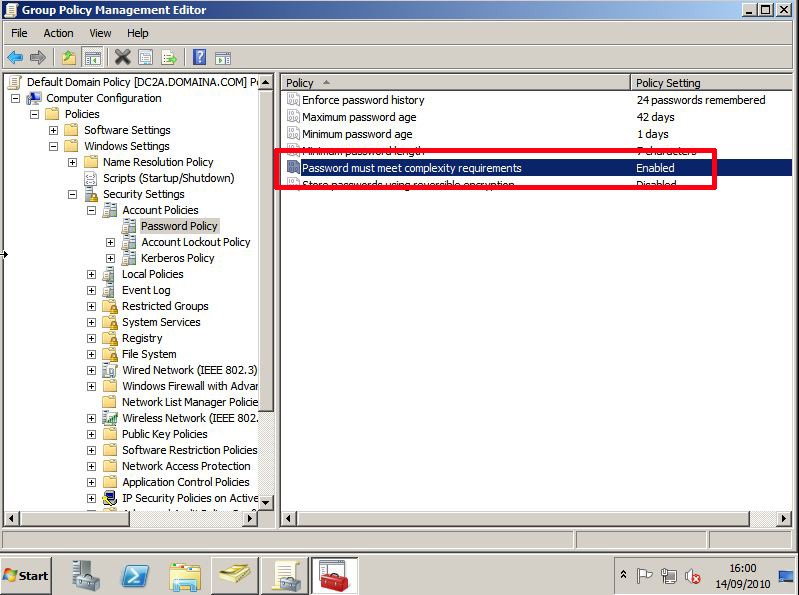
Windows Server Disable Password Complexity PeteNetLive

Set Up A New Password Policy Gpo Seattlelopas

Audit Findings Office Of The Auditor General

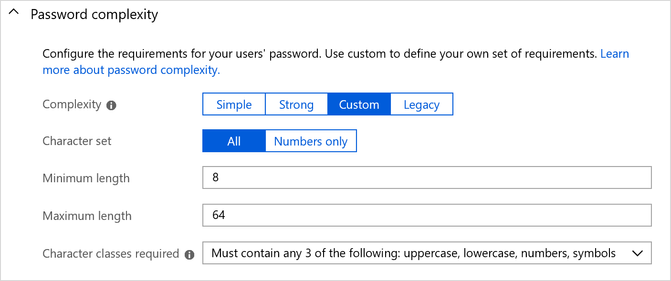
Configure password complexity Sign in to the Azure portal If you have access to multiple tenants select the Settings icon in the top menu to switch to your Azure AD B2C tenant from the Directories subscriptions menu In the Azure portal search for and select Azure AD B2C Select User flows Select a user flow and click Properties

Open Settings Org settings Click on the Security Privacy tab Open the Password Expiration Policy Enable Set user passwords to expire after a number of days Optionally change the number of days before the password expires and the notification Click Save to apply the settings Using PowerShell to set the Password Policy

Default password policy settings Create a custom password policy Next steps To manage user security in Microsoft Entra Domain Services you can define fine grained password policies that control account lockout settings or minimum password length and complexity
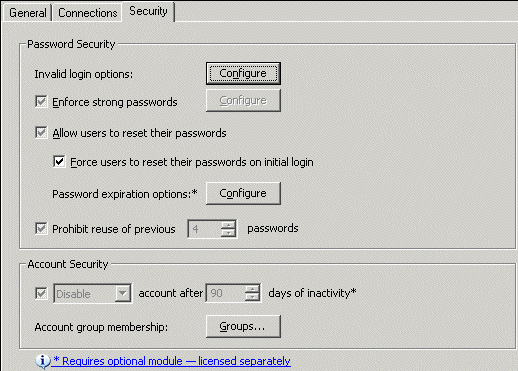
Password complexity policy in Azure AD Discussion Options null null Copper Contributor Apr 20 2020 01 07 AM last edited on Jan 14 2022 04 32 PM by TechCommunityAPIAdmin Password complexity policy in Azure AD Where we can get check password complexity policy for cloud only users in Azure AD Can we modify it according to our requirement Labels

The Azure Active Directory password policy defines the password requirements for tenant users including password complexity length password expiration account lockout settings and some other parameters In this article we ll take a look into how to manage a password policy in Azure AD
Open the Azure classic portal which can be found at https manage windowsazure and then click on Active Directory on the left side of the screen Click the directory you want to configure and then on the next screen click the CONFIGURE tab Scroll down and click Yes for the Users enabled for password reset option and then You should always test password reset functionality as a user without any Azure administrator roles assigned p n p dir auto The two gate policy requires two pieces of authentication data such as an email address authenticator app or a phone number and it prohibits security questions
Without a password policy in place you can be sure that a lot of users will take a password that can be easily guessed and or brute forced in less than 5 minutes Default Azure AD Password policy By using Azure Active Directory you will automatically use the default Azure AD password policy The default settings can be found in the following