Autohotkey V2 Examples Setting Up VS Code For AutoHotkey V2 YouTube Webview2 Example Files Display Modern Websites With AutoHotkey V2 HyperSearch Bookmark Manager And Searchbar Updated To V2 FileSelect Syntax Usage AutoHotkey V2 How To Execute JavaScript Within AutoHotkey V2 YouTube Web Dec 20 2022 nbsp 0183 32 The syntax is overall more consistent with much fewer quirks and traps and many other improvements have been made For extensive details about the differences between v1 and v2 refer to Changes from v1 1 to v2 0 v2 0 0 was released on 2022 12 20 Requirements Windows 7 and later are supported
Web How to run example code How to write hotkeys How to send keystrokes How to run programs How to manage windows Beginner tutorial by tidbit Text editors with AutoHotkey support Frequently asked questions Scripts Concepts and conventions explanations of various things you need to know Scripting language how to write scripts Web For example w200 h100 Tn Specifies the timeout in seconds For example T10 0 is ten seconds If this value exceeds 2147483 24 8 days it will be set to 2147483 After the timeout has elapsed the input box will be automatically closed and InputBoxObj Result will be set to the word Timeout
How To Execute JavaScript Within AutoHotkey V2 YouTube WinAPI DataTypes AutoHotkey Community V2 Installer Autodetect Version Of AutoHotkey To Run YouTube Scavin On Twitter AHK2Manager AutoHotKey V2 AHK How To Install AutoHotkey V2 YouTube Make The Switch To AutoHotkey V2 Here s What You Need To Know AHK 58 V1 V2 Script Converter AutoHotkey Community WinAPI DataTypes AutoHotkey Community
Autohotkey V2 Examples
 Autohotkey V2 Examples
https://i.ytimg.com/vi/u66dw-hIj3g/maxresdefault.jpg
Web Learn how to Automate your Windows computer with AutoHotkey version 2 In this short video we show you some of the lowest hanging fruit using AutoHotkey We discuss HotStrings HotKeys Sending
Templates are pre-designed documents or files that can be used for different functions. They can conserve effort and time by providing a ready-made format and design for creating various type of content. Templates can be used for personal or professional tasks, such as resumes, invitations, flyers, newsletters, reports, discussions, and more.
Autohotkey V2 Examples

How To Add Custom Information To A GUI Event In AutoHotkey V1 V2
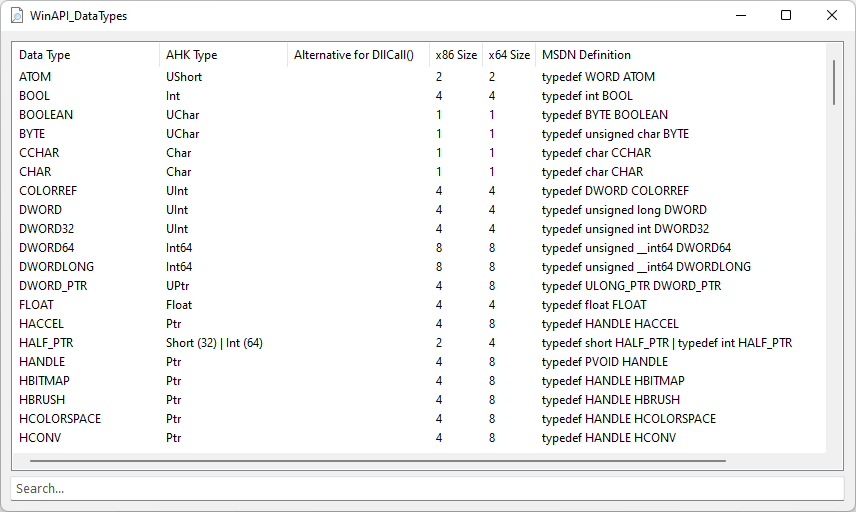
WinAPI DataTypes AutoHotkey Community

V2 Installer Autodetect Version Of AutoHotkey To Run YouTube

Scavin On Twitter AHK2Manager AutoHotKey V2 AHK

Make The Switch To AutoHotkey V2 Here s What You Need To Know

AHK 58

Web This showcase lists some scripts created by different authors which show what AutoHotkey might be capable of For more ready to run scripts and functions see AutoHotkey v2 Scripts and Functions Forum Table of Contents Context Sensitive Help in Any Editor Easy Window Dragging Easy Window Dragging KDE style Easy Access to Favorite Folders

Web How to Run Example Code The easiest way to get started quickly with AutoHotkey is to take example code try it out and adapt it to your needs Within this documentation there are many examples in code blocks such as the one below MsgBox quot Hello world quot Most but not all examples can be executed as is to demonstrate their effect
Web Introduction and Simple Examples A function is a reusable block of code that can be executed by calling it A function can optionally accept parameters inputs and return a value output Consider the following simple function that accepts two numbers and returns their sum Add x y return x y

Web Sep 30 2013 nbsp 0183 32 Functions amp Script Examples ComObject EnumInstalledApps Gets general information about an application FileObject FileCountLines Count the number of lines in a text file FileFindWord Finds a specific word string in a text file FileReadLastLines Read last x lines of a text file

Web A collection of useful AutoHotkey v2 scripts and functions AHK forum Tested with AutoHotkey v2 0 2 64 bit Functions amp Script Examples ComObject EnumInstalledApps Gets general information about an application FileObject FileCountLines Count the number of lines in a text file FileFindString Finds a specific word string in a text
[desc-11] [desc-12]
[desc-13]