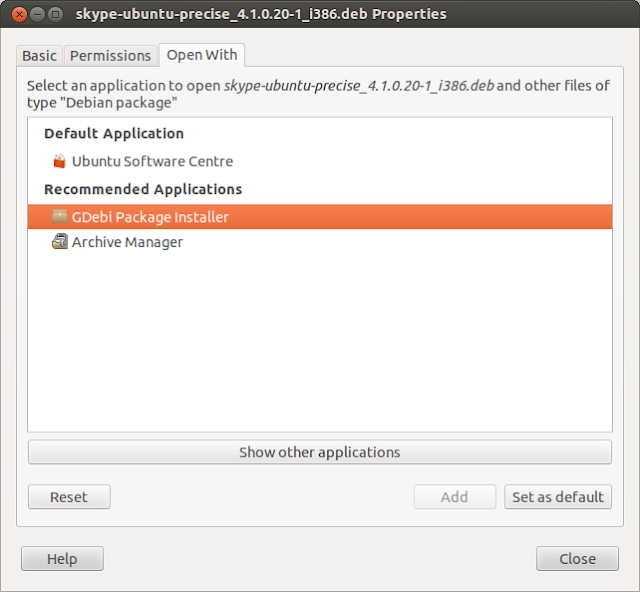
Apt Install Local Deb How To Install Local deb Packages With Apt get 4 Solutions YouTube Install Deb Package On Arch Linux Screenshots Ubuntu Package Manager All About Dpkg And Apt LinuxForDevices Cara Install Gdebi Package Installer Gpsfasr How To Install Deb File On Ubuntu Using Gdebi WPcademy Web Jan 4 2021 nbsp 0183 32 This article explains how you can manually install software bundled as a DEB package onto your Debian system Two different ways of manually installing a DEB package will be presented Manual install of a DEB package using APT in the terminal Manual install of a DEB package using the GDebi graphical user interface program
Web Sep 27 2012 nbsp 0183 32 using a bash shell and acquiring the quot package deb quot file assuming pack name is quot package quot you can run the following command to accomplish what you want installing the package so that your home directory is treated the same way quot quot would be treated in a normal install This is the command apt get download package dpkg i Web Jun 7 2019 nbsp 0183 32 Installing a deb package locally Ask Question Asked 4 years 6 months ago Modified 20 days ago Viewed 3k times 2 On a Debian system how can I extract and install a deb package located in one folder and its dependencies located in a quot pool quot of other folders using apt dpkg and Synaptic respectively Edit
How To Install Deb File On Ubuntu Using Gdebi WPcademy 3 Local Debian DEB 3 Local Debian DEB 3 Local Debian DEB Exigen Al IEE Convocatoria Para Registro De Independientes Ubuntu Package Manager All About Dpkg And Apt LinuxForDevices Installing Teamviewer 9 In Ubuntu 13 10 64bits Keyboard Exploit Debian Linux Download Makewestern Linux Mint Community
Apt Install Local Deb
 Apt Install Local Deb
https://i.ytimg.com/vi/6NKT9OABVxc/maxresdefault.jpg
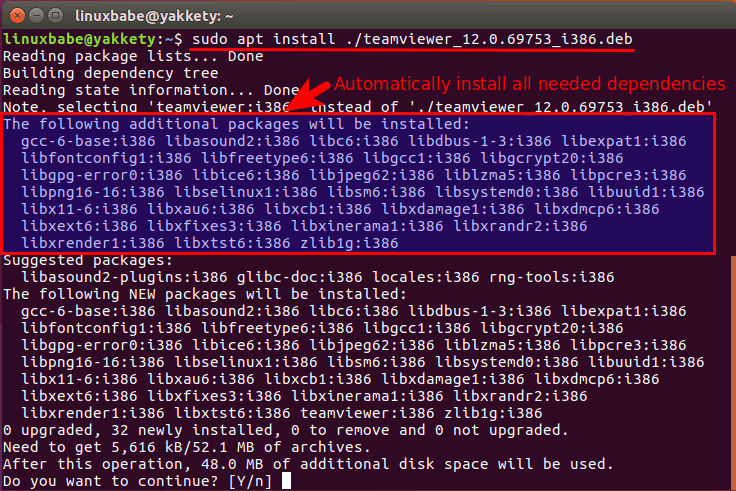
Web Feb 24 2020 nbsp 0183 32 To install local deb files provide the full path to file Otherwise the command will try to retrieve and install the package from the APT repositories sudo apt install full path file deb Removing Packages apt remove To remove an installed package type the following sudo apt remove package name
Pre-crafted templates provide a time-saving option for developing a varied range of documents and files. These pre-designed formats and layouts can be made use of for various individual and professional tasks, consisting of resumes, invitations, leaflets, newsletters, reports, presentations, and more, enhancing the material production process.
Apt Install Local Deb

Fooxpert Blog

3 Local Debian DEB

3 Local Debian DEB

3 Local Debian DEB

Ubuntu Package Manager All About Dpkg And Apt LinuxForDevices

Installing Teamviewer 9 In Ubuntu 13 10 64bits Keyboard Exploit

Web Feb 24 2020 nbsp 0183 32 To install local deb packages with apt you need to provide the full path to the deb file If the file is located in your current working directory instead of typing the absolute path you can prepend before the package name Otherwise apt will try to retrieve and install the package from Ubuntu s repositories
Web Install a package sudo dpkg i DEB PACKAGE For example if the package file is called askubuntu 2 0 deb then you should do sudo dpkg i askubuntu 2 0 deb If dpkg reports an error due to dependency problems you can run sudo apt get install f to download the missing dependencies and configure everything

Web You can install a local deb package by sudo apt install foo deb Make sure to specify a local relative or absolute path if in current dir otherwise it will look for foo deb in the remote repos and fail
Web Jul 6 2021 nbsp 0183 32 via apt sudo apt install path to package or via dpkg sudo dpkg i path to package If you want to install all packages in directory you can use something like sudo apt install path to packages

Web Apr 24 2018 nbsp 0183 32 sudo dpkg i package name deb or sudo apt install package name deb Using the dpkg may broke the package dependencies which do not resolve it automatically so you can use apt get to resolve the issue sudo apt get install f
[desc-11] [desc-12]
[desc-13]