Apex Email Service Example Apex International Rentals Apex Invoking Salesforce Planet Apex Venture Login APEX Career Services On Twitter Need Salary Negotiation Coaching Help The email services will then invoke a handleInboundEmail method on the Apex class whenever an email is received on the email address salesforce email service example Lets create very simple email service which will create contact when an email is sent to salesforce
The APEX mail system sends email to a mail server or mail relay The details of the service need to be set at in the APEX instance You can find that location here The following example sends an email with a CLOB and BLOB attachment The BLOB attachment is junk but it could be any BLOB data including media files A button on the lead contact page to send a request for a document That buttons sends an email asking the user to reply directly with their attachment with the Reply To header set to the address of the inbound email service At the same time the Message ID header is saved on the lead contact When the lead replies their email client
APEX Career Services On Twitter Need Salary Negotiation Coaching Help Apex Legends Introduces First Transgender Legend Catalyst Apex Realtors Care Month 1 Engineering Apex Communication Forgotten Password APEX Email Template Using SQL HTML CSS On A PL SQL Code Process Apex Kitchenware Rajkot APEX Case Study Club Kathmandu
Apex Email Service Example
 Apex Email Service Example
http://www.aictravels.com/assets/img/Apex_Int_Logo.png
The email that is sent by the external user is received by the Apex email service in salesforce and processed by Apex classes that use the Inbound Email object To access email services in Salesforce we will activate email service Example of Email Service Change the Opportunity Stage to Closed Won Subject of Email USH Youth
Pre-crafted templates use a time-saving solution for developing a diverse variety of files and files. These pre-designed formats and layouts can be made use of for numerous personal and professional tasks, consisting of resumes, invites, leaflets, newsletters, reports, discussions, and more, streamlining the material creation process.
Apex Email Service Example

Apex India Gurugram

Apex Legends Introduces First Transgender Legend Catalyst

Apex Realtors Care
Month 1

Apex Communication Forgotten Password

APEX Email Template Using SQL HTML CSS On A PL SQL Code Process

In our case we went for ContactEmailTrigger Once the file is named you need to then select Contact for the sObject using the dropdown menu Finally to implement the trigger class you can follow this code example trigger ContactEmailTrigger on Contact before insert Access all emails in the list

In Salesforce you can use apex to send mass emails or individual emails using apex You can also include all of the standard email attributes such as subject reply to and so forth Sending emails can be an important task that helps keep track of important information We can send an email if a specific value is set for a field or if an apex
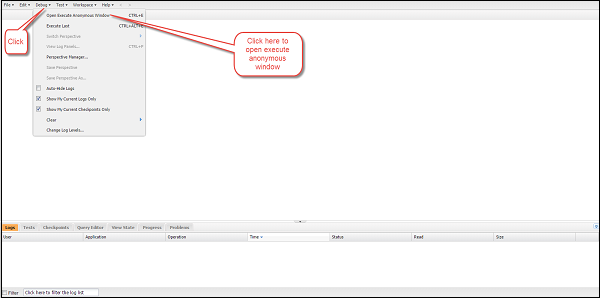
Example of Email Service Creating Contact from email Presumption Subject should contain word Create Contact Body contains only Contact Name Apex Code with test method Email services are automated processes that use Apex classes to process the contents headers and attachments of inbound email

Below are the steps to create an email service Setup Develop Email Services Click on New Email Service button Fill the required details like Email Service Name APexClass and check Active checkbox click on SaveandNewEmailAddress See the below image for reference Again fill required details and click on save

Email You can use Apex to work with inbound and outbound email Use Apex with these email features Inbound Email Use Apex to work with email sent to Salesforce Outbound Email Use Apex to work with email sent from Salesforce
ExtractInboundEmail source includeForwardedAttachments Use this method in your email service code to control how to parse and process forwarded or attached emails Returns an instance of Messaging InboundEmail from a stream of data that is in RFC822 format The data stream can be a forwarded email in an attachment to an existing InboundEmail Manage Flow To run a flow Run Flows From the Elements panel drag Action onto the canvas From the Filter By dropdown list select Type and then click Apex Action In the Action field select Send Email to Guest Enter a name such as Send Email to Guest and an API name such as Send Email to Guest for the element Set these input values
Create a process to send the email Next we need a process to send an email when we hit the Send Email button Therefore switch to Processes in the tree structure and create a new process For example name it Send mail and select the type Send E Mail Under Settings enter the following From APP EMAIL