Affinity Designer Space Between Letters Space Affinity Designer Tutorial Von Landi pop Affinity Tutorials Haiku 49 Scott Helmes Mia Discharge How To Set The Optimal Distance Between Letters Pikabu monster Increase The Spacing Between Letters In Word Deldamer Change Kerning In Microsoft Word Ebpilot Web Spacing Leading controls the distance between text baselines vertical gap between lines within the paragraph Select from the pop up menu Options include Default sets the line spacing to the font s default i e single Exactly sets a fixed spacing other text attributes are ignored for line spacing purposes
Web To adjust kerning With an insertion point made by clicking between two characters in your text do one of the following From the Characterpanel choose a value from the Kerningsetting using the up and down arrows the pop up menu or by typing in a new value Autowill automatically kern characters by default Web Inter paragraph spacing Inter paragraph spacing settings allow you to precisely determine the offset between a paragraph and its preceding and following paragraphs To adjust text leading Do one of the following From the context toolbar select or enter a value via the panel select or enter a value via the
Change Kerning In Microsoft Word Ebpilot Affinity Photo Affinity Designer Connect On How To Control Letter Spacing By Adjusting Tracking And Kerning Settings How To Create Spaces Between Letters And Cell Borders In Excel Morse Code In Musical Notation A A La Z De Affinity Publisher Consejos Trucos Y Hacks Controlling Space Between Letters Web Design Garage Adjust Space Between Letters Crossword Clue Stylish Letter A Logo Design Affinity Designer Letter Logo Design
Affinity Designer Space Between Letters
 Affinity Designer Space Between Letters
https://affinitytutorials.de/wp-content/uploads/2020/04/landi-pop-affinity-designer-tutorial-x.jpg
Web May 3 2022 nbsp 0183 32 I m trying to adjust the spacing between Text and Underline in Affinity Publisher You can t do that right now as Publisher uses the underlining specified by the font Others have also asked for more control
Templates are pre-designed documents or files that can be utilized for different functions. They can save effort and time by providing a ready-made format and layout for producing different type of material. Templates can be used for personal or professional tasks, such as resumes, invites, leaflets, newsletters, reports, presentations, and more.
Affinity Designer Space Between Letters
Handwritting

Affinity Photo Affinity Designer Connect On

How To Control Letter Spacing By Adjusting Tracking And Kerning Settings
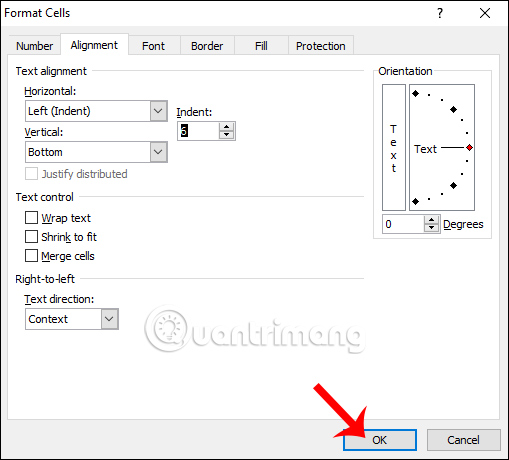
How To Create Spaces Between Letters And Cell Borders In Excel

A A La Z De Affinity Publisher Consejos Trucos Y Hacks
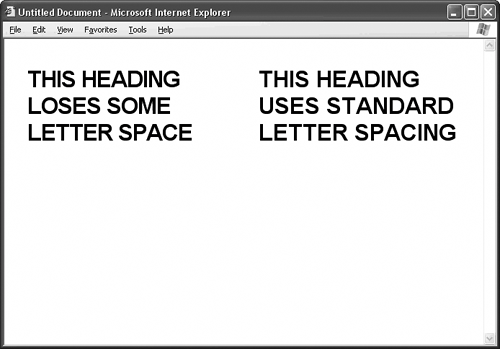
Controlling Space Between Letters Web Design Garage

Web Oct 6 2016 nbsp 0183 32 Posted September 27 2016 Hello forum First of all Affinity Designer is wonderful software have been using it for a couple of days now and it is amazing But now I have run into a problem When I write some normal text everything is fine 1
Web Jan 6 2019 nbsp 0183 32 In addition to what Fixx has said you can also change the spacing between only two characters place the cursor between these two characters hold down the quot Alt quot key and use the left or right arrows to change their spacing The other characters will not be modified Quote Posted January 6 2019

Web On the Toolbar click Alignment click Space Horizontallyor Space Verticallyfrom the pop up panel and then click Apply With Auto Distributeselected default the objects are spaced evenly within the selection bounds If this option is off a specified distance between objects can be set in an input box adjacent to the option

Web Nov 10 2022 nbsp 0183 32 Note that if you re using Publisher and have the Baseline Grid enabled your spacing will be controlled by the Baseline Grid not by the Leading You can override that for individual paragraphs if you need to or for individual text frames

Web Oct 24 2018 nbsp 0183 32 Page 1 of 3 Stokestack Members 427 Posted June 26 2018 Hi all I searched the Designer help for quot kerning quot and got zero hits So that s the first major problem I selected a line of text and examined the Character properties panel In the kerning drop down everything except quot Auto quot and 0 was greyed out
[desc-11] [desc-12]
[desc-13]