Adobe Acrobat Set Default Page Size Notes On Digital Printing 2013 Flower Stick Acrobat Set Traumladen Internetshop Des Circus Some Images And Video Won t Show Thumbnail In Windows Explorer Fear Trembling A Community Horror Zine Vol 1 System Configuration Web May 23 2023 nbsp 0183 32 Choose File gt Print From the Page Scaling pop up menu select one of the following options Fit To Printable Area Scales small pages up and large pages down to fit the paper Shrink To Printable Area Resizes only large pages to fit the paper and prints small pages as they are Click OK or Print
Web Oct 24 2011 nbsp 0183 32 Ed8r 121 1 1 3 Add a comment 6 Answers Sorted by 9 The quot Default Page Layout quot option never worked for me but I ve found another option in the Preferences that seems to work Open Preferences In the Accessibility category under quot Override Page Display quot check the Always use Page Layout Style and select the preferred option Web Oct 30 2023 nbsp 0183 32 Select As Default PDF Handler Windows only Specifies which application Reader or Acrobat is used to open PDFs This setting applies if you have both Acrobat and Reader installed on your computer In Windows 7 or earlier a browser uses this setting only if it is using the Adobe plug in or add on for viewing PDF files
System Configuration Diabolo Acrobat Set SV T HER CZ Spole ensk Deskov Hry Hrajte Si Flower Stick Acrobat Set Traumladen Internetshop Des Circus How To Get Pdf File To Print Larger Naaautos The Internet Explorer Registry Tweaks How To Set Page Margin Fonts How To Change The Size Of A PDF Page Using Acrobat DC Preflight Tool On Mac How To Set Default Page Using Web Config In ASP NET How To Set Default Page In ASP NET Core Infologs YouTube Adobe Acrobat Pro Dc 2017 Download Purchase Vasthawaii
Adobe Acrobat Set Default Page Size
 Adobe Acrobat Set Default Page Size
https://2.bp.blogspot.com/-R-OaTbcoyXs/UcnTJKBfPvI/AAAAAAAAANc/F3YaP6lj6y4/s1600/Screen+Shot+2013-06-26+at+12.27.48+AM.png
Web Jun 10 2020 nbsp 0183 32 Despite configuring Adobe Acrobat DC or Acrobat Reader DC to open a full page by default you may occasionally have to zoom in or change display modes when viewing certain pages to
Pre-crafted templates offer a time-saving service for creating a varied range of files and files. These pre-designed formats and layouts can be made use of for different personal and expert jobs, consisting of resumes, invites, flyers, newsletters, reports, presentations, and more, improving the content development process.
Adobe Acrobat Set Default Page Size

Adobe Acrobat For Microsoft 365
Diabolo Acrobat Set SV T HER CZ Spole ensk Deskov Hry Hrajte Si

Flower Stick Acrobat Set Traumladen Internetshop Des Circus

How To Get Pdf File To Print Larger Naaautos
How To Change The Size Of A PDF Page Using Acrobat DC Preflight Tool On Mac

How To Set Default Page Using Web Config In ASP NET

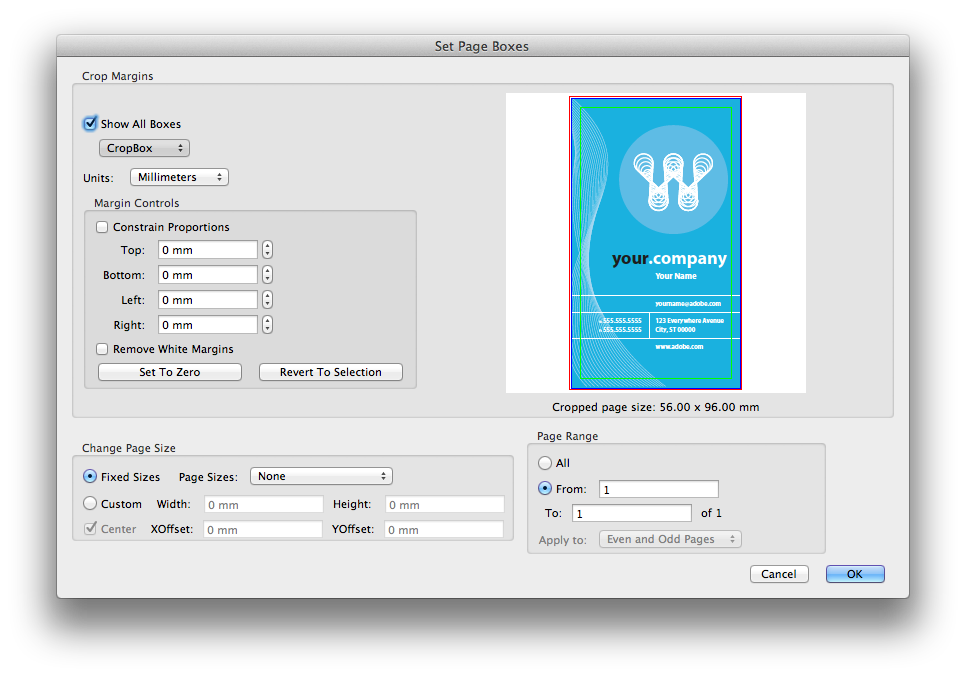
Web Feb 10 2016 nbsp 0183 32 3 Correct answers damond57764072 New Here Dec 09 2016 Under edit PDF find the crop tool Draw a box around your page doesn t matter what size and hit enter In the dialog box that opens on the bottom left is Change Page Size Select custom and change the page to the size you desire 1 Upvote Translate Jump to answer

Web Oct 23 2020 nbsp 0183 32 29 3K Translate Report 1 Correct answer George Johnson LEGEND Oct 23 2020 It sounds like you want to crop the page If so you can find more info here https helpx adobe acrobat using crop pdf pages html Note that you can increase the page size as well if that s what you need to do 2 Upvotes Translate Jump to answer 5
Web Mar 30 2017 nbsp 0183 32 As a work around we would suggest you to try the following steps Open file gt Select Print or quot Ctrl Print quot Select quot Page Setup quot at the lower left corner Paper Size select A4 gt Ok Top left side select quot Printer quot Adobe PDF Save As other copy of the file Hope this helps Regards Akanchha
Web Jul 20 2017 nbsp 0183 32 set change default page size Acrobat DC Win 10 Tools Create PDF Blank Page Peter Whan New Here Jul 19 2017 I want to use Acrobat Pro DC on Win 10 to create a new blank PDF with the page size defaulting to A4 If I go Tools Create PDF Blank Page Create it is always US Letter size

Web Aug 19 2020 nbsp 0183 32 How to change the default paper size in print gt page setup Simon5E99 New Here Aug 19 2020 Hello We are using Acrobat Pro or reader to print our invoices As we are in a EU country our invoices are in A4 format The problem we face Acrobat insists the documents are in Letter format
Web Feb 19 2010 nbsp 0183 32 1 Click Print Set printer to Adobe PDF In Page Sizing amp Handling gt Disable Choose paper source from PDF page size Click Properties at the top next to Printer Go to Layout tab gt Click advanced In Paper size choose Postscript Custom Page Size and edit page size as needed Web Jan 9 2019 nbsp 0183 32 1 Correct answer try67 Community Expert Jan 09 2019 Go to Edit Preferences Accessibility tick quot Always use Zoom setting quot and select quot 100 quot 2 Upvotes Translate Jump to answer 5 Replies Jump to latest reply try67 Community Expert Jan 09 2019 For a specific file or for all files that you open Upvote Translate Report debj8570
Web LEGEND Feb 19 2017 By editing the quot Preferences quot in Reader or Acrobat one can set the quot Default View quot to any of several options including a set zoom factor This setting will be used when a PDF is opened and there has been no default setting established by the author or creator of the PDF It should be possible to set the quot Initial View quot with