Active Directory Best Practices Veeam Backup Active Directory Best Practices Girlbda Azure Reference Architecture And Best Practices Integrate On premises Best Practices To Configure Active Directory Groups For Enterprise Active Directory Group Management Best Practices Active Directory Best Practices For Administration And Backup Nov 8 2021 nbsp 0183 32 How to Enable or Disable Adaptive Brightness in Windows 10 Displays especially on laptops and tablets may utilize ambient light sensors to detect surrounding levels of light
Aug 16 2021 nbsp 0183 32 How to Set Network Location to Private Public or Domain in Windows 10 A network location identifies the type of network that a PC is connected to with a network Sep 23 2020 nbsp 0183 32 How to Enable or Disable Bash on Ubuntu on Windows 10 Information Microsoft first made investments that improve cmd PowerShell and many
Active Directory Best Practices For Administration And Backup Active Directory Best Practices That Frustrate Pentesters YouTube Active Directory Best Practices Security Performance One Identity Microsoft IT s Best Practices For Securing Active Directory A Must Active Directory Best Practices How To Design Active Directory Structure Active Directory Best Practices I Azure ICM Active Directory Best Practices Create A User In Active Directory Best Practices YouTube
Active Directory Best Practices
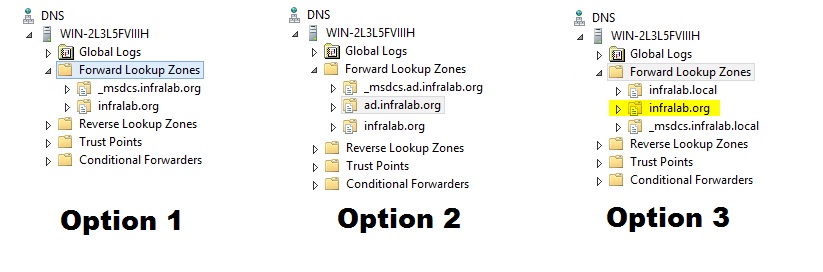 Active Directory Best Practices
https://techgenix.com/tgwordpress/wp-content/uploads/2016/03/active-directory-naming-options.jpg
Jul 29 2022 nbsp 0183 32 A In the elevated command prompt copy and paste the command below press Enter and go to step 6 below see screenshot below net user Administrator active no If you
Templates are pre-designed files or files that can be used for numerous functions. They can conserve effort and time by providing a ready-made format and design for creating different kinds of material. Templates can be utilized for personal or professional tasks, such as resumes, invites, leaflets, newsletters, reports, discussions, and more.
Active Directory Best Practices

Active Directory Best Practices YouTube

Active Directory Best Practices That Frustrate Pentesters YouTube

Active Directory Best Practices Security Performance One Identity

Microsoft IT s Best Practices For Securing Active Directory A Must

How To Design Active Directory Structure

Active Directory Best Practices I Azure ICM

Sep 28 2023 nbsp 0183 32 To Activate Windows 10 Online in Command Prompt 1 Open an elevated command prompt 2 Do step 3 active with current key and or step 4 activate with specified

Nov 3 2019 nbsp 0183 32 How to Enable or Disable User Account Control UAC in Windows When User Account Control UAC is enabled Windows prompts for consent or prompts for credentials of

Dec 17 2023 nbsp 0183 32 This tutorial will show you how to enable or disable automatic updates in Windows Update for all users in Windows 10
Dec 16 2020 nbsp 0183 32 How to Switch Between Open Apps in Windows 10 Windows 10 introduces a new feature called Task view Task view is a virtual desktop manager that allows you to quickly

Oct 17 2020 nbsp 0183 32 How to Enable or Disable Toolbars on Taskbar in Windows Windows includes a special application desktop toolbar called the taskbar that shows on the bottom of a display
[desc-11] [desc-12]
[desc-13]