Activate Microsoft Office Using Command Prompt How To Activate Microsoft Office Using Command Prompt Rahul YouTube How To Activate Microsoft Office Using Command Prompt Updated 2022 How To Activate Microsoft Office License Using Command Prompt Activate This Is The Easist Way To Activate Microsoft Office Permanently Using Trick How To Activate Microsoft Office 2021 Using Script Close the activation window and all Office apps Right click the Start button on the lower left corner of your screen and select Run Type regedit and then press Enter Select Yes when prompted to open the Registry Editor On the left side of the Registry Editor under Computer navigate to the following key in the registry
You can use the ospp vbs script with the dstatusall option to check the license state for all Office clients Or use the dstatus option to check the status of the local client For more information about using the ospp vbs script see Tools to manage volume activation of Office Related articles Overview of volume activation of Office Use a switch once by adding it to the Run command Make a switch available for reuse by creating a shortcut List of command line switches for Office products Each Office product has a different set of command line switches Note These lists don t include all switches added since Office 2007
Trick How To Activate Microsoft Office 2021 Using Script This Is The Easist Way To Activate Microsoft Office Permanently Using Office Activation Cmd Therealolpor How To Activate Microsoft Office License Using Command Prompt Activate Microsoft Office Professional Plus 2021 Product Key Free EVERY THING HERE How To Find Windows Product Key Using Command Prompt C mo Activar Office 2019 Pro Gratis Y Sin Programas CMD How To Check The Microsoft Office License Expiration Date How To Activate Microsoft Offce 13 I Microsoft Office 13 Activator I
Activate Microsoft Office Using Command Prompt
 Activate Microsoft Office Using Command Prompt
https://i.ytimg.com/vi/zr6KgYNaPAk/maxresdefault.jpg
Guided support in your browser can provide digital solutions for Office problems Try guided support Select your version of Microsoft 365 below to learn how to activate Microsoft 365 Activate Microsoft 365 or a non subscription version of Office Activate Office that s pre installed on a new Windows device
Pre-crafted templates provide a time-saving service for creating a diverse range of documents and files. These pre-designed formats and designs can be made use of for numerous individual and professional jobs, including resumes, invitations, flyers, newsletters, reports, discussions, and more, enhancing the material production process.
Activate Microsoft Office Using Command Prompt
This Is The Easist Way To Activate Microsoft Office Permanently Using
This Is The Easist Way To Activate Microsoft Office Permanently Using

Office Activation Cmd Therealolpor

How To Activate Microsoft Office License Using Command Prompt Activate
EVERY THING HERE How To Find Windows Product Key Using Command Prompt
C mo Activar Office 2019 Pro Gratis Y Sin Programas CMD

Sample commands Detected conditions and results The Office Activation scenario automates checks and recovery activities to reset activation related settings and successfully activate a subscription version of Office

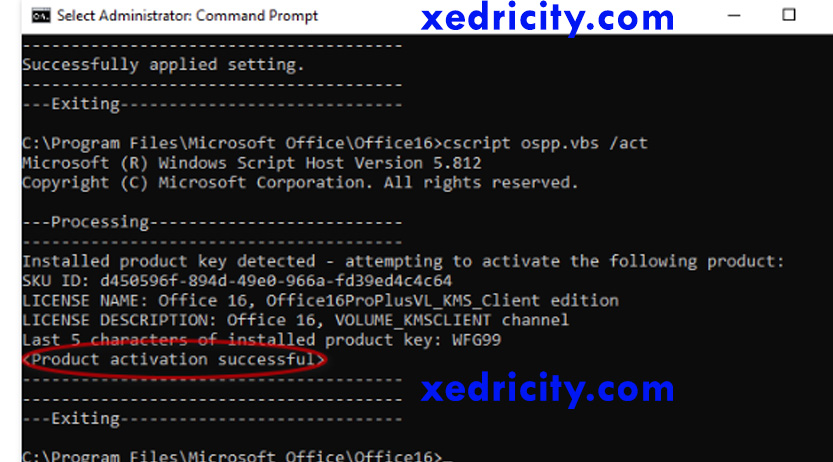
Type the following command cscript slmgr vbs ato and press Enter Close the Command Prompt window And you re done for that installation of Windows on that computer Activate Desktop Edition of Microsoft Office 2016

If you are activating Office 2019 type the following command at the prompt cd C Program Files Microsoft Office Office16 cscript ospp vbs sethst kmsprdapp02 adcu columbia edu cscript ospp vbs act 7 After executing the command s you will have successfully activated your Windows 2019 or Office 2019 software submit a ticket 212 854 1919

Most versions of Office 2021 and Office 2019 don t include a product key and you only need to sign in with the account already linked to your Office license If your version did include a product key follow the steps under the 2016 tab Need more help Want more options Discover Community Contact Us

Resetting Office activation Open Command Prompt and navigate to the following folder C Program Files x86 Microsoft Office Office15 C Program Files Microsoft Office Office15 Run cscript ospp vbs dstatus Observe the results and uninstall each product key cscript ospp vbs unpkey last 5 chars of product key shown in dstatus
To enter a MAK key by using the Office Customization Tool OCT follow these steps In the OCT go to the Licensing and user interface page Select Enter another product key and then in the Product key field enter the multiple activation key five sets of five numbers or characters After making any other necessary changes in the OCT save The Office Deployment Tool is a free download from the Microsoft Download Center We recommend that you always download and use the most current version of the ODT After you download the Office Deployment Tool double click on the officedeploymenttool executable exe file to extract the ODT files
Run Command Prompt as Administrator Type the following cscript C Program Files x86 Microsoft Office Office16 OSPP vbs dstatus and press Enter Your location of OSPP vbs