Write A Short Note On Ms Excel Write A Short Note On Cytoplasm CBSE Class Notes Online Classnotes123 What Is Computer Network Brainly in Note Do Take Notes And Maintain To Do Lists In Microsoft Office Add In Write Short Note On MS Windows Brainly in Write A Short Note On Indian Desert Write A Short Note On Indian Desert 2022 10 29 How to Start MS Excel Microsoft Excel is a component of the Microsoft Office suite of programs Alternatively one can even download it from the Microsoft website but you will have to purchase the license key Working on Excel is not different from working with any other Windows program
The three most important components of Excel you need to understand first 1 Cell A cell is a smallest but most powerful part of a spreadsheet You can enter your data into a cell either by typing or by copy paste Data can be a text a number or a date Insert or edit note About This Shortcut If there is no note in the active cell a new note will be created If a note already exists in the active cell this shortcut will open the note Note In Excel 365 the original comment was renamed to note and a new threaded comment was added to allow back and forth comments by reviewers
Write A Short Note On Indian Desert Write A Short Note On Indian Desert 2022 10 29 Satya K Goldhill On LinkedIn Teachers Day Wishes To Many Here In Linkedin An Industry Guru Microsoft Word 2003 Notes Sunshinemertq Explain The Structure Of Os Brainly in Short Note On Desert Short Notes On Desert Development Programme 2022 10 24 Answer This If Anybody Can Brainly in Short Note On Transport Write A Short Note On Transport Of Materials In Plants 2022 10 10 Write A Short Note On How To Improve Organisational Skills Write A Short Note On Pollution Air Pollution 2022 10 22
Write A Short Note On Ms Excel
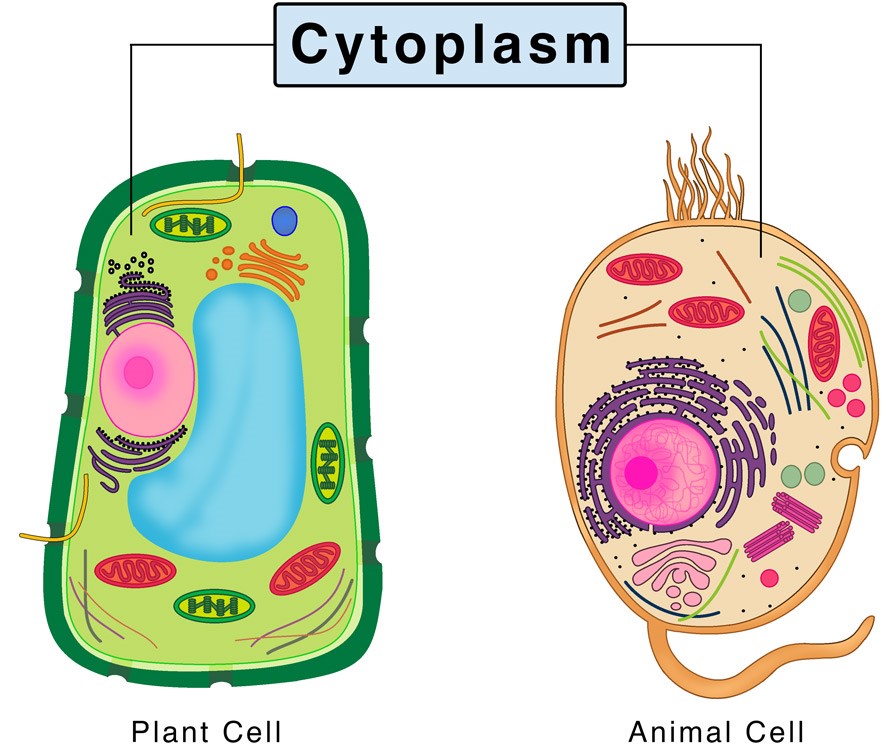 Write A Short Note On Ms Excel
https://classnotes123.com/wp-content/uploads/2022/12/Write-a-Short-Note-on-Cytoplasm-Class-8.jpg
The tutorial provides a list of Excel basic formulas and functions with examples and links to related in depth tutorials Being primarily designed as a spreadsheet program Microsoft Excel is extremely powerful and versatile when it comes to calculating numbers or solving math and engineering problems
Pre-crafted templates provide a time-saving service for producing a diverse range of documents and files. These pre-designed formats and layouts can be made use of for various individual and expert tasks, consisting of resumes, invitations, leaflets, newsletters, reports, discussions, and more, enhancing the content development process.
Write A Short Note On Ms Excel

Write A Short Note On MTP Act

Satya K Goldhill On LinkedIn Teachers Day Wishes To Many Here In Linkedin An Industry Guru

Microsoft Word 2003 Notes Sunshinemertq

Explain The Structure Of Os Brainly in

Answer This If Anybody Can Brainly in

Short Note On Transport Write A Short Note On Transport Of Materials In Plants 2022 10 10
Introduction of MS Excel Microsoft Excel is a powerful spreadsheet program used to record manipulate store numeric data and it can be customized to match your preferences The ribbon is used to access various commands in Excel The options dialogue window allows you to customize a number of items i e the ribbon formulas proofing save

What is MS Excel MS Excel is a spreadsheet program where one can record data in the form of tables It is easy to analyse data in an Excel spreadsheet The image given below represents how an Excel spreadsheet looks like How to open MS Excel To open MS Excel on your computer follow the steps given below Click on Start Then All Programs
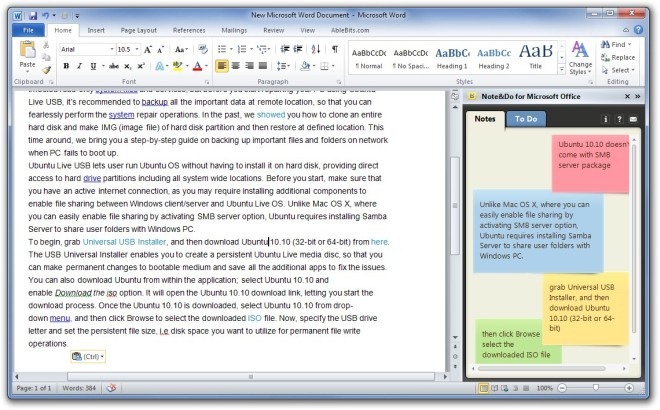
The notes you add are saved automatically Once you add a note to a cell you ll see a red triangle in the corner of the cell This is your indicator that a note is attached Simply select the cell or hover your cursor over it to display the note Change How Notes Display

In Excel for Microsoft 365 you can use Comments to have conversations with others or use Notes to make annotations Right click a cell and select New Comment Enter your comment and select Post Others can now reply to continue the discussion Hover over the cell hover over the comment and select Edit

You can write reminders important notes things to look out for whatever you want and place it in a note style comment for specific cells Here is an example of a comment in Excel You can see that cell B2 has what looks like a sticky note attached to it and this is the comment
To add a note to a cell in your worksheet Select a cell first Then go to Review Notes New Note After hitting the New Note command you ll see a banner beside your selected cell Just type your notes and that s it Excel allows you to add as many notes as you can Microsoft 365 Copilot in Excel works for Excel tables of up to two million cells Some skills like formula column suggestions highlight sort and filter do not have a limit on the amount of data you can interact with However it can take a long time even 30 seconds or more to get a response from Copilot when interacting with large tables
What is MS Excel Microsoft Excel is a software application designed for creating tables to input and organize data It provides a user friendly way to analyze and work with data The image below provides a visual representation of what an Excel spreadsheet typically appears like Excel Interface What is a Cell