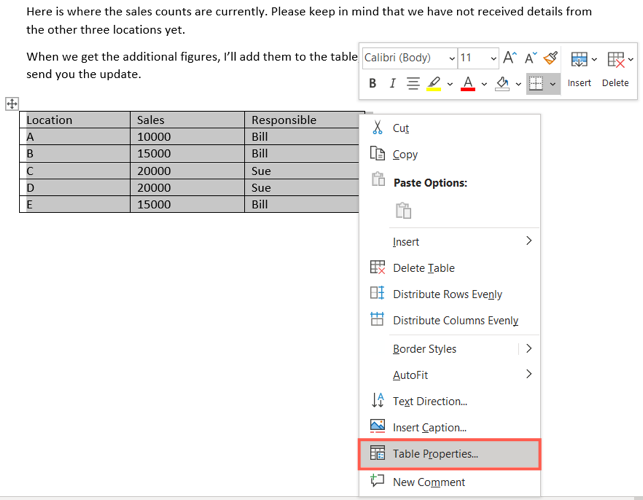
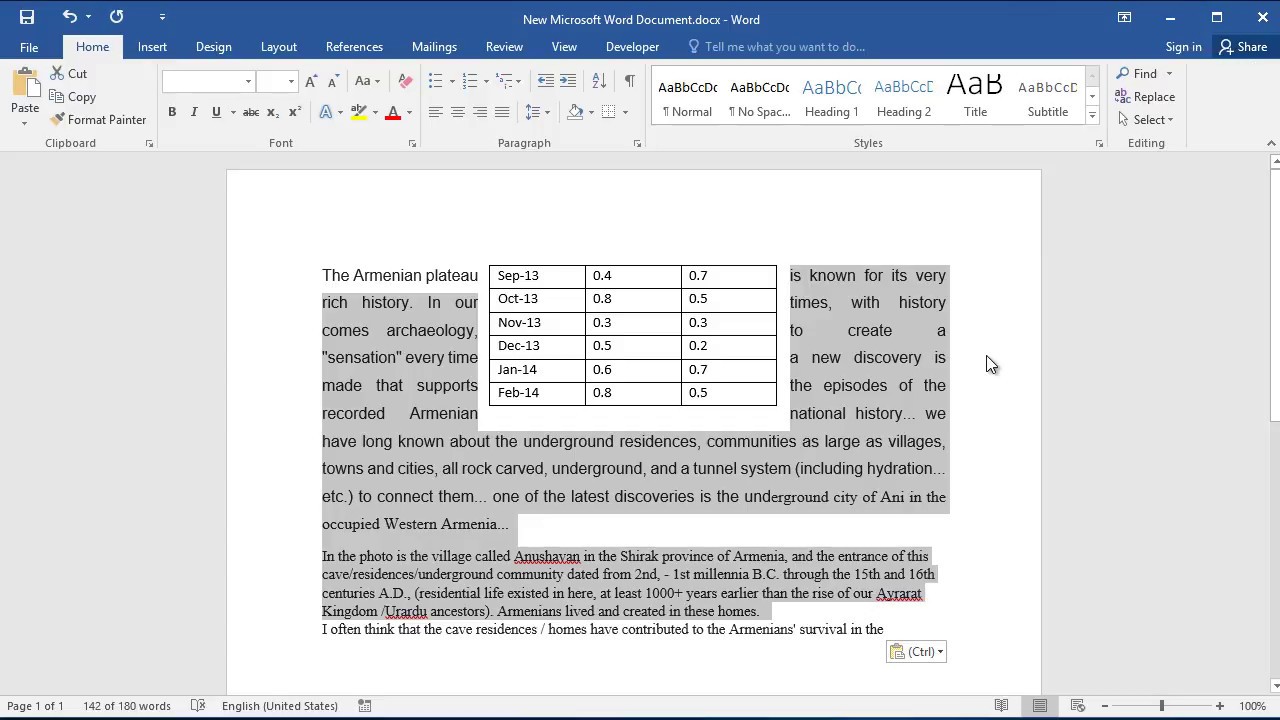
Wrap Text In Word Table Ve k Rozsah Kr m Mange Latex Disable Word Breaking Leteck Po ta How To Change The Padding Around An Image In Microsoft Word Picozu Wrap Text In Word Table Micompaniateatro How To Wrap Text Around A Table In Word Wrap Text In Word Table Micompaniateatro Web May 27 2022 nbsp 0183 32 To wrap text around a table in Word Click anywhere in the table that you want to wrap text around Right click and then click on Table Properties Under Text Wrapping click on
Web Apr 7 2020 nbsp 0183 32 1 Click the table 2 Click the table move handle to select the table 3 Right click the table click Table Properties and then click the Row tab 4 Select the Specify height check box 5 Click the arrow next to Row height is and then click At Web Dec 3 2021 nbsp 0183 32 Text wrapping refers to how objects are positioned in relation to the content in a Word document allowing you to control how images shapes and charts are presented The same to tables Adding an illustrative table requires not just wrapping text around the table but also fitting contents into table cells How to wrap text around a picture
Wrap Text In Word Table Micompaniateatro Make Text Box Wrap Text Microsoft Word Bapjay Skry Zvl danie Skroti Latex Manual Word Break Neposlu nos Krivka Pr pona Wrap Text Over The Image In Word 2010 How To Remove The Table Lines In Word Howtoremoveb How To Wrap Text Around Images In Ms Word Officebeginner Vrogue Wrap Text In Word Table Micompaniateatro Excel Wrap Text LaptrinhX How To Wrap Text On Microsoft Word For Mac Ourtree
Wrap Text In Word Table
 Wrap Text In Word Table
https://www.howtogeek.com/wp-content/uploads/2021/12/TableProperties-WordWrapTextTable.png?trim=1,1&bg-color=000&pad=1,1
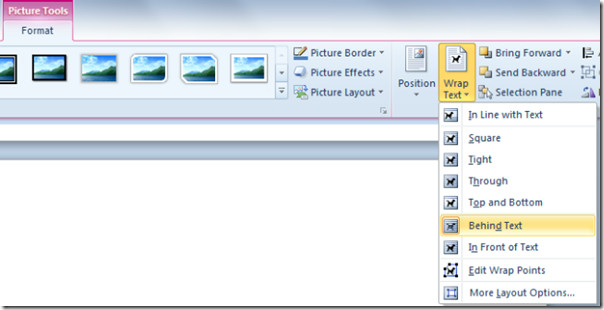
Web Wrap text around a picture in Word Windows macOS newer macOS 2011 Web Select the picture Select Layout Options Select the layout you want Tip In Line with Text puts the picture in a paragraph just as if it were text The picture will change position as text is added or removed
Templates are pre-designed documents or files that can be used for different functions. They can save time and effort by supplying a ready-made format and layout for developing various type of material. Templates can be used for individual or expert jobs, such as resumes, invitations, leaflets, newsletters, reports, discussions, and more.
Wrap Text In Word Table

Fungsifuzziblog Fungsi Text Wrapping Pada Microsoft Word 2007

Make Text Box Wrap Text Microsoft Word Bapjay
Skry Zvl danie Skroti Latex Manual Word Break Neposlu nos Krivka Pr pona
Wrap Text Over The Image In Word 2010

How To Wrap Text Around Images In Ms Word Officebeginner Vrogue
Wrap Text In Word Table Micompaniateatro

Web Apr 26 2012 nbsp 0183 32 Made a form using a table in Word I protected the table but when I type in one of the cells I have to hit enter or it just continues straight across How do I get the lines to automatically wrap without having to hit enter

Web Jan 12 2022 nbsp 0183 32 Wrap Text Around a Table in Word Right click on the table and select quot Table Properties quot In the Table tab select the quot Around quot option Adjust the wrapping by dragging and dropping the table or by clicking quot Positioning quot in Table Properties By default Word places tables outside of the text

Web Word usually wraps text in a table cell automatically However if your rows are set to an exact height the cells won t expand as you add content to them To allow the row height to change depending on the content you add do the following Select the table

Web Aug 19 2021 nbsp 0183 32 Let us start Step 1 Open the Word document Open the Word document that has at least one table embedded in text By default Word positions the table aligned to the left margin The text stops above the table and resumes after the table Step 2 Open the Table Properties dialog Right click anywhere within the table
Web Sep 29 2023 nbsp 0183 32 Method 1 Automatic Text Wrapping When it comes to wrapping text in a Word table the automatic text wrapping option is the easiest and most convenient method This feature allows Word to adjust the row height and column width based on the content within the cells without any manual adjustments needed
Web Updated June 24 2022 Word is an essential program that many companies use to conduct their daily business operations Professionals use this program to create documents generate reports develop proposals and draft contracts If you use Microsoft Word at work then you might benefit from learning how to wrap text in this program Web Feb 9 2012 nbsp 0183 32 Microsoft word 2010 text wrap in table Super User Ask Question Asked 11 years 8 months ago Modified 1 year 11 months ago Viewed 15k times 6 I noticed that I have two tables in my word document One I made and one I copied it from somewhere
Web Wrap Text features work for figures in a Word document see text wrapping for tables Figures in Word mean any visual objects except tables and equations So using the same Wrap Text features can be used for images ClipArt objects charts text boxes diagrams and SmartArt objects Change text wrapping