Wrap Text In Word Document How To Wrap Text Around Images In Ms Word Officebeginner Vrogue How To Wrap Text Around Images In Ms Word Officebeginner Vrogue How To Wrap Text In Word Around A Picture Printable Templates Free How To Text Wrapping In Word 2007 YouTube How To Wrap Text Around An Image In WordPress Beginners Series YouTube WEB Wrapping text in Word improves the overall look of the document and helps in a better flow of content around the image How to Insert an Image in Word Before we learn how to wrap text in Word let us learn how to add an image to the Word document
WEB Jul 23 2024 nbsp 0183 32 Wrapping text in Microsoft Word is all about making sure your document looks neat and flows smoothly Here s a step by step guide to help you wrap text around images or shapes efficiently Step 1 Insert an Image or Shape First insert the image or shape you want to wrap your text around WEB Wrap text around pictures in Word Rotate a text box shape WordArt or picture in Word Group or ungroup shapes pictures or other objects Select layout options to wrap text and move objects like pictures photos and images
How To Wrap Text Around An Image In WordPress Beginners Series YouTube How To Wrap Text In Word 2010 Hzlasopa How To Wrap Text Around The Table In Word 2016 YouTube How To Wrap Text Around An Image In Microsoft Word 2010 Microsoft Office Text Wrapping In MS Word For Mac YouTube How To Wrap Text Around A Picture In Publisher 4 Steps Riset How To Wrap Text In Canva Canva Templates How To Wrap Text Around Images And Objects In Microsoft Word Pictures And Text Wrapping Word 2016 Tutorial Office Word
Wrap Text In Word Document
 Wrap Text In Word Document
https://www.wikihow.com/images/thumb/2/28/Wrap-Text-in-Word-Step-2-Version-3.jpg/aid4706328-v4-728px-Wrap-Text-in-Word-Step-2-Version-3.jpg
WEB Aug 7 2018 nbsp 0183 32 What are the Text Wrapping Options Editing Your Wrap Points Fine Tune Your Wrapping Keeping Your Object in Place Changing Your Default Wrapping Adding an image to a Word document is as simple as dragging and dropping or clicking Insert gt Picture and then moving it to the right place
Templates are pre-designed files or files that can be used for various purposes. They can save time and effort by offering a ready-made format and design for developing various kinds of content. Templates can be utilized for personal or professional jobs, such as resumes, invitations, leaflets, newsletters, reports, presentations, and more.
Wrap Text In Word Document
HOW TO USE WRAP TEXT IN MS WORD Simple Easy Ways To Use Text

How To Wrap Text In Word 2010 Hzlasopa
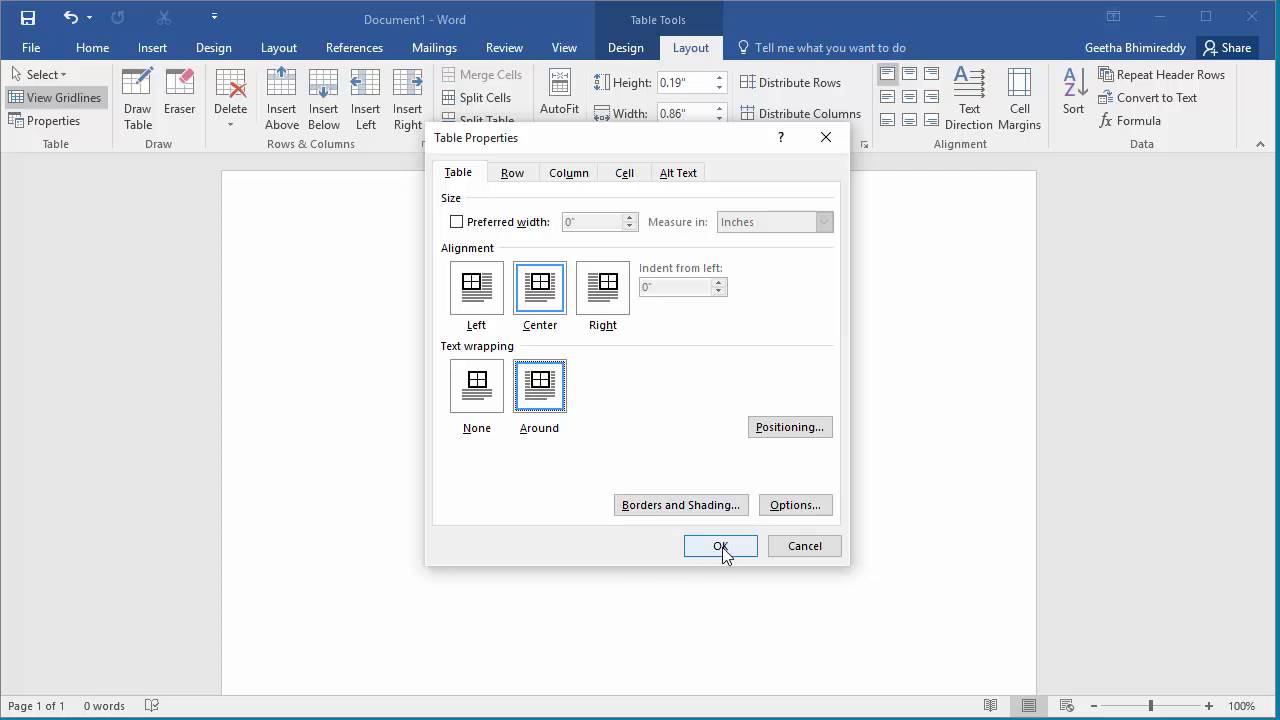
How To Wrap Text Around The Table In Word 2016 YouTube

How To Wrap Text Around An Image In Microsoft Word 2010 Microsoft Office

How To Wrap Text Around A Picture In Publisher 4 Steps Riset

How To Wrap Text In Canva Canva Templates

WEB Jan 29 2024 nbsp 0183 32 Wrapping text around other text in a Microsoft Word document is a handy technique to make your document look professional and organized In just a few simple clicks you can align your text with images or other elements in your document giving it a polished appearance

WEB Jun 28 2024 nbsp 0183 32 Here are some steps to help you wrap text around a picture in Word using the built in text wrap feature Open the Word document you want to edit and right click on the image you plan to wrap your text around

WEB Feb 8 2024 nbsp 0183 32 Wrapping text in Word 365 is a breeze once you know where to look Simply select the image you want to wrap text around go to the Format tab choose Wrap Text and pick the wrapping option that suits your needs

WEB Sep 28 2022 nbsp 0183 32 In this quick Microsoft Word tutorial video learn how to wrap texts in Word using six wrap text options To see the full blog article that this video came f

WEB Use wrap points to adjust text flow around a shape You can add an image in your document and make the text flow around it in a way that follows the shape of the image For best results use a picture with a transparent white or solid colored background
WEB Wrap Text features work for figures in a Word document see text wrapping for tables Figures in Word mean any visual objects except tables and equations So using the same Wrap Text features can be used for images ClipArt objects charts text boxes diagrams and SmartArt objects WEB Sep 27 2021 nbsp 0183 32 Text wrapping in Word is about how text behaves around a graphical object or illustration such as a picture shape textbox or even a table It controls how text position itself or flexibly flows to the position of a graphic in your Word document
WEB Jun 26 2021 nbsp 0183 32 To do this Word provides several text wrapping options which allow you to control how images and objects are displayed in a document Let s see how to wrap text around an image or object in a Word document