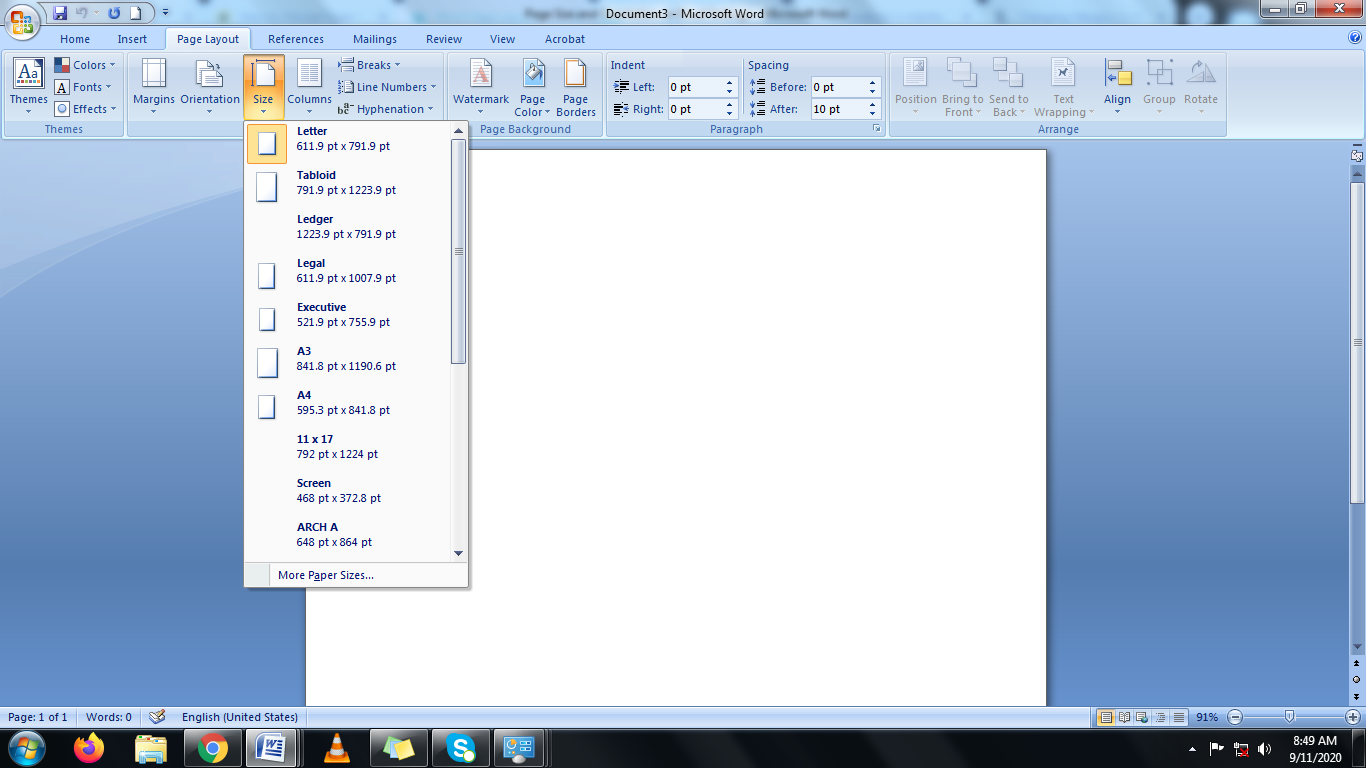
Word Document Default Page Size How To Change The Default Page Layout In Microsoft Word Panonar Fungsi Margins Pada Microsoft Word Edumi ID Map Of Northern New Jersey For Printable Map Of New Jersey Printable Printable Michigan County Map Ruby Printable Map How To Fit To Page In Word Snotab Web Mar 2 2021 nbsp 0183 32 In the US Word s default paper size is Letter 8 5 x 11 inches 21 59 x 27 94 cm If you use a different paper size more though you can change this Go to Layout gt Size gt More Paper Sizes on the main ribbon Select a paper size from the dropdown menu or enter custom values
Web Dec 30 2020 nbsp 0183 32 By default a new Word document uses an A4 size sheet measuring 8 27 inches by 11 69 inches Schools and offices use the A4 size most for printing presentations But documents can be larger or smaller in comparison to A4 Also the user might want to change the page size of the document for printing Web Oct 2 2022 nbsp 0183 32 The default paper size in Word depends on the Windows regional settings when Office was originally installed In the US it s Letter Size 8 5 x 11 21 59 x 27 94cm but in most of the world it s the metric A4 paper 8 27 x 11 69 21 x 29 7cm So I want to change my default paper size to A4
How To Fit To Page In Word Snotab World Map Printable Ruby Printable Map What Is Page Setup In Ms Word Design Talk Printable Map Of Southeast Us Ruby Printable Map Printable Labeled US Map Ruby Printable Map Printable United States Map Ruby Printable Map How To Change The Default Paper Size In Word Revolutionary War Map Printable Ruby Printable Map How To Change Default Font In Word 2016 Mac Togokol
Word Document Default Page Size
 Word Document Default Page Size
https://www.guidingtech.com/wp-content/uploads/how-to-change-the-default-page-layout-in-Microsoft-Word-3.jpg
Web Normally the default format would be letter which is the standard size for a page 8 5 x 11 inches This size is easy to work with and print since it fits into any printer or copier If that is what you would wish to use there is no reason to learn how to change size and orientation of one page in Word
Pre-crafted templates offer a time-saving option for developing a diverse variety of files and files. These pre-designed formats and designs can be made use of for various personal and professional tasks, consisting of resumes, invitations, flyers, newsletters, reports, presentations, and more, enhancing the material development process.
Word Document Default Page Size

Change Word Spacing In Word Double Chicagokurt
World Map Printable Ruby Printable Map
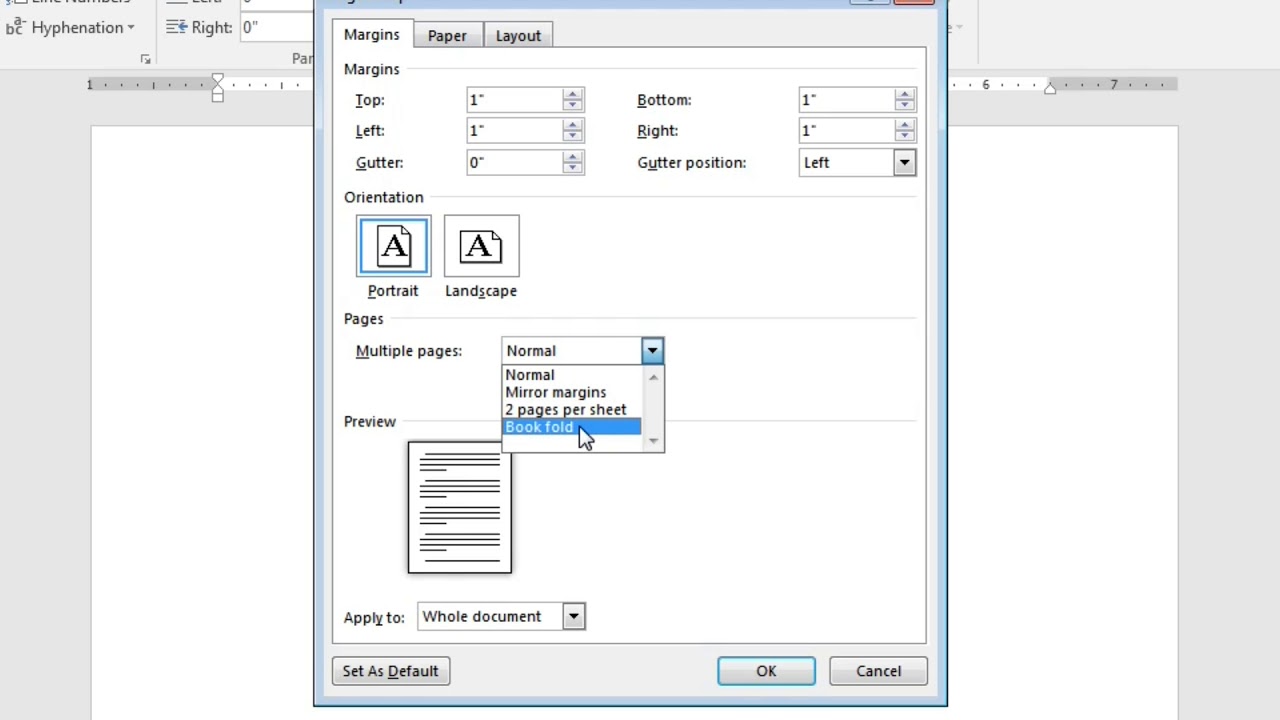
What Is Page Setup In Ms Word Design Talk

Printable Map Of Southeast Us Ruby Printable Map
Printable United States Map Ruby Printable Map
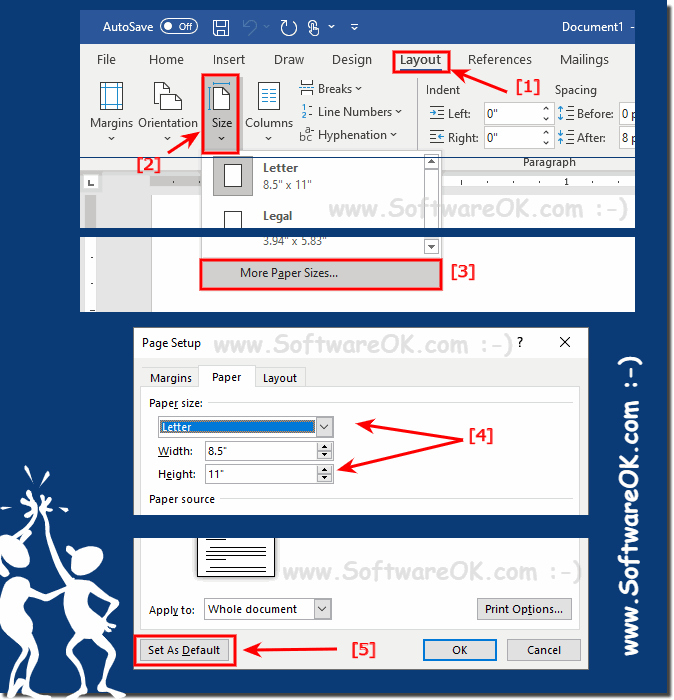
How To Change The Default Paper Size In Word

Web Nov 21 2022 nbsp 0183 32 Change Page Size Microsoft Word uses the document size and layout as A4 by default You can change it to Letter Tabloid A3 A5 B4 B5 Executive Legal and Statement entirely

Web Jan 19 2012 nbsp 0183 32 How to set default page display size When I open a new doc in Word 14 1 4 it always opens at 250 in the display page size drop down menu It didn t use to do that I have to reset the page display percentage to
Web Change paper size Word 2016 for Mac Word for Mac 2011 In Word for Mac you can choose a predefined paper size from a list and change the paper size for all pages in your document for a specific page or for a specific section You can also change the default paper size used for new documents
Web Open the template or a document based on the template whose default settings you want to change On the Format menu click Document and then click the Layout tab Make any changes that you want and then click Default
Web Jan 4 2021 nbsp 0183 32 What to Know Mac Go to File gt Page Setup choose Page Attributes from the drop down menu then set the Paper Size Word 365 Go to File gt Print gt Page Setup select the Paper tab then set the Paper Size If you don t see the size you want select Custom or Manage Custom Sizes to set your own margins and define a nonprintable area
Web Jan 17 2024 nbsp 0183 32 Here s how you can change the default size of a page in MS Word 2016 Follow steps 1 to 3 just like mentioned above Now instead of clicking Margins click Size Click More Paper Sizes Select one from the given templates or create one of your own by entering the required measurements Click Set as Default at the bottom left corner Web Quickly resize the drawing page by dragging the page edges Click the Pointer tool Position the pointer at the edge of the page and then press the CTRL key The pointer changes to a double headed arrow or a rotation cursor Drag the page edge to where you want it If you drag the corner of a page it adjusts the page size in both dimensions
Web Mar 2 2021 nbsp 0183 32 Go to the quot Layout quot tab and to quot Size quot 2 Right at the bottom on quot Other Paper Sizes quot 3 In the quot Page Setup quot dialog box click on quot Paper quot 4 Then on the selection field arrow group quot Paper Size quot 5 Select the paper size you want to be the default for all future documents 6 Press the button quot Set as default quot see Image 1 Point 1 to 5