Word Count Google Docs Ipad How To Count Words In Google Sheets Google Docs For IOS Updated With Word Count And IPad Pro Support V rifier Le Nombre De Mots Dans Google Docs Sheets How To Check Word Count On Google Docs Keyboard Shortcut Templates Counting Words And Characters In Google Docs Web Result Jun 13 2022 nbsp 0183 32 Simon Chandler Updated on June 13 2022 Mac Command Shift C Windows Ctrl Shift C Or from the toolbar select Tools gt Word Count Or download an add on Select Add ons gt Get add ons gt Word count gt Better Word Count gt select Free Google Docs includes em and en dashes in its
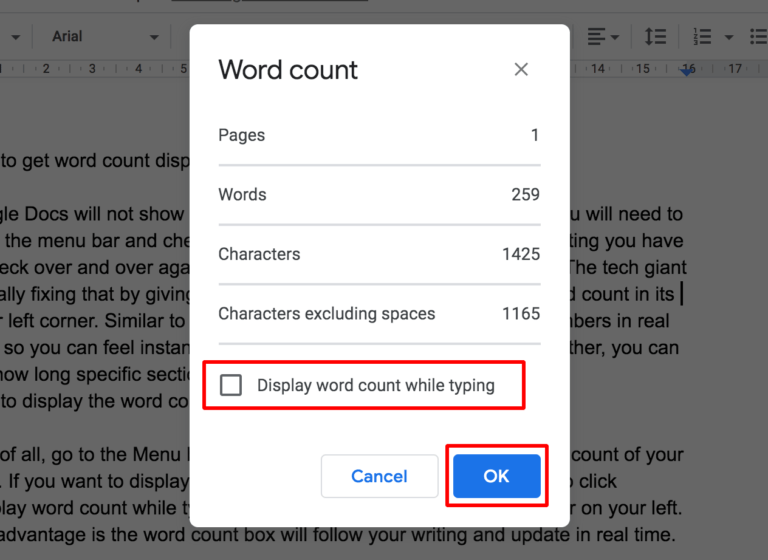
Web Result Mar 25 2020 nbsp 0183 32 Click quot Tools quot on the menu bar while editing a document and select quot Word count quot A menu will pop up on the screen that displays word count statistics Click on the checkbox next to quot Display word count while typing quot Google Docs will display a live word count box in the lower left corner of the document Web Result May 18 2021 nbsp 0183 32 What to Know Open the Google Docs app on an iPad Select a document Click the pencil icon to open the document in editing mode Use the keyboard to edit as you normally would and format it using familiar tools Open the information panel for additional options Share the document with others or mark it
Counting Words And Characters In Google Docs How To View Word Count On Google Docs Geeky Gadgets How To Check Google Docs Word Count In Single Click Where To Find Word Count In Google Docs Word Count Tool Finding Your Word Count In Google Docs Microsoft Word And More Google Docs How To Use Word Count YouTube How To Check The Word Count On Google Docs How To See Word Count In Google Docs Marketedly Does Google Docs Count Words RWODA
Word Count Google Docs Ipad
 Word Count Google Docs Ipad
https://www.modernschoolbus.com/wp-content/uploads/Word-Count-Google-Sheets.jpg
Web Result Nov 6 2023 nbsp 0183 32 To check word count on an iPad iPhone or Android open the Google Docs app and select your file Go to the three dots in the top right corner and tap quot Word Count quot These device users
Templates are pre-designed documents or files that can be utilized for numerous purposes. They can conserve time and effort by offering a ready-made format and design for creating different kinds of content. Templates can be used for personal or professional jobs, such as resumes, invitations, leaflets, newsletters, reports, discussions, and more.
Word Count Google Docs Ipad

How To Check Word Count On Google Slides Quick Guide

How To View Word Count On Google Docs Geeky Gadgets
How To Check Google Docs Word Count In Single Click
Where To Find Word Count In Google Docs Word Count Tool
Google Docs How To Use Word Count YouTube

How To Check The Word Count On Google Docs

Web Result Want to get more out of Google Docs for work or school

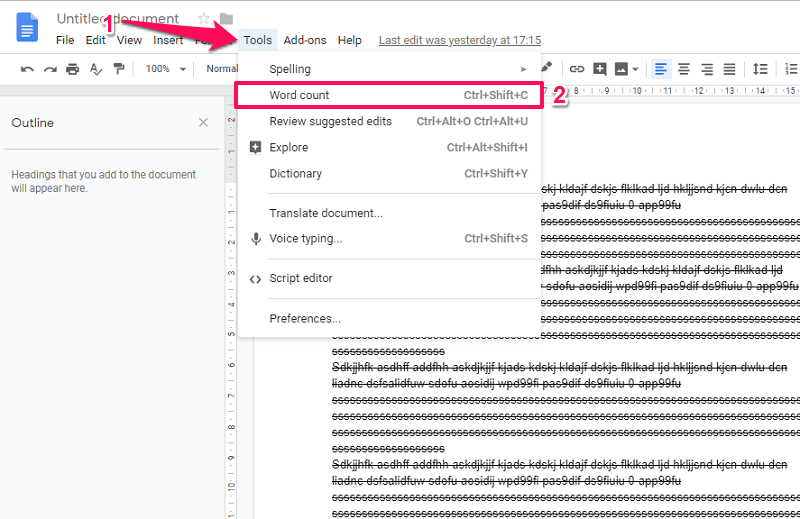
Web Result May 23 2022 nbsp 0183 32 You can check the word count in Google Docs easily and in a few different ways including a keyboard shortcut See the Word Count for a Document Open the document and if applicable highlight the text you want to count Click Tools gt Word Count and find the number labeled quot Words quot Click quot OK quot when
Web Result Mar 9 2016 nbsp 0183 32 Google Docs for iOS now offers word count First up Google Docs for iOS has finally been updated with a feature that no self respecting word processor would want to be without

Web Result Feb 24 2021 nbsp 0183 32 This is a quick How To on getting a word count for a Google Doc document on an iPad Transcript Follow along using the transcript Show transcript

Web Result Aug 7 2023 nbsp 0183 32 Select Tools Select Word count Alternatively press Ctrl Shift C or on an Apple device Command Shift C In Chrome on the web the system offers the option to display the word count
Web Result Jun 3 2022 nbsp 0183 32 5 minutes How to see the word count on Google Docs Step 1 Open your Docs file if necessary In the top menu select Tools Image used with permission by copyright holder Step 2 Web Result Feb 6 2024 nbsp 0183 32 Want to know how many words you ve written in your Google Doc It s pretty simple Google Docs has a built in feature that counts the words for you All you need to do is click a few buttons and voil 224 you ll see your word count in
Web Result Use keyboard shortcuts in Google Docs to navigate format and edit Note Some shortcuts might not work for all languages or keyboards