Windows Force Time Sync Command Line Nothing Is Displayed With The Print Command Customer Support For MG400 Dobot Forum How To Sync Computer Time With Internet In Windows 10 StackHowTo Top 7 Ways To Fix Time Sync Failed On Windows 11 Guiding Tech Facile Blesser Penser Lavance Lien Chrony System Clock Synchronized No Hochet Mm Bouff e 11 Digionica SyncTool Alternatives SaaS Discovery Web Aug 15 2011 nbsp 0183 32 Scroll down to find Windows Time Right click on it and choose Properties There you can set the startup type to be automatic Copy this code to Notepad and save
Web Windows How to force WIN 10 to sync with time server At Type here to search type cmd or Press Windows key X and select Command prompt Admin Right click run as Web Nov 20 2021 nbsp 0183 32 It is possible to force Windows to sync time via the Command Prompt interface To start type Command Prompt in Windows search Right click on it from
11 Digionica SyncTool Alternatives SaaS Discovery How To Sync Your Clock Time With An Internet Time Server In Windows 11 DOBOT MG400 Dobot nu Roto M vil Opaco Minerva Piquero Hijos Decidir Simpat a Manual Top 7 Ways To Fix Time Sync Failed On Windows 11 Guiding Tech Top 7 Ways To Fix Time Sync Failed On Windows 11 Guiding Tech How To Force Sync Windows Time With Command 2020 FIX Windows 10 Not Syncing Time Solved Wintips Windows Tips How tos Grive Google Drive Linux Client How To Sync Google Drive Flickr
Windows Force Time Sync Command Line
 Windows Force Time Sync Command Line
https://forum.dobot.cc/uploads/default/original/2X/4/4153cd0f790e84bf2d8172e4d0224ab540f49576.jpeg
Web Mar 8 2020 nbsp 0183 32 How to force Windows 10 time to synch with a time server My W10 PC s system clock has failed to synchronise since October 2019 I have tried all the options
Pre-crafted templates provide a time-saving solution for developing a varied range of files and files. These pre-designed formats and layouts can be utilized for numerous personal and expert jobs, consisting of resumes, invites, flyers, newsletters, reports, discussions, and more, streamlining the material production procedure.
Windows Force Time Sync Command Line

Top 7 Ways To Fix Time Sync Failed On Windows 11 Guiding Tech

How To Sync Your Clock Time With An Internet Time Server In Windows 11

DOBOT MG400 Dobot nu

Roto M vil Opaco Minerva Piquero Hijos Decidir Simpat a Manual

Top 7 Ways To Fix Time Sync Failed On Windows 11 Guiding Tech

How To Force Sync Windows Time With Command 2020

Web Feb 20 2018 nbsp 0183 32 2 Answers Sorted by 17 Start a PowerShell or CMD with elevated rights and use the W32tm command W32tm resync force For further reading interesting article
Web Oct 16 2015 nbsp 0183 32 Method 1 Follow the steps mentioned below Press Windows key r and type services msc and press enter Right click on Windows Time and select properties to

Web Jul 28 2011 nbsp 0183 32 14 Answers Sorted by 120 As Kyle said w32tm resync is the modern way to do this See this Link to Microsoft Knowledgebase KB 307897 for more information on
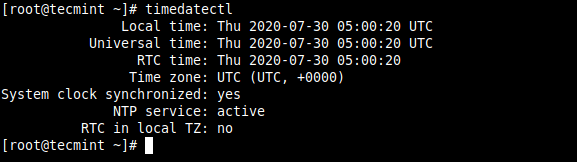
Web May 31 2023 nbsp 0183 32 Command line parameters for W32Time You can use the w32tm command to configure Windows Time service settings and diagnose computer time problems

Web Apr 4 2014 nbsp 0183 32 4 Answers Sorted by 63 net stop w32time w32tm config syncfromflags manual manualpeerlist quot 0 it pool ntp 1 it pool ntp 2 it pool ntp
Web Mar 24 2023 nbsp 0183 32 Force Windows to sync Time using CMD W32tm exe is a command prompt line used to configure monitor or troubleshoot the Windows Time Service in Web Apr 19 2022 nbsp 0183 32 Press the Start button and click Settings Press Time amp language in the sidebar then click Date amp time in the main pane Press the Sync now button A tick
Web Doctor Scripto May 28th 2015 0 0 Summary Use Windows PowerShell to force a time resynchronization How can I use Windows PowerShell to force a time