Windows Can T Type Special Characters Alt Codes How To Type Special Characters And Keyboard Symbols On Buy GK GAMAKAY MK61 Wired Mechanical Keyboard 61 Keys Compact Keyboard Getting Vim To Create Tempfiles On Windows 10 Chris Davison s Website Kari Unknown Mother Goose School Ver Minecraft Skin Pin By On In 2023 Character Design Inspiration Concept Art Web Jan 3 2023 nbsp 0183 32 By Brian Burgess Published January 3 2023 Special characters come in all kinds of designs and uses If you want to type special characters on Windows with ALT codes follow this
Web Apr 1 2021 nbsp 0183 32 Select the search icon in your taskbar type character in your search field and then select the Character Map app You ll get a pop up map showing a bunch of special characters for a Web Aug 26 2010 nbsp 0183 32 Yes in Windows you can type alt and a four number code for special symbols You can find a table with all the different codes here There are separate commands for Mac It doesn t seem there s a shortcut for in particular though The codes for Windows must be typed on the numpad or if you re using a laptop by hitting numlock
Pin By On In 2023 Character Design Inspiration Concept Art Fix Windows Can t Find One Of The Files In This Theme 2022 Active Data Studio LSoft Technologies How To Type Special Characters PC Shortcut Keys YouTube How To Fix Headphone Jack Not Working On Laptop Ernest Painting LLC How To Type Special Characters iOS Android Win Ubergizmo How To Type Special Characters On A Windows 11 PC United News Post The Best Speech to Text Apps And Tools For Every Type Of User Can t Type Special Characters In Windows 10 Password Recovery
Windows Can T Type Special Characters
 Windows Can T Type Special Characters
https://www.freecodecamp.org/news/content/images/2021/06/5f9c9ac9740569d1a4ca27c0.jpg
Web Dec 6 2022 nbsp 0183 32 Click and hold a key or if you re on touch press and hold a key on the touch keyboard It will display extra symbols that you can use instead Select the special key you want to use from the
Templates are pre-designed files or files that can be utilized for different purposes. They can save time and effort by supplying a ready-made format and design for creating various type of material. Templates can be utilized for individual or professional tasks, such as resumes, invitations, leaflets, newsletters, reports, discussions, and more.
Windows Can T Type Special Characters
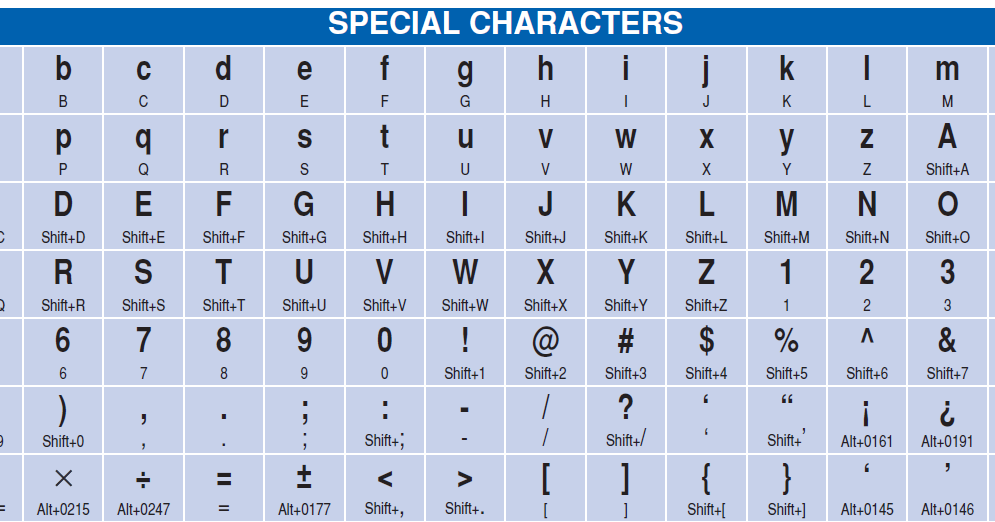
All Keyboard Character English Keyboard Symbols Bojler
Fix Windows Can t Find One Of The Files In This Theme 2022

Active Data Studio LSoft Technologies
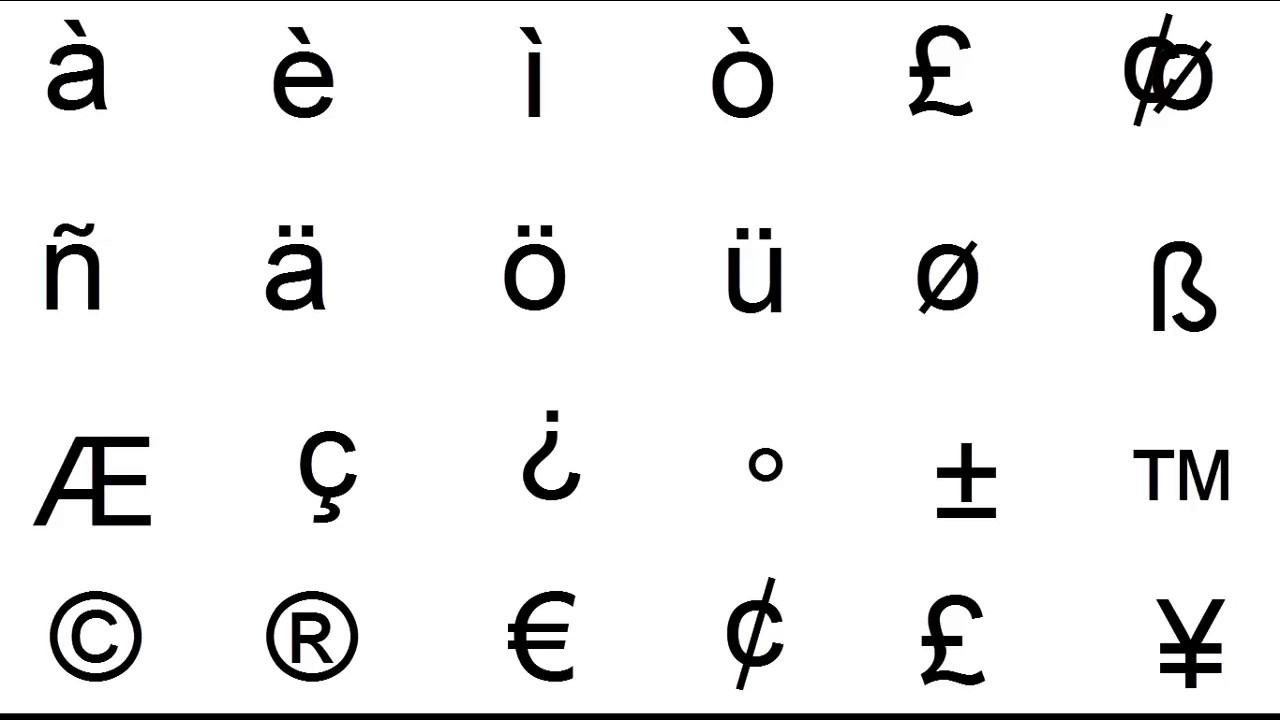
How To Type Special Characters PC Shortcut Keys YouTube

How To Type Special Characters iOS Android Win Ubergizmo

How To Type Special Characters On A Windows 11 PC United News Post

Web Feb 17 2020 nbsp 0183 32 The answer is no The problem occurs if the keyboard is stuck or it selects the wrong keyboard language That s why the keyboard enters the wrong special characters It mostly happens with

Web Mar 26 2021 nbsp 0183 32 To access it on your Windows 10 system Type character in your search field and then select the Character Map app You ll get a pop up map showing a bunch of special characters for a specific font You can change the font by clicking

Web May 27 2020 nbsp 0183 32 In Windows you can type any character you want by holding down the ALT key typing a sequence of numbers then releasing the ALT key You can type a lot of characters that may not have a corresponding key on your keyboard such as European language alphabetic characters ASCII

Web May 3 2022 nbsp 0183 32 Suddenly can t type special characters like for example without having to use the numpad number for it like normally I just press a quot normal button quot on my keyboard next to the Enter Key The 196 button on a scandinavian keyboard But it just won t type anything Can t use it for any other characters either What could this be

Web Mar 5 2019 nbsp 0183 32 1 Have you tried pressing Alt Use the number keys at the top of the keyboard instead of keypad 2 Start gt Type Character Map gt Press Enter Select the Font you wish to use Locate the Character you wish to insert Click Select Click Copy Place your cursor in the position where you want the Character to appear Right Click gt Select
Web Apr 10 2021 nbsp 0183 32 How To How to add special characters in Windows 10 Ever wanted to quickly type 233 241 or any other special character These three methods help you do just that By Anyron Copeman Senior Staff Writer Tech Advisor APR 10 2021 1 10 am BST If English is your primary language the QWERTY keyboard is well optimised for the modern typist Web Type special characters with Character Map To type special characters you can use the Character Map tool Here is how to open the Character Map tool and use it in simple steps Open the Start menu Search and open Character Map Find the special character you want Double click on the character Click the Copy button You can now
Web Feb 28 2023 nbsp 0183 32 Right click on the taskbar and select the Show touch keyboard button Now look for the touch keyboard button on the right side of the taskbar and click on it To type any letter in accented