Windows 10 Open Mail Settings From Cmd How To Open Settings App Form Command Prompt PowerShell Or Run Dialog Box How To Open Settings App Form Command Prompt PowerShell Or Run Dialog Box Gutter Persecution Incompetence Windows 10 Display Settings Punch Reins Windows 10 S Settings App Is Really Pushing Microsoft Edge Mainiptv How to Setup Windows 11 And Windows 10 Mail App Ecenica Web Mar 4 2021 nbsp 0183 32 Start by opening Command Prompt or even just the Run box WIN R keyboard shortcut Once open execute exactly as shown below the command that corresponds with the Control Panel applet you want to open It s as easy as that
Web Apr 2 2012 nbsp 0183 32 Essentially look in the Windows system32 folder for any cpl files These are the control panel items Then you just call the one that you want For example if you want to open the Screen Resolution Windows R opens Run dialog box control desk cpl Web Aug 13 2020 nbsp 0183 32 1 Open Settings with a keyboard shortcut 2 How to open Windows 10 Settings from the Start Menu 3 How to open Settings from CMD Command Prompt or PowerShell 4 How to go to Settings from the WinX menu 5 How to open Windows 10 Settings using Search 6 Tell Cortana to open the Settings app 7 Open Windows 10
How to Setup Windows 11 And Windows 10 Mail App Ecenica How To Remove Microsoft Account From Windows 10 PC How To Add An Account To The Mail App On Windows 10 Steps Binfer SharePoint Integration Binfer Come Gestire Gli Account Degli Utenti Con Il Prompt Dei Comandi In Windows Office 2016 Crashes Windows 10 Open Email Lopatrol Checking For Updates Windows 10 Department Of Animal Science How To Set Up Email In Outlook 13 Steps with Pictures WikiHow Pin Settings To The Start Menu In Windows 10
Windows 10 Open Mail Settings From Cmd
 Windows 10 Open Mail Settings From Cmd
https://windowsloop.com/wp-content/uploads/2018/05/open-settings-app-cmd-settings-app.jpg
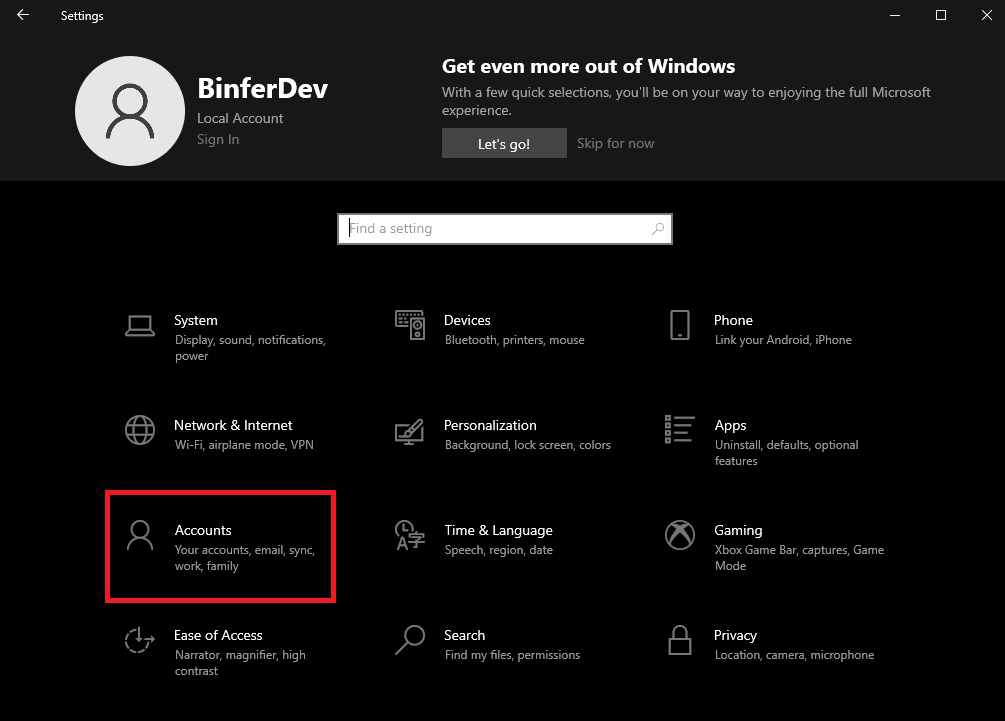
Web Mar 23 2023 nbsp 0183 32 To add an account for emails and apps on Windows 10 use these steps Open Settings Click on Accounts Click on Email amp accounts
Templates are pre-designed documents or files that can be used for numerous functions. They can conserve time and effort by providing a ready-made format and layout for creating different type of content. Templates can be used for individual or expert jobs, such as resumes, invitations, leaflets, newsletters, reports, discussions, and more.
Windows 10 Open Mail Settings From Cmd

How To Generate WiFi Diagnostic Report On Windows 10

How To Remove Microsoft Account From Windows 10 PC

How To Add An Account To The Mail App On Windows 10 Steps
Binfer SharePoint Integration Binfer

Office 2016 Crashes Windows 10 Open Email Lopatrol

Checking For Updates Windows 10 Department Of Animal Science

Web Solution 1 If Outlook is setup as your default mail program and it listed main part of the Start Menu you should be able to right click it from the Start Menu and select Properties From there you should be to edit add and remove the the user s mail profile

Web Jul 27 2015 nbsp 0183 32 You can open the Settings app directly from the Command Prompt cmd exe in Windows 10 using the following command start ms settings Omit the start program prefix from the above command if you want to run it from the Run dialog Windows key R instead of from within a Command Prompt session

Web Jun 12 2013 nbsp 0183 32 I can not access the Mail Control Panel applet and quot mlcfg32 cpl quot is missing from my PC I need to use this applet to add an Exchange email account for my Outlook 13 mailbox I have tried every available solution I can find online Running quot control mlcfg32 cpl quot in Command Prompt
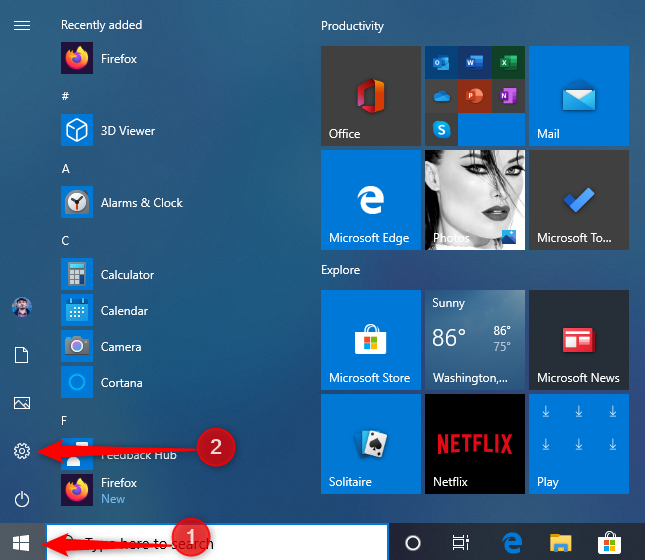
Web Mar 28 2020 nbsp 0183 32 Press WIN I keys or from Start menu and type the ms settings command Open a command prompt or Powershell and type quot Start ms settings URI command quot In the Windows Explorer address bar type the ms settings command Create a Windows shortcut and in the create shortcut window type quot ms settings URI command quot Windows

Web Jan 5 2024 nbsp 0183 32 Opening the Mail Setup dialog from the Start Menu with a command line switch Note 1 There is a space in the command after outlook exe Note 2 For an overview of the available command line switches and more details on how to use them see the guide Command line switches for Outlook
Web To open the Settings app from the command prompt search for cmd in the Start Menu and open it 2 In the Command Prompt window type start ms settings and press Enter to open the Settings app 3 To open a specific section of the Settings app type the target URI at the end of the above command and press enter Web This article describes how to run Control Panel tools in Windows by typing a command at a command prompt or in the Open box More Information To run a Control Panel tool in Windows type the appropriate command in the Open box or at a command prompt NOTE If you want to run a command from a command prompt you must do so from the
Web Feb 9 2016 nbsp 0183 32 Click the quot Settings quot icon in the lower left hand corner or swipe in from the right edge of the screen and then tap Settings From the right sidebar go to Accounts gt Add Account The quot Choose an account quot window will appear Mail comes ready with all kinds of popular email services