What Is Sum And Average Function In Excel How To Calculate Sum And Average Of Numbers Using Formulas In MS Excel Use SUMIF Function In Excel SUMIF range Criteria Sum range With Example How To Use The SUM Function And AUTOSUM In Microsoft Excel Tutorial How To Use The Average Function In Excel 2010 YouTube Using The Sum Function In Excel YouTube In Microsoft Excel there are a handful of different functions for calculating the average for a set of numeric values Moreover there is an instant non formula way On this page you will find a quick overview of all the methods illustrated with examples of use and best practices
Excel provides a variety of ways to find the average of a set of numbers For example you can use function to calculate a simple average a weighted average or an average that excludes specific values Newer versions Office 2011 Use the provided sample data and the following procedures to learn how to calculate averages Copy the sample data Place your cursor in the cell to the right of a row of numbers or in the cell below a column of numbers Click the tiny down arrow at the right side of the AutoSum button select Average from the
Using The Sum Function In Excel YouTube 3 Excel Formula SUM Subtraction Average NetworkUstad How To Calculate Average In Excel With Formula Haiper How To Use Sum And Average Formula In Excel Excel Math Count And Sum Function In Ms Excel Excel Tutorials YouTube C Program To Read Numbers And Find Their Sum And Average Hot Sex Picture How To Use Excel SUM Function Earn Excel Excel SUM Formula CustomGuide How To Calculate Average In Python Haiper Riset
What Is Sum And Average Function In Excel
 What Is Sum And Average Function In Excel
https://media.geeksforgeeks.org/wp-content/uploads/20210820172543/9.png
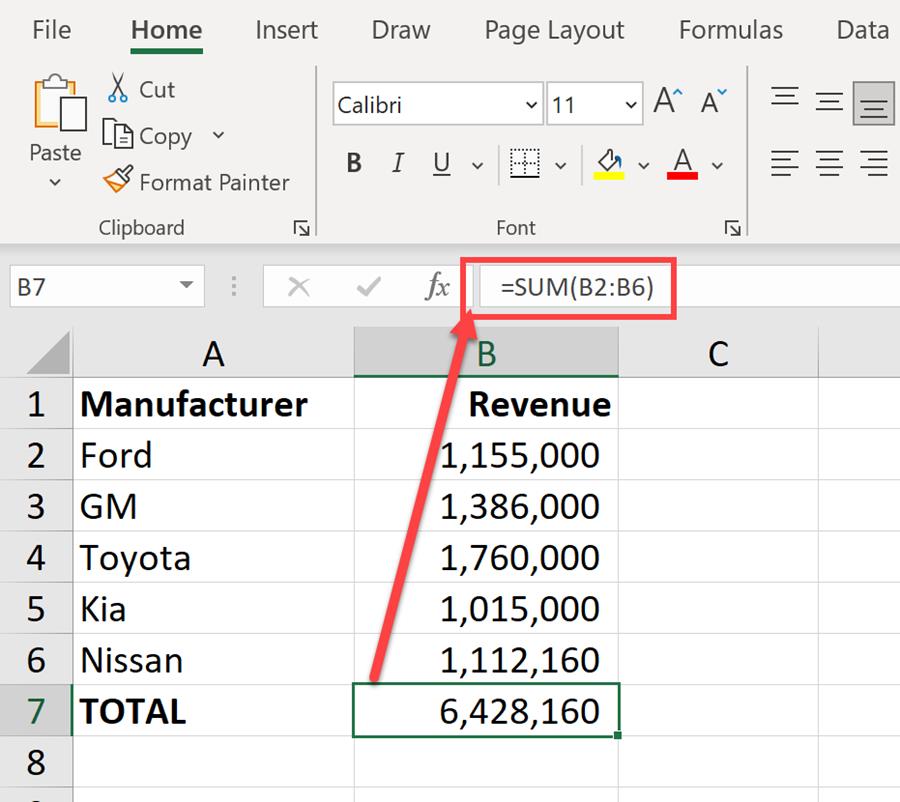
SUM function The SUM function adds values You can add individual values cell references or ranges or a mix of all three For example SUM A2 A10 Adds the values in cells A2 10 SUM A2 A10 C2 C10 Adds the values in cells A2 10 as well as cells C2 C10 Syntax Best Practices with SUM Frequently Asked Questions Need more help
Templates are pre-designed files or files that can be utilized for numerous functions. They can save time and effort by offering a ready-made format and layout for developing various kinds of material. Templates can be used for personal or expert jobs, such as resumes, invitations, flyers, newsletters, reports, presentations, and more.
What Is Sum And Average Function In Excel
AVERAGEIF Function In Excel Finding Average With Condition

3 Excel Formula SUM Subtraction Average NetworkUstad

How To Calculate Average In Excel With Formula Haiper

How To Use Sum And Average Formula In Excel Excel Math
C Program To Read Numbers And Find Their Sum And Average Hot Sex Picture

How To Use Excel SUM Function Earn Excel

SUM COUNT AVERAGE functions in Excel Two of the most frequently used tools in Excel are the Count and Sum functions These functions let you count and sum cells based on one or multiple different criteria COUNT in Excel You can use the COUNT function to count the number of cells containing numbers

The AVERAGE function syntax has the following arguments Number1 Required The first number cell reference or range for which you want the average Number2 Optional Additional numbers cell references or ranges for which you want the average up to a maximum of 255 Remarks
The AVERAGE function calculates the average of numbers provided as arguments To calculate the average Excel sums all numeric values and divides by the count of numeric values AVERAGE takes multiple arguments in the form number1 number2 number3 etc up to 255 total Arguments can include numbers cell references ranges arrays and constants

The SUM and AVERAGE functions are probably the two most commonly used functions in Excel because they re amazingly simple to use and because we tend to add up and average things a lot To make sure you know how to use them and to use them for more than a simple single contiguous range of cells let s look at them now using the

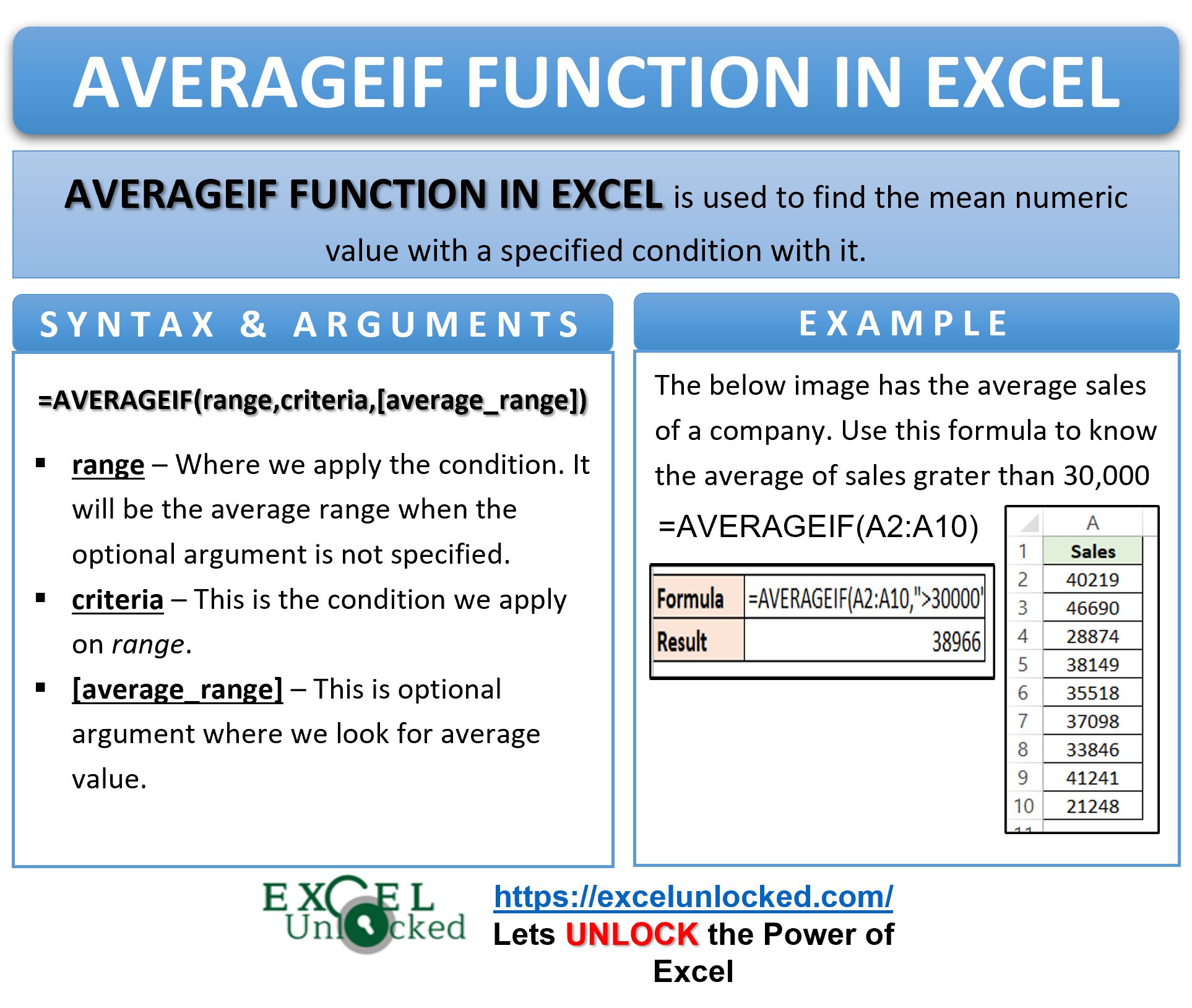
The AVERAGE function in Excel calculates the average arithmetic mean of a group of numbers The AVERAGE function ignores logical values empty cells and cells that contain text Average Instead of using the AVERAGE function use SUM and COUNT 1 For example the AVERAGE function below calculates the average of the numbers in cells A1 through A3
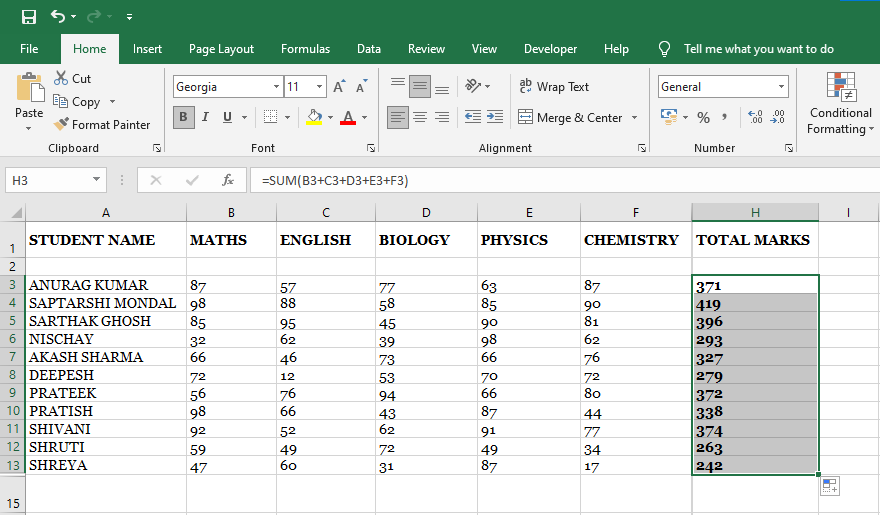
What Is Average in Excel The average for numerical values is calculated by adding all the numbers and dividing the sum of those numbers by the count of numbers For example if your numbers are 10 15 20 25 and 30 you will first add all these numbers and then divide that sum by 5 because you have a total of five numbers Step 1 Select the cell where you want to display the result Step 2 Then type sign in the highlighted area as shown in the figure Step 3 Now type SUM and then type opening parenthesis Step 4 Now select the data cells to add them as shown in the figure Step 5 Hit the ENTER button to get the result
2 Type and then average As you type a list of functions appears 3 You can double click the AVERAGE function in this list to complete it or keep typing If you type it remember to type an open parenthesis after the function name 4 Select range B2 B8 Type a closing parenthesis and press Enter