What Does Pixel Eraser Do Art Gum Ubicaciondepersonas cdmx gob mx Caramel Gum Eraser Ubicaciondepersonas cdmx gob mx 12 Best Erasers Reviewed And Rated In 2022 Art Ltd Mag 2022 What Is Pixel Magic Eraser Canada Today How Does pixel flavored Coke Taste Well We Drank It Play Gamez 1 Find the photo you want to alter and tap the Edit button Image credit Tom s Guide 2 Scroll on the bar just below the different photo effects until you reach Tools Select that and then
Open Google Photos Tap the photo you want to edit to open it Magic Eraser may appear as one of the suggested editing tools but if you don t see it then tap Edit Tools Magic eraser You Open the Google Photos app Tap Edit on the photo you want to change Tap on tools and select Magic Eraser Either approve the suggested edit or circle an object manually Once complete save
How Does pixel flavored Coke Taste Well We Drank It Play Gamez What Does Pixel Pitch Mean For LED Video Walls What Does Pixel Perfect Reporting Mean Lineco Art Gum Eraser 12 Pack L479 211 B H Photo Video Gum Eraser Vs Kneaded Eraser Wayne Arthur Gallery Google Pixel 6 Series Set For 19 October Launch To Come With Magic Eraser Feature Here s How Pixel 6 Pro s Magic Eraser Works PhoneArena Google s Pixel Guru On What s Next For Magic Eraser And The Pixel 6a Stuff Magic Eraser On Google Pixel So Cool But I Use It Too Rarely Real Mi Central
What Does Pixel Eraser Do
 What Does Pixel Eraser Do
https://images.ctfassets.net/f1fikihmjtrp/1PHpHf5NitQCs583oZsNHD/75a774e171ba50f2e70c1f969104b095/21027-1002-4ww.jpg
It works similarly to the Spot Removal tool in Adobe Lightroom but instead of using your mouse and a brush tool to select the area to edit you can let Google automatically select change to make or use your fingers to highlight the problem areas
Templates are pre-designed documents or files that can be utilized for different functions. They can conserve effort and time by providing a ready-made format and design for producing different kinds of content. Templates can be utilized for personal or professional projects, such as resumes, invites, leaflets, newsletters, reports, discussions, and more.
What Does Pixel Eraser Do

Purpose Of The Blue Part On A Pencil Eraser You Use It Everyday But That s Not What It s Really

What Does Pixel Pitch Mean For LED Video Walls

What Does Pixel Perfect Reporting Mean

Lineco Art Gum Eraser 12 Pack L479 211 B H Photo Video

Google Pixel 6 Series Set For 19 October Launch To Come With Magic Eraser Feature

Here s How Pixel 6 Pro s Magic Eraser Works PhoneArena
Magic Eraser test Selfie outdoors This shot taken with the Pixel 6 s front camera in front of my local cinema is marred only slightly by the two people wandering into the background over my

1 Select an image in Google Photos that you want to edit then tap the Edit button 2 Select the Tools heading from the bottom bar then Magic eraser 3 The tool will suggest elements of the

By Adamya Sharma July 7 2023 Google debuted Magic Eraser on the Pixel 6 series It is a handy photo editing tool that allows you to clean up unwanted distractions from your photos It works
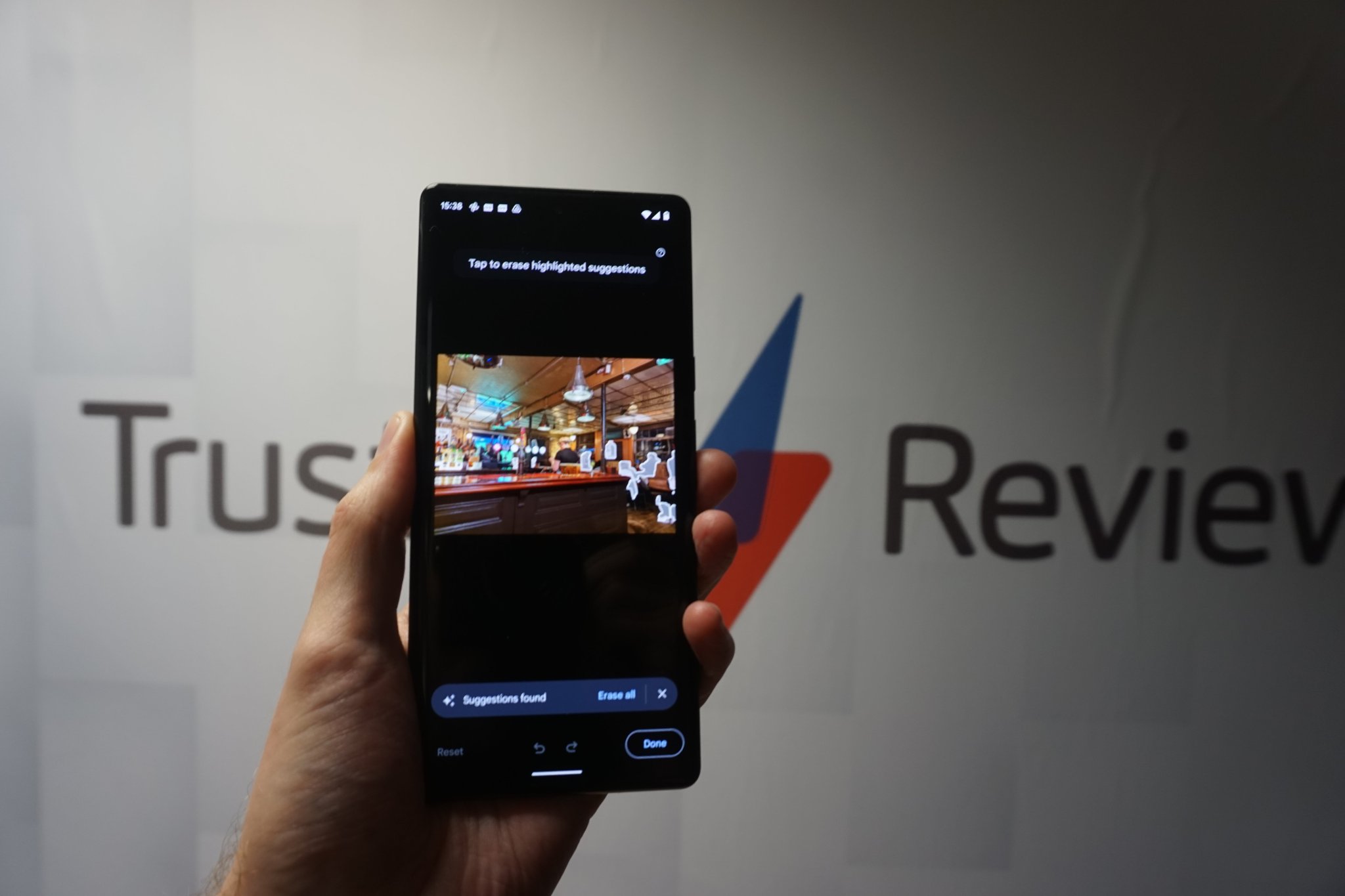
The Magic Eraser tool used to only appear if Google Photos detected objects or people in the photo to erase but now it can basically be used at will on most photos You can choose to completely erase things or more subtly camouflage them First open Google Photos and select a photo that has something you d like to erase

Google Pixel s Magic Eraser can wipe out the most obnoxious photobombers Here s how For my next trick I will show you how to use the Google Pixel 6 or 7 to make photobombers and uninvited
Here s how to do it On your Pixel 6 or 6 Pro open up the Google Photos app Once in find a photo that you d like to use Magic Eraser on In general try to use Magic Eraser on a photo that How to use the Google Pixel 6 Magic Eraser feature Tap on the photo reel in camera app or choose a snap from the Photos app Tap on Edit Tools Magic Eraser Use the Suggestions option if you want Eraser to mark objects fit for deletion Smudge or draw a circle around an object to mark it for manual erasure
Magic Eraser is a part of the Google Photos app on the Pixel 6 and Pixel 7 series Select the photo from which you want to remove the unwanted object Tap Edit from the bottom toolbar Select