Web Application Firewall Policy Terraform How To Deploy High availability Web App Using Terraform UpCloud Create Web Application Firewall WAF Policies For Application Gateway Limitar O Tr fego De Rede Com O Firewall Do Azure No AKS Servi o De GitHub Claranet terraform azurerm firewall Terraform Module For Azure Firewall Architecture Guide Azure Architecture Center My XXX Advanced Web Application Firewall Rules in Azure with Terraform If you re creating an Application Gateway in Terraform for Azure you re using this resource azurerm application gateway This resource allows for some basic configuration of the Web Application Firewall through the waf configuration block However the configuration there is very limited and basically restricted to turning it
The firewall is structured as so You create specific conditions to be run against an incoming request Such as a string match for a user agent an IP match or for the presence of dodgy SQL You In this article In this quickstart you use Terraform to create an Azure Firewall and a firewall policy The firewall policy has an application rule that allows connections to www microsoft and a rule that allows connections to Windows Update using the WindowsUpdate FQDN tag A network rule allows UDP connections to a time server at 13 86 101 172
Azure Firewall Architecture Guide Azure Architecture Center My XXX Deploying A Web Application Firewall Policy With C DevCentral Azure Landing Zones Terraform Module Design Considerations Global David Romero Trejo Web Application Firewall WAF AWS Network Firewall Using AWS Firewall Manager With Terraform Part 2 Web Application Firewall Vs Network Firewall IP With Ease Azurerm web application firewall policy Managed rule set For Microsoft Deploy A 3 Tier Architecture With AWS CloudFormation By Dahmear Simplify Your Google Cloud Firewall Rules With JSON And Terraform The
Web Application Firewall Policy Terraform
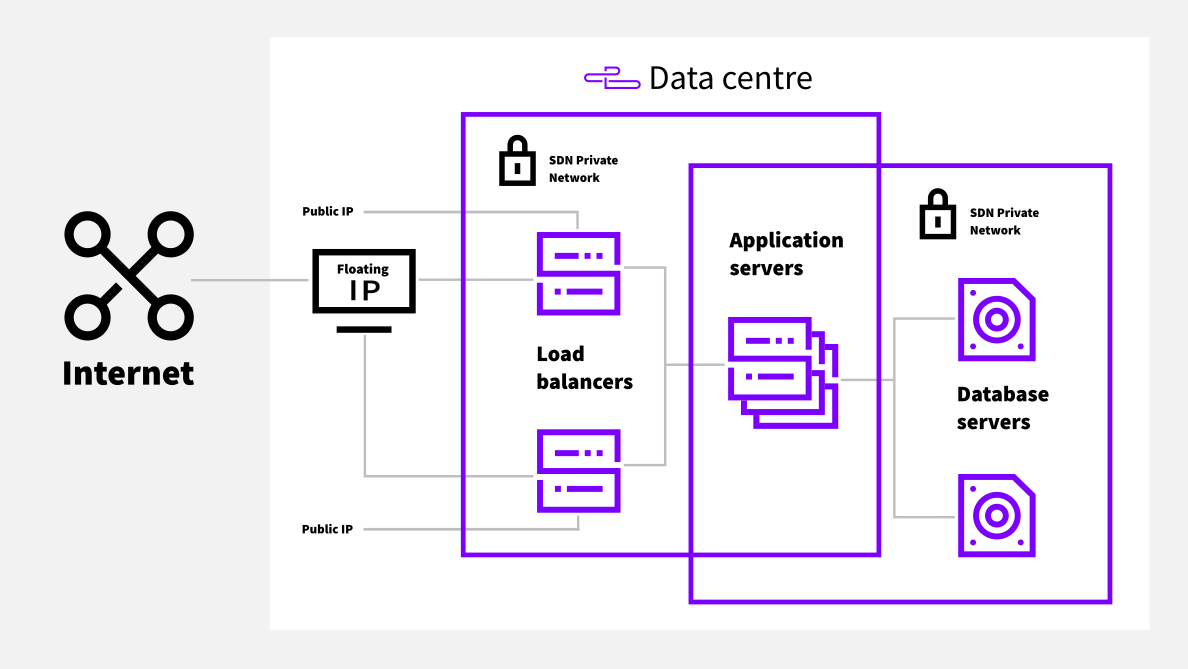 Web Application Firewall Policy Terraform
https://upcloud.com/media/ha-web-app-terraform.png
1 Configure your environment Azure subscription If you don t have an Azure subscription create a free account before you begin Configure Terraform If you haven t already done so configure Terraform using one of the following options Configure Terraform in Azure Cloud Shell with Bash Configure Terraform in Azure Cloud Shell with PowerShell
Pre-crafted templates use a time-saving solution for creating a diverse variety of files and files. These pre-designed formats and layouts can be used for numerous individual and professional tasks, including resumes, invitations, flyers, newsletters, reports, discussions, and more, simplifying the material production procedure.
Web Application Firewall Policy Terraform

Deploying A Web Application Firewall Policy With C DevCentral

Deploying A Web Application Firewall Policy With C DevCentral

Azure Landing Zones Terraform Module Design Considerations Global

David Romero Trejo Web Application Firewall WAF

Web Application Firewall Vs Network Firewall IP With Ease

Azurerm web application firewall policy Managed rule set For Microsoft
Latest Version Version 3 91 0 Published 10 days ago Version 3 90 0 Published 17 days ago Version 3 89 0

n The custom rules block supports the following n n n enabled Optional Describes if the policy is in enabled state or disabled state Defaults to true n n n name Optional Gets name of the resource that is unique within a policy This name can be used to access the resource n n n priority Required Describes priority of the rule Rules with a lower value will be

Creating the Azure Firewall instance Creating an Azure Firewall instance is very straightforward initially all we need is a Public IP for management and then the Firewall instance itself Azure Firewall Setup Public IP resource azurerm public ip region1 fw01 pip name region1 fw01 pip
Main tf L1 resource azurerm web application firewall policy example name var wafpolicyname resource group name var wafrg name location var wafrg loc custom rules Find out how to use this setting securely with Shisho Cloud fireblade95402 terraform app gw module tf L1

There are 3 major components of Hierarchical Firewall Policies Rules Policy and Association Broadly speaking a Rule is a decision making construct to declare if the traffic should be allowed denied or delegated to the next level for decision Policy is a collection of rules i e one or more rules can be associated with a Policy
Create a policy First create a basic WAF policy with a managed Default Rule Set DRS using the Azure portal On the upper left side of the portal select Create a resource Search for WAF select Web Application Firewall then select Create On Create a WAF policy page Basics tab enter or select the following information and accept the Arguments Reference The following arguments are supported name Required The name of the Web Application Firewall Policy resource group name Required The name of the Resource Group where the Web Application Firewall Policy exists Attributes Reference In addition to the Arguments listed above the following Attributes are exported
Manages an Azure Front Door classic Web Application Firewall Policy instance Be Aware Azure is rolling out a breaking change on Friday 9th April 2021 which may cause issues with the CDN FrontDoor resources