Vs Code Analysis Dynamic Code Analysis VS Static Code Analysis DevOpsSchool Binary Code Analysis Vs Source Code Analysis Top 10 Static Code Analysis Tool Best Static Code Analysis Tools List Difference Between Static Malware Analysis And Dynamic Malware Analysis Source Code Analysis Tools Archives ScmGalaxy Web Visual Studio Code IntelliSense is provided for JavaScript TypeScript JSON HTML CSS SCSS and Less out of the box VS Code supports word based completions for any programming language but can also be configured to have richer IntelliSense by installing a language extension Below are the most popular language extensions in the Marketplace
Web Mar 9 2023 nbsp 0183 32 Code style analyzers are built into Visual Studio The analyzer s diagnostic ID or code format is IDExxxx for example IDE0001 You can configure preferences in the text editor options page or in an EditorConfig file Web Apr 22 2023 nbsp 0183 32 Code quality analysis quot CAxxxx quot rules inspect your C or Visual Basic code for security performance design and other issues Analysis is enabled by default for projects that target NET 5 or later You can enable code analysis on projects that target earlier NET versions by setting the EnableNETAnalyzers property to true
Source Code Analysis Tools Archives ScmGalaxy What Is Static Code Analysis 7 Best Static Code Analysis Tools For 2022 Paid Free Why Static Code Analysis Is Not Enough To Secure Your Web Applications What Is Static Code Analysis An Introduction ACCELQ Managed Code Analysis VS Code Extensions That ll Boost Your Development Productivity Flipboard What Is Static Code Analysis 5 Reasons Why Every Business Needs Static Code Analysis
Vs Code Analysis
 Vs Code Analysis
http://www.scmgalaxy.com/tutorials/wp-content/uploads/2015/04/dynamic-code-analysis-and-s.png
Web Mar 9 2023 nbsp 0183 32 Visual Studio analyzes code while you re editing source files in the editor This is referred to as background analysis Some of it is required minimal analysis for an acceptable Visual Studio IDE editing experience Some of it is for improved responsiveness for IDE features
Pre-crafted templates offer a time-saving service for developing a varied variety of documents and files. These pre-designed formats and designs can be utilized for numerous individual and expert tasks, consisting of resumes, invitations, leaflets, newsletters, reports, discussions, and more, simplifying the material development process.
Vs Code Analysis

Code Analysis
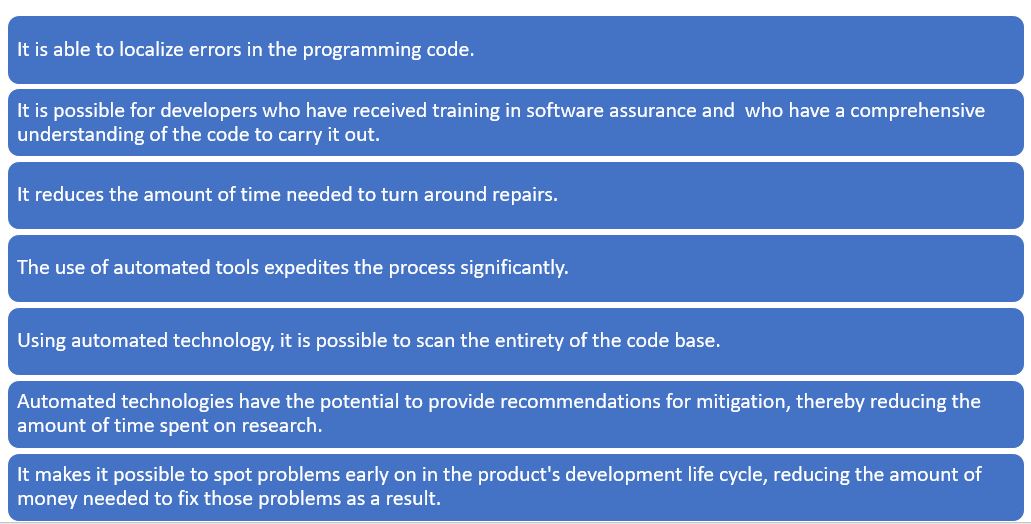
What Is Static Code Analysis

7 Best Static Code Analysis Tools For 2022 Paid Free

Why Static Code Analysis Is Not Enough To Secure Your Web Applications

Managed Code Analysis
VS Code Extensions That ll Boost Your Development Productivity Flipboard

Web Data Science in Visual Studio Code You can do all of your data science work within VS Code Use Jupyter Notebooks and the Interactive Window to start analyzing and visualizing your data in minutes Power your Python coding experience with IntelliSense support and build train and deploy machine learning models to the cloud or the edge with
.jpg?w=186 "Binary Code Analysis Vs Source Code Analysis")
Web Mar 9 2023 nbsp 0183 32 In Solution Explorer select the project On the Analyze menu select Run Code Analysis on Project Name Code analysis will start executing in the background You should see the message Running code analysis for lt project gt in the Visual Studio status bar towards the bottom left corner

Web Mar 9 2023 nbsp 0183 32 Visual Studio can perform code analysis of managed code in two ways with legacy analysis also known as FxCop static analysis of managed assemblies and with the more modern NET Compiler Platform based code analyzers NET Compiler Platform based code analyzers which analyze your code live as you type replace legacy FxCop
Web Set up a data science environment Visual Studio Code and the Python extension provide a great editor for data science scenarios With native support for Jupyter notebooks combined with Anaconda it s easy to get started

Web Apr 2 2019 nbsp 0183 32 The Code Analysis feature of Visual Studio performs static code analysis to help developers identify potential design globalization interoperability performance security and a host of other categories of potential problems
Web This is a C C code analysis plugin for VSCode that shows bug reports detected by the Clang Static Analyzer and Clang Tidy analyzers using CodeChecker as a backend Quick Start Install CodeChecker version 6 18 2 or later and optionally add it to the PATH environment variable Web The Python Extension for Visual Studio Code is highly configurable This page describes the key settings you can work with For general information about working with settings in VS Code refer to User and workspace settings as well as the Variables reference for information about predefined variable support General Python settings
Web Mar 9 2023 nbsp 0183 32 Visual Studio 2019 version 16 3 and later You can set the severity for compiler warnings or analyzer rules in an EditorConfig file with the following syntax dotnet diagnostic lt rule ID gt severity lt severity gt