Vpn Server For Windows 10 Vpn Server For Windows 10 Mertqoregon Conecting To Tigervnc From Windows Websitestiklo How To Create And Connect Free VPN Server For Windows 10 Free Vpn Trial Dowloand For Windows Lasopaman Best Free Vpn Server For Windows 10 Victorialasopa Web Aug 2 2023 nbsp 0183 32 This article contains step by step instructions on how to create and run an OpenVPN server on a PC that runs on Windows OS The information provided here is geared towards users of almost any knowledge level The instructions apply to Windows 7 and newer systems Configuration overview and prerequisites
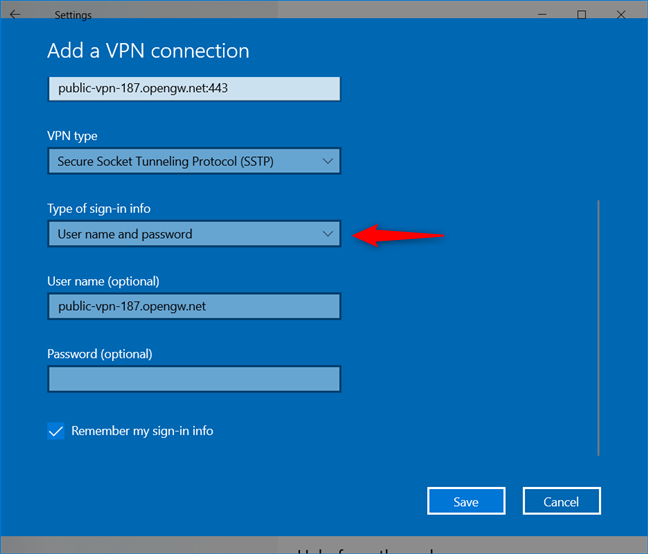
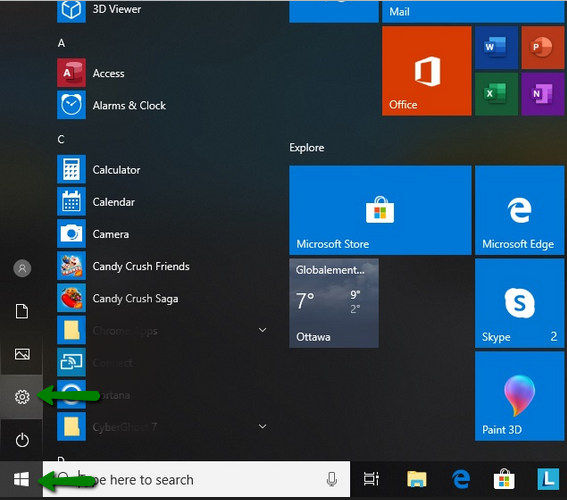
Web Nov 19 2019 nbsp 0183 32 Hello I am an Independent Advisor I would love to help you out Creating your own VPN server requires a lot of work And most likely you will need to upgrade your service with your ISP in order to get a static IP address so that your IP does not change every so often breaking your VPN for a while Web Feb 10 2022 nbsp 0183 32 1 On your Windows 10 desktop right click the Start button and select Settings from the menu that appears 2 In the new window that pops up click Network amp Internet then select VPN from the
Best Free Vpn Server For Windows 10 Victorialasopa Best Free Vpn Server For Windows 10 Victorialasopa How To Create And Connect Free VPN Server For Windows 10 Vpn Unlimited For Pc Dubaikesil How To Set Up F5 Vpn Client On Microsoft 10 Naamoving L2tp Vpn Server For Windows 10 Hopdegas Free Vpn For Windows 10 Stashokbiz Windows 10 Vpn Vpn Server For Windows 10 Pro Free Passlclassifieds
Vpn Server For Windows 10
 Vpn Server For Windows 10
http://www.digitalcitizen.life/wp-content/uploads/2018/06/win10_vpn-8-1.png
Web Dec 6 2016 nbsp 0183 32 Windows 10 supports PPTP L2TP IPsec SSTP and IKEv2 connections without any third party software To connect to a VPN on Windows 10 head to Settings gt Network amp Internet gt VPN Click the quot Add a VPN connection quot button to set up a new VPN connection Provide the connection details for your VPN
Templates are pre-designed files or files that can be utilized for various functions. They can save effort and time by providing a ready-made format and layout for developing various sort of material. Templates can be used for individual or expert jobs, such as resumes, invites, flyers, newsletters, reports, presentations, and more.
Vpn Server For Windows 10

How To Create And Connect Free VPN Server For Windows 10
Best Free Vpn Server For Windows 10 Victorialasopa

How To Create And Connect Free VPN Server For Windows 10

Vpn Unlimited For Pc Dubaikesil
L2tp Vpn Server For Windows 10 Hopdegas
Free Vpn For Windows 10 Stashokbiz

Web Sep 10 2023 nbsp 0183 32 Here are the prerequisites of setting up a VPN server on Windows Server 2022 A Dedicated Server with Windows Server 2022 installed or a Cloud VPS You must be logged into the system as an administrative user via Remote Desktop Protocol

Web Stream game work and browse online without interruption with the fastest VPN for Windows PC Easy VPN setup for Windows 7 Service Pack 1 Windows 8 1 Windows 10 version 1607 or later and Windows 11 Try it risk free with our 30 day money back guarantee Buy NordVPN Download App

Web In Proxy settings select the type of proxy setup you want to use then enter the proxy server information for that VPN connection If you don t know the proxy server settings for your VPN connection you might need to contact your IT department

Web Under Windows Settings select Network amp Internet Select VPN from the left menu then at the right click Add a VPN connection In the dialog box that opens Set VPN provider to quot Windows built in quot Set Connection name to quot UWSP VPN quot Set Server name or address to quot vpn uwsp edu quot
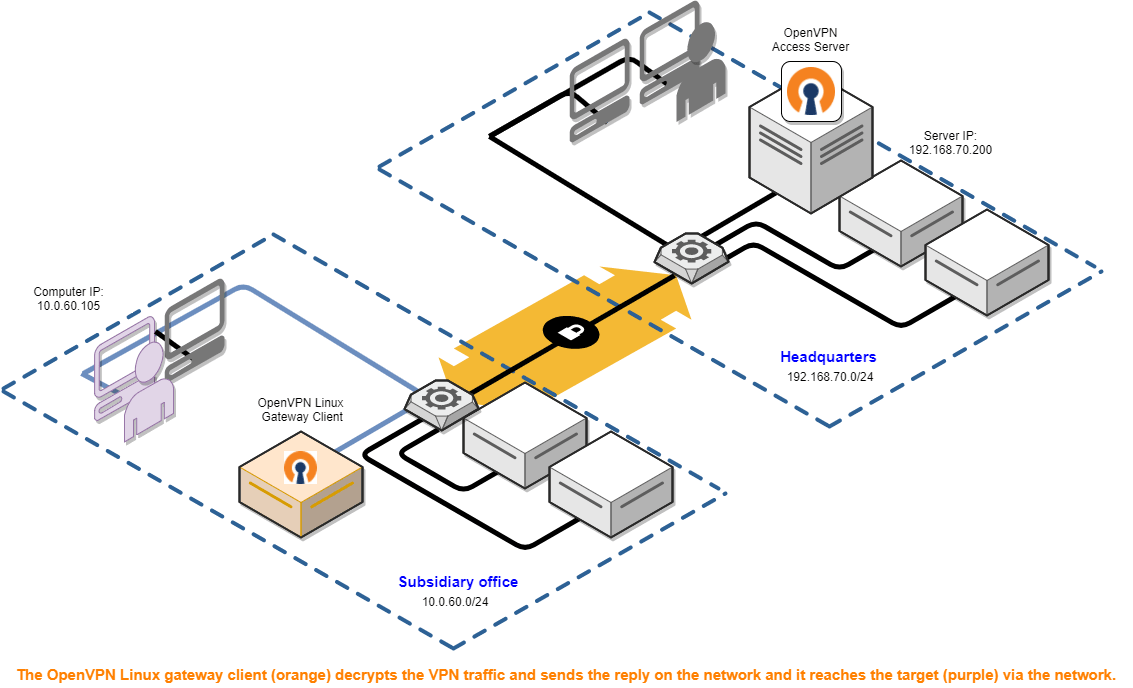
Web Aug 3 2023 nbsp 0183 32 VPNs are point to point connections across a private or public network like the Internet A VPN client uses special TCP IP or UDP based protocols called tunneling protocols to make a virtual call to a virtual port on a VPN server In a typical VPN deployment a client initiates a virtual point to point connection to a remote access server
[desc-11] [desc-12]
[desc-13]