Vmware Internet Not Working Windows 11 10 Fix Mouse Not Working Windows 10 YouTube HOW TO FIX VMWARE INTERNET NOT WORKING WINDOWS YouTube How To Fix Ethernet Not Working Windows 11 10 YouTube Internet Access But Browser Not Working Windows 11 FIX YouTube How Reimage Macbook Windows Operating System Divinetide FIXED No Internet VirtualBox Works for all Operation Systems Fix No Internet Connection
Virtual Machine no internet connection EASY FIX VMware Fix No Internet Connection VMware Bridged network not working Select the correct network connection Restart VMware Bridge Control Select a particular virtual network
How Reimage Macbook Windows Operating System Divinetide VMware Workstation No Internet Access Problem Fix 2017 18 YouTube How To Fix VMware Internet Not Working Issues Solved SOLVED Vmware Bridged Network Not Working MiniTool How To Fix Internet Not Working In Windows XP Tutorial YouTube How To Fix Netgear Routerlogin Not Working Windows Bulletin Tutorials How To Fix Laptop Camera Not Working In Windows 10 Fix Network And Internet Connection Issues In Windows 10 8 1 And 7 Outlet Not Working Online Shop Save 46 Jlcatj gob mx
Vmware Internet Not Working Windows 11
 Vmware Internet Not Working Windows 11
https://i.ytimg.com/vi/rt9QGYTJ-jM/maxresdefault.jpg
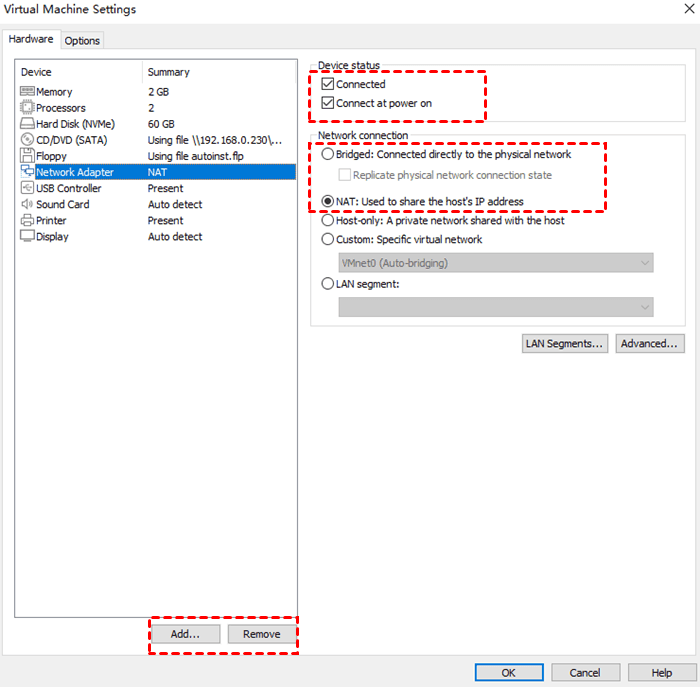
Fix 1 Select Correct Internet Connection Fix 2 Use VMnet0 Fix 3 Reboot VMware Bridge Control via CMD Fix 4 Deselect All Unessential
Templates are pre-designed files or files that can be used for numerous functions. They can conserve effort and time by providing a ready-made format and layout for creating different type of content. Templates can be utilized for individual or expert projects, such as resumes, invitations, leaflets, newsletters, reports, discussions, and more.
Vmware Internet Not Working Windows 11

Fix No Internet Connection In MacOS 12 Monterey VM Virtual Machine In

VMware Workstation No Internet Access Problem Fix 2017 18 YouTube
How To Fix VMware Internet Not Working Issues Solved

SOLVED Vmware Bridged Network Not Working MiniTool

How To Fix Netgear Routerlogin Not Working Windows Bulletin Tutorials

How To Fix Laptop Camera Not Working In Windows 10

Network Bridge Mode Not Working Windows 11 Host Restarted vmnetbridge in Windows Deactivated firewall Norton Uninstalled VPN Reset to defaults in network
Solution 1 Restart your VM Solution 2 Disable antivirus Solution 3 Enable VMWare NAT service DHCP service Solution 4 Update the Windows

Step 1 Check the VMware host has correct network connection Step 2 Check that the virtual machine s firewall is not blocking Internet access

UPDATE 2022 Windows 11 ARM Offline Install Fix No Network Internet VM on Mac

EDIT New Windows 11 ARM offline fix is here 11 ARM Offline Install Fix No Network
Option 2 Enable Network Adapter in VMware Machine If the previous option doesn t work try to check whether the network adapter in the virtual machine is Vm will reset and it wont ask you network connection then you can install vmtools for the vmxnet driver
If you have attempted to install Windows 11 lately whether on a virtual machine like VirtualBox Parallels VMWare UTM dual boot Boot