Visual Studio 2019 Community Installation Guide Visual Studio 2019 Community C Visual Studio 2019 Qiita Visual Studio 2019 Community Visual Studio 2019 Community Visual Studio 2019 Community Edition Installation Guide Install Visual Install Visual Studio 2019 Community Iqmzaer Download and Install Visual Studio 2019 for free and learn how to program This video is a guide to help you install Visual Studio 2019 Community Edition so t
In this video I will show you how to install Visual Studio 2019 Community Edition This software is the free version of Visual Studio that is available to Download Visual Studio Tools Install Free for Windows Mac Linux Supercharge Visual Studio 2022 with GitHub Copilot Building new functionality writing unit tests and learning new technologies has never been easier or more fun Free trial Learn more Downloads Visual Studio 2022
Install Visual Studio 2019 Community Iqmzaer Descargar E Instalar Visual Studio 2019 Community En Windows 10 YouTube Visual Studio 2019 Community Kako Blog Visual Studio 2019 Community Visual Studio 2019 Community Visual Studio Code Vs Visual Studio 2019 Community Meshtop Ways To Access Visual Studio Download Visual Studio 2019 Community Tutorial Install MICROSOFT VISUAL STUDIO 2019 COMMUNITY EDITION How To Install Visual Studio 2019 Community Edition Visual Basic
Visual Studio 2019 Community Installation Guide
 Visual Studio 2019 Community Installation Guide
https://img2020.cnblogs.com/blog/1475638/202111/1475638-20211119211707710-1735020438.png
Learn to download and install Microsoft Visual Studio 2019 Community Edition on Windows 10 We will also run a sample C Console Application and display the
Templates are pre-designed documents or files that can be used for various purposes. They can conserve time and effort by providing a ready-made format and design for developing different type of material. Templates can be utilized for personal or professional jobs, such as resumes, invitations, flyers, newsletters, reports, discussions, and more.
Visual Studio 2019 Community Installation Guide

Visual Studio 2019 Community

Descargar E Instalar Visual Studio 2019 Community En Windows 10 YouTube

Visual Studio 2019 Community Kako Blog
Visual Studio 2019 Community
Visual Studio Code Vs Visual Studio 2019 Community Meshtop
Ways To Access Visual Studio Download Visual Studio 2019 Community

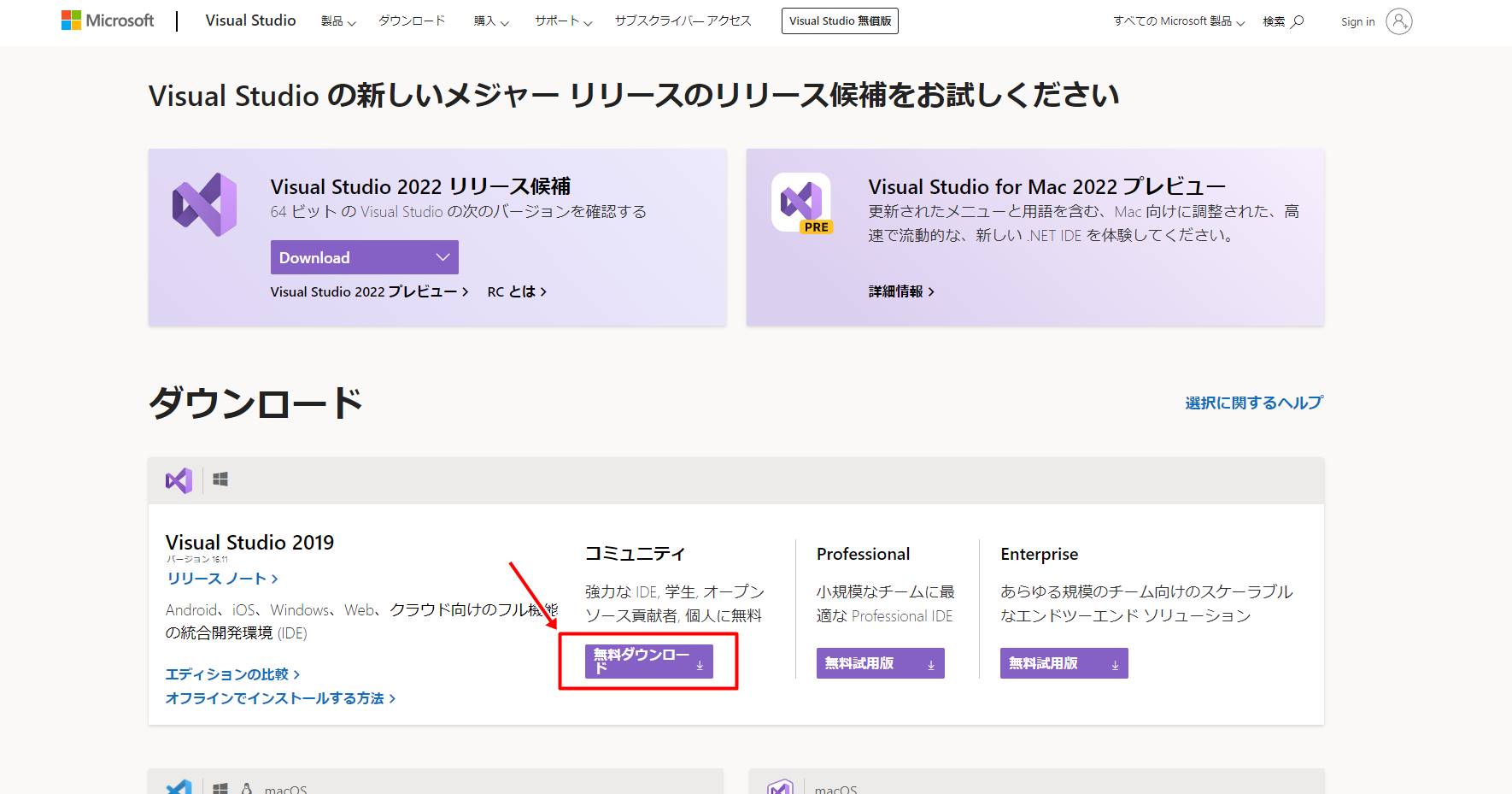
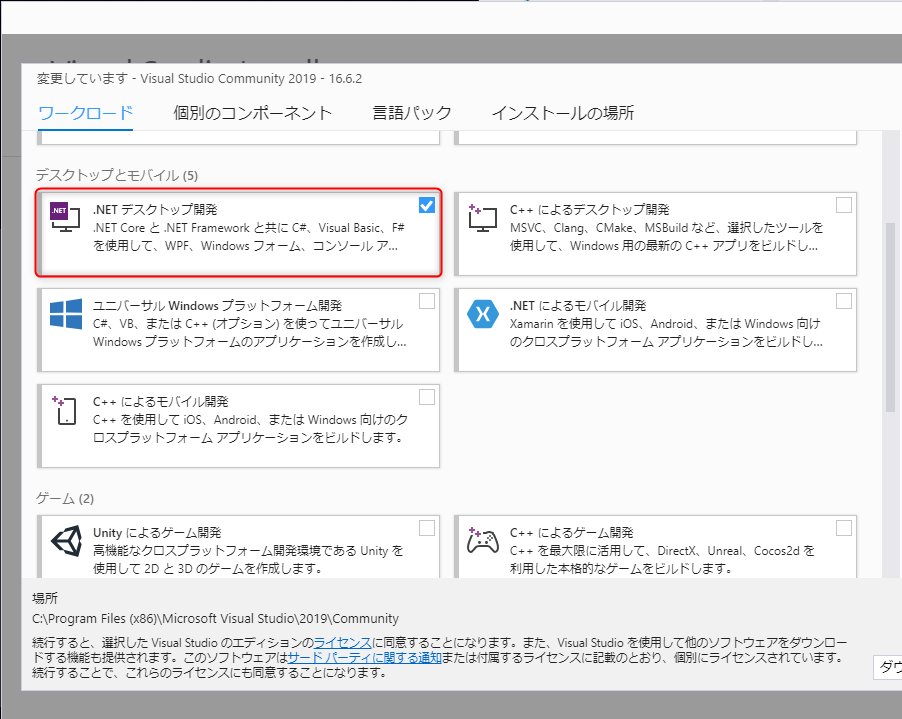
1 Installing the prerequisites 2 Download Visual Studio 2019 3 Starting Installation of Visual Studio 2019 4 Software License Terms 5 Installer Downloads the required files 6 Choose what to install 7 Installing Registration Summary Edition of Visual Studio 2019 The Visual Studio 2019 comes in three editions
Download previous versions of Visual Studio Community Professional and Enterprise softwares Sign into your Visual Studio MSDN subscription here Visual Studio Professional 2019 Visual Studio Enterprise 2019 Visual Studio 2019 for Mac The Visual Studio 2013 VC Update 3 5 Redistributable Packages install run time components that

Ready to install We ll walk you through it step by step Step 1 Make sure your computer is ready for Visual Studio Before you begin installing Visual Studio Check the system requirements These requirements help you know whether your computer supports Visual Studio 2022

1 Answer Sorted by 36 Microsoft no longer offers offline installers such as ISO images of Visual Studio instead they have instructions of placing the burden on you to create an offline installer You need to use the layout command line argument and then run the downloaded installer Download and Cache offline files

What is the size of Visual Studio 2019 Community Before Installing Visual Studio Make sure your Operating System is up to date with the latest patches from Windows Visual Studio requires a minimum of Windows Service Pack 1 or newer I believe everyone has Windows 10 by now so you will be good to go
You can acquire the latest most secure version of Visual Studio 2019 version 16 11 by clicking one of the buttons above by visiting the Visual Studio site or by going to the downloads section of my visualstudio You can get updates from the Microsoft Update catalog Download Steps To kick off your experience with Visual Studio 2019 Community edition the first step is to download the installer Head to the official Microsoft website to grab the setup file Select The Edition Download The Installer
To install the visual studio 2019 community edition follow the steps below Step 1 Download the Visual Studio bootstrapper click on this link to download community edition rename the file as vs community exe copy the file to C VS2019 Step 2 Download files for offline installation open command prompt go to c VS2019 run the command