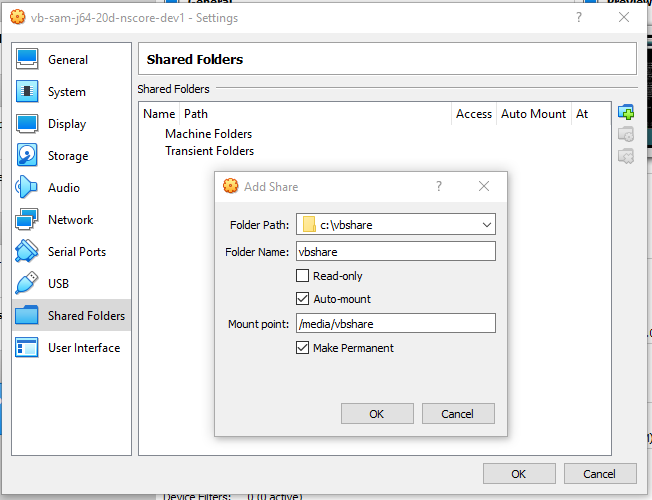
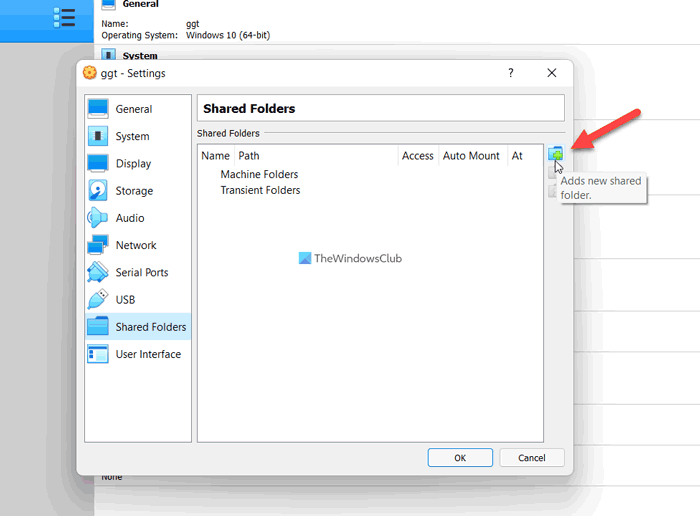
Virtualbox Shared Folder Not Working Windows 11 Shared Folders Learn VirtualBox Shared Folder In VirtualBox With Android Not Working 4 Solutions How To Create A VirtualBox Shared Folder In Windows 11 10 How To Create Shared Folder For Virtual Machine On VirtualBox How To Setup VirtualBox Shared Folder To set up VirtualBox to share a folder with a virtual machine use these steps Open VirtualBox Right click the virtual machine and select the Settings option Click on Shared Folders Click the Add new shared folder button from the top right corner In the Folder path field confirm the path for the local folder to share with the
There are 2 steps to creating a VirtualBox shared folder in Windows 11 1 Create VirtualBox Shared Folder Step 1 Open VirtualBox Right click the desired virtual machine in the left pane and select the Settings option Step 2 Select the Shared Folders option in the left pane then click the folder with the plus sign in the top right corner Go to Settings of any VM from VirtualBox console and go to Shared Folders Click on the Icon to the right Select other from the drop down menu to Browse to a folder I usually prefer to have anything shared as Read only just so that some malware wont get infected to the Host and auto mount for Linux VMs you can set the mount point as
How To Setup VirtualBox Shared Folder How To Share Files Between Windows VM And Host Machine VirtualBox Virtualbox Shared Folder Windows 10 Vsestats Windows 10 Startup Folder Not Working FIXED Studytonight VirtualBox Tutorial 10 Create Shared Folder Between Windows Host And How To Enable Shared Folders Between Your VM And Host In VirtualBox How To Setup Shared Folders In VirtualBox 6 1 YouTube Cara Share Folder Windows Ke OS Virtualbox VMware Workstation Linux How To Make A VirtualBox Shared Folder On Windows 11 2022 Guide
Virtualbox Shared Folder Not Working Windows 11
 Virtualbox Shared Folder Not Working Windows 11
https://learn.openwaterfoundation.org/owf-learn-virtualbox/vm-settings/shared-folders/images/win-linux-shared-folders1.png
A prompt should pop up Select the first option to run the VirtualBox Windows Additions software The installation will take a bit of time Wait for it to complete and then reboot by hitting Finish Once the Windows VM has restarted hover over Devices Shared Folders then select Shared Folders Settings
Templates are pre-designed documents or files that can be used for numerous purposes. They can save effort and time by supplying a ready-made format and layout for producing various kinds of content. Templates can be utilized for personal or professional projects, such as resumes, invitations, leaflets, newsletters, reports, presentations, and more.
Virtualbox Shared Folder Not Working Windows 11

The Host Path Of The Shared Folder Is Missing

How To Share Files Between Windows VM And Host Machine VirtualBox

Virtualbox Shared Folder Windows 10 Vsestats

Windows 10 Startup Folder Not Working FIXED Studytonight
How To Enable Shared Folders Between Your VM And Host In VirtualBox

How To Setup Shared Folders In VirtualBox 6 1 YouTube

The shared folder permission error can occur due to misconfigured settings Here are the settings you need to enable In VirtualBox navigate to Settings Shared Folders Right click on
Working with VirtualBox shared folders in Windows 11 entails 2 processes creating a shared folder and mapping the drive Shared folders are a viable way of networking between a host and a guest machine alternatively dragging and dropping files between the machines may suffice
To create a VirtualBox shared folder in Windows 11 10 follow these steps Enter the shared folder path Open File Explorer on the virtual machine Turn on Network discovery To learn

1 Disable Hyper V on Windows 11 Microsoft has acknowledged that there is a problem with VirtualBox running on Windows 11 To get around it users need to disable Hyper V on their system To disable Hyper V on Windows 11 follow these steps Open Control Panel Go to Programs Select Turn Windows features On or Off

10 I have Windows 10 and Virtual Box 5 1 4 I need to create a shared folder which would be shared between Windows and the MSDOS used in Virtual Box So I used the shared folder option to setup a folder on Windows The instructions said to then type net use x vboxsvr share but that gives an error
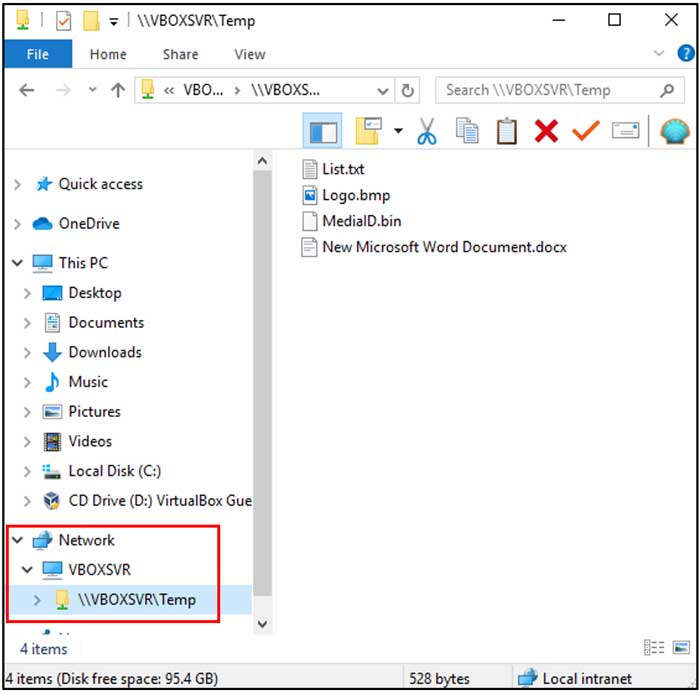
Open a terminal window and issue the command mkdir SHARED With this folder created or chosen go back to your VM and select Settings From the Settings window select Shared Folders In the To attach the host s shared folder to your Windows guest open Windows Explorer and look for the folder in My Networking Places Entire Network Oracle VM VirtualBox Shared Folders By right clicking on a shared folder and selecting Map Network Drive from the menu that pops up you can assign a drive letter to that shared folder
Click on the Devices menu and then Shared Folders Shared Folder Settings In this settings menu click the blue icon to add a new shared folder Select the folder path dropdown and choose other Choose the folder you want to share and click Select Folder Select auto mount and then click OK