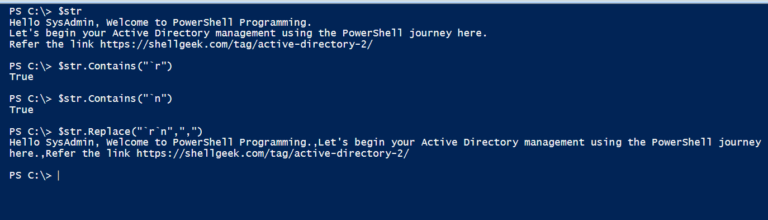
Vi Replace String With Newline Python Check If String Ends With A Newline Character Data Science R Replace String With Another String Or Character Spark By Examples PowerShell Replace Newline With Comma ShellGeek Morgue Pretty Yeah Talend Replace Character In String Doctor Of How To String Replace Newline With Space In PHP 1 The problem isn t the r characters in your string but the fact that the string also contains literal newline characters and Vim is including these in the replacement as NUL characters after the linebreaks If you remove the latter from your bash script then the replacement works correctly
To replace a string with a newline character we simply need to insert n in the replace section of the command For example let s say we have the following text hello world If we want to replace world with a newline character we would use the following command s world n g The result would be hello newline character Press the key type your search text and press enter This is just like the less command But this method of finding text doesn t allow you to replace the found result Let me share how you can find and replace in Vim s foo bar gci
How To String Replace Newline With Space In PHP Replace String With Newline PHPStorm 2022 Code teacher Replace String With Newline PHPStorm 2022 Code teacher Given String WorkString On One Line String NewStr On A Second Line R Replace Empty String With NA Spark By Examples Auto Entities With Mushroom Cards Replace String With Templating Solved Replace r n With Newline In Notepad 9to5Answer Excel REPLACE Function Exceljet Find And Replace String With Line Breaks Using Notepad Stack Overflow
Vi Replace String With Newline
 Vi Replace String With Newline
https://datascienceparichay.com/wp-content/uploads/2022/10/python-check-if-string-ends-with-a-newline.png
Here s the trick First set your Vi m session to allow pattern matching with special characters i e newline It s probably worth putting this line in your vimrc or exrc file set magic Next do s M g To get the M character type Ctrl V and hit Enter Under Windows do Ctrl Q Enter The only way I can remember these
Templates are pre-designed documents or files that can be used for various functions. They can save time and effort by providing a ready-made format and design for developing various kinds of material. Templates can be used for personal or professional projects, such as resumes, invites, leaflets, newsletters, reports, presentations, and more.
Vi Replace String With Newline
Find And Replace Comma With Newline Printable Templates Free

Replace String With Newline PHPStorm 2022 Code teacher

Replace String With Newline PHPStorm 2022 Code teacher
Given String WorkString On One Line String NewStr On A Second Line

Auto Entities With Mushroom Cards Replace String With Templating

Solved Replace r n With Newline In Notepad 9to5Answer

How can I find and replace with a new line Ask Question Asked 12 years 11 months ago Modified 1 year 5 months ago Viewed 47k times 11 I have a CSV delimited by commas and I want to delimit it by newlines instead Input a b c Output a b c I ve written Java parsers that do this stuff but couldn t this be done with vim or some other tool

4 In vim I want to replace newlines with the literal string n For example if I open a file that contains this text This is line one This is line two I want to replace the newlines and have the following This is line one nThis is line two How can I achieve this regular expression vim Share Improve this question Follow
Find and replace strings in vim on multiple lines Ask Question Asked 10 years 3 months ago Modified 3 years 9 months ago Viewed 611k times 599 I can do s search string replace string g for replacing a string across a file or s search string replace string to replace in current line

In vim editor I want to replace a newline character n with two new line characters n n using vim command mode Input file content This is my first line This is second line Command that I tried s n n n g But it replaces the string with unwanted characters as This is my first line This is second line

In Vim you can find and replace text using the substitute s command To run commands in Vim you must be in normal mode the default mode when starting the editor To go back to normal mode from any other mode just press the Esc key The general form of the substitute command is as follows range s pattern string flags count
Any one help me how to replace the string within multiple lines which choose randomly Suppose my file text txt contain 100 lines every line also have same string name Hello But my requirement is I have to replace the String name Hello to Hi in line no 1 10 28 45 if I am using 1 10 28 45s Hello Hi Then all the lines from 1 to 45 Pls Let me know how to replace the 2 You can use r to represent a newline in substitute patterns s source PATH TO OLD ENV sh source PATH TO NEW ENV1 sh rsource PATH TO NEW ENV2 sh Note that in substitute patterns n means NULL byte not newline This is inconsistent and confusing I m not sure what the reason for it is it s a vi quirk you ll just have to remember
1 Answer Sorted by 4 I found the answer in the help page for the s command or more specifically for sub replace expression CR insert a carriage return CTRL M Type the CR as CTRL V Enter s CR so to replace with a carriage return 0x0d I need to type C v CR Share Improve this answer Follow answered Mar 18 2020 at 22 19