Vba Replace Carriage Return Solved Notepad How To Add Carriage Return pressing 9to5Answer 3 Ways To Remove Carriage Returns In Excel Formulas VBA Macro Find How To Replace Carriage Return With Comma In Excel 3 Ways Range Find Text With Carriage Return Excel VBA Stack Overflow How To Replace Carriage Return CR And Not Line Feed LF On Nifi Web Jun 28 2019 nbsp 0183 32 That will only replace the specific combination of vbTab amp Chr 13 amp Chr 10 If you want to replace them you will need to do the individually Replace Replace Replace SQLStatement vbTab quot quot Chr 13 quot quot Chr 10 quot quot Although you need to be careful that your lines do not run into one another You might be safer with
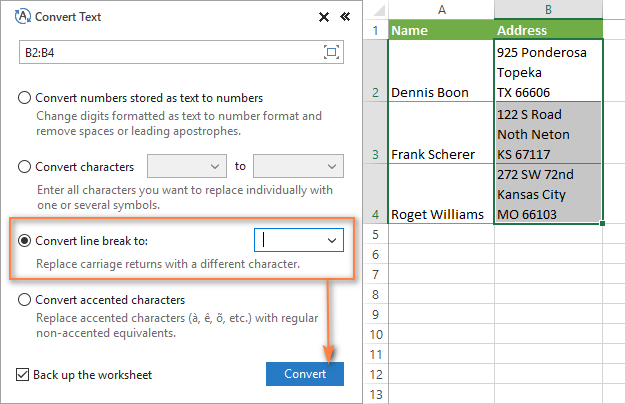
Web Mar 10 2021 nbsp 0183 32 Step 1 This function will take a string strString and load each individual character into the declared array varStringArray Step 2 If the code finds any known Line breaks or carriage returns Ascii code 10 9 and 32 then it proceeds to re dimension the array removing those characters in the process Web Feb 7 2023 nbsp 0183 32 In this tip you ll find 3 ways to remove truck returns from Excel cells You ll also learn what to replace line breaks with various symbols See choose work for Excellent 365 2021 2019 and lower versions There can be different reasons for line breaks occurring included your text
How To Replace Carriage Return CR And Not Line Feed LF On Nifi Replace Carriage Return And Line Feed In Notepad Super User Replace Carriage Return CR And Carriage Return And Line Feed CRLF Excel Replace Carriage Return With Space Pnabar How Do I Carriage Return Excel For Mac Hrfasr How To Insert Remove Carriage Return In Excel with Examples Replace Carriage Return And Line Feed In Notepad Super User Replace Carriage Return And Line Feed In Notepad Super User How To Replace The Carriage Returns In Microsoft Word Microsoft
Vba Replace Carriage Return
 Vba Replace Carriage Return
https://sgp1.digitaloceanspaces.com/ffh-space-01/9to5answer/uploads/post/avatar/890895/template_notepad-how-to-add-carriage-return-pressing-enter-key-after-certain-character20220621-84318-1osfsei.jpg
Web Jul 26 2021 nbsp 0183 32 You can use the line continuation character aka the underscore to continue a statement from one line to the next in your VBA code The following code shows you how to use the line continuation character Sub LineContinuation If Range quot b1 quot Value gt 0 Then Range quot c1 quot Value quot Greater Than Zero quot End Sub
Templates are pre-designed files or files that can be utilized for numerous purposes. They can save effort and time by supplying a ready-made format and design for producing various type of content. Templates can be utilized for personal or expert jobs, such as resumes, invitations, flyers, newsletters, reports, discussions, and more.
Vba Replace Carriage Return

Excel VBA Add Carriage Return Line Feed At The Start Of Uppercase

Replace Carriage Return And Line Feed In Notepad Super User

Replace Carriage Return CR And Carriage Return And Line Feed CRLF
Excel Replace Carriage Return With Space Pnabar

How To Insert Remove Carriage Return In Excel with Examples

Replace Carriage Return And Line Feed In Notepad Super User

Web Jun 15 2017 nbsp 0183 32 1 returned an overflow error 2 his program only removed carriage returns did not replace them I need to be able to replace carriage returns because currently I have cells like this Apples Oranges Grapes note there is no quot space quot after each string I need a space there in order to use the split function
Web Apr 5 2012 nbsp 0183 32 It captures and returns everything up until a single 1 trailing new line n or carriage return amp new line r n at the end of the text To remove all trailing line breaks change 1 to And to remove all trailing whitespace including line breaks use oRE Pattern quot s quot

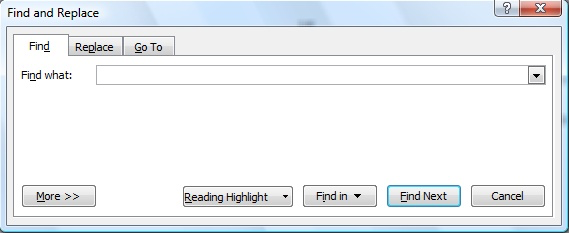
Web Feb 7 2023 nbsp 0183 32 Select all cells where you want to remove or replace carriage returns Press Ctrl H to open the Find amp Replace dialog box In the Find What field enter Ctrl J It will look empty but you will see a tiny dot In the Replace With field enter any value to replace carriage returns Usually it is space to avoid 2 words join accidentally

Web Jun 14 2018 nbsp 0183 32 Remove carriage return alt enter from the end VBA Sub removeEndingCarriageReturns Dim Rng As Range Dim inputRange As Range On Error Resume Next Set inputRange Application Selection Set inputRange Application InputBox quot Range quot quot Remove Ending Carriage Returns quot

Web May 30 2015 nbsp 0183 32 1 Answer Sorted by 0 If you are sure there always is a vbcrlf at the end of the textbox you can use this left Text50 Text len Text50 Text 2 Note that the length of vbcrlf is 2 since it is considered 2 characters carrige return and line feed If you are unsure if the last character is vbcrlf or not you can use this method
Web Oct 31 2023 nbsp 0183 32 Remove Carriage Return Using Find and Replace Feature Open the Find and Replace dialog box by pressing Ctrl H Then press Ctrl J to insert the carriage return in the Find what field Insert the delimiter you want to replace the carriage return with to win the Replace with field Click the image to get a detailed view Web Nov 21 2014 nbsp 0183 32 1 Hello I am using the following macro below with Excel 2010 and would like to include some VBA code that will trim all carriage returns from columns A B C D and E prior to the file being saved at the end of the process Can anyone please assist Sub ReadyForUpload
Web May 12 2014 nbsp 0183 32 Then using Mid and Replace you can pull out the numeric portion for Car Hire oRng Offset 1 12 Value Replace Trim Mid text CarHire endParse CarHire sMarker8 vbNullString In the example file this returns 0 00 I think this should work even if the dollar amount is separated by a carriage return