Vba Excel Count Rows With Data In A Column Excel VBA To Count Rows With Data 4 Examples ExcelDemy Excel VBA Macro While Column Doesn t Contain At Least One Red Cell How To Count Rows With Data In Excel 4 Suitable Formulas Quickly Numbering Rows Or Cell In Excel My XXX Hot Girl Excel VBA To Count Rows With Data 4 Examples ExcelDemy Excel VBA Count Columns with Data 2 Ways 1 Count All the Columns in a Worksheet with Data Using a Simple VBA Code We can see the 3 columns in the following data
Use VBA to Count Rows First you need to define the range for which you want to count the rows After that use a dot to open the list of properties The VBA COUNT function is used to count the number of cells in your Worksheet that have values in them It is accessed using the WorksheetFunction method in VBA COUNT
Excel VBA To Count Rows With Data 4 Examples ExcelDemy Count Rows In Group With Pivot Table In Excel Step by Step Guideline How Excel Count Rows With Value 8 Ways ExcelDemy How To Count Columns Or Rows In Excel On PC Or Mac 4 Steps This Article Will Help You Visualize 9 Different Methods Of Excel VBA How To Count Rows With Data In Excel 4 Formulas ExcelDemy Excel VBA Count Rows With Specific Data 8 Examples ExcelDemy How To Count Rows With Data In Column Using VBA In Excel 9 Ways Excel VBA To Count Rows With Data 4 Examples ExcelDemy
Vba Excel Count Rows With Data In A Column
 Vba Excel Count Rows With Data In A Column
https://www.exceldemy.com/wp-content/uploads/2022/01/Excel-VBA-Count-Rows-with-Data-1-788x464.png
It s a common task and VBA makes it pretty straightforward For instance let s say that in my worksheet named Sheet1 I want to count the rows
Templates are pre-designed documents or files that can be utilized for various functions. They can conserve effort and time by offering a ready-made format and layout for developing different sort of content. Templates can be utilized for personal or expert tasks, such as resumes, invites, flyers, newsletters, reports, discussions, and more.
Vba Excel Count Rows With Data In A Column

How To Count Rows With Data In Column Using VBA In Excel 9 Ways
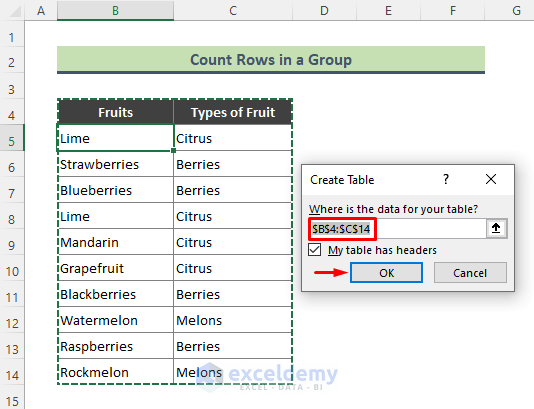
Count Rows In Group With Pivot Table In Excel Step by Step Guideline

How Excel Count Rows With Value 8 Ways ExcelDemy

How To Count Columns Or Rows In Excel On PC Or Mac 4 Steps

How To Count Rows With Data In Excel 4 Formulas ExcelDemy

Excel VBA Count Rows With Specific Data 8 Examples ExcelDemy

27 If you want to find the last populated cell in a particular column the best method is Range A Rows Count End xlUp Row This code uses

It s pretty easy to count rows in Excel using VBA All you need to do is specify the range for which you want to count the rows and then use the Range Count

1 Use VBA Code to Count Rows of a Specific Range Step 1 Press ALT F11 on your keyboard The VBA window will open Step 2 Go to the Insert tab in the VBA
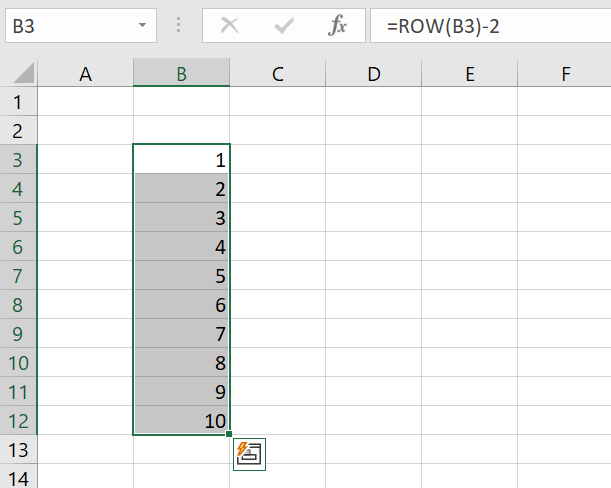
Here you will get 10 editable VBA codes to count all the columns and rows having data in an Excel sheet Count Columns Rows with Data Using VBA in Excel xlsx I ve used

The macro countDataRows1 below uses range Rows Count to find the number of rows of data in the current selection To use the macro we first select the list of data and
The best way to get the count of rows records in most cases is to use UsedRange Rows Count You can assign the return value to a variable like VBA Used Range Count Number of Used Rows or Columns Written by Reviewed by Steve Rynearson Last updated on July 19 2021 In this
You can use the following syntax to count the number of rows in a table in Excel using VBA Sub CountTableRow Dim tbl As ListObject specify