Use Sed To Replace Text In Directory How To Use Sed To Replace Text With Special Characters 2 Solutions Use Sed To Replace A Text And Output To A New Line And Also Print It 2 Search And Replace Texts In Files With Sed YouTube How To Use Sed To Recursively Replace Text In Multiple Files How To Use Sed To Replace A Pattern At The End Of Each Line In A File Jun 18 2025 nbsp 0183 32 Hi I m having a connection issue i manage several Hotmail accounts at work and I m getting the message quot Please retry with a different device use a VPN or another
Hola a todos El d 237 a de hoy me topo con este problema Les hablo desde Colombia Si tienes configurado un pin de inicio de sesi 243 n en el pc este te servir 225 como m 233 todo para ingresar al Jul 23 2024 nbsp 0183 32 Using canned responses in the new Outlook is a game changer for productivity Here are simple steps to insert a template into your messages In a message you are
How To Use Sed To Replace A Pattern At The End Of Each Line In A File How To Use Sed To Find And Replace A String In A File s In Linux Solved How To Use Sed To Replace Text With Special 9to5Answer Linux Replace Text String In File Guide Solved Using Sed To Replace Text With Spaces With A 9to5Answer How To Use Sed To Find And Replace Text In Files In Linux Unix Shell Sed Command Linux Administator Data Stream How To Use Sed Command On Sed Command In Linux With Examples DevOpsTuT How To Use SED Unix Command HowTech
Use Sed To Replace Text In Directory
 Use Sed To Replace Text In Directory
https://i.ytimg.com/vi/Ab0mdisn7Ow/maxresdefault.jpg
May 7 2025 nbsp 0183 32 N 227 o consigo acessar meu email a VPN da erro e pede verifica 231 227 o e troca de senha todas as tentativas preciso acessa meu email por favor me ajuda Todas as vezes que
Pre-crafted templates provide a time-saving option for producing a varied series of files and files. These pre-designed formats and layouts can be used for numerous individual and professional tasks, consisting of resumes, invites, leaflets, newsletters, reports, presentations, and more, improving the content production procedure.
Use Sed To Replace Text In Directory

Guide To Using The sed Command In Linux Tutorial Documentation
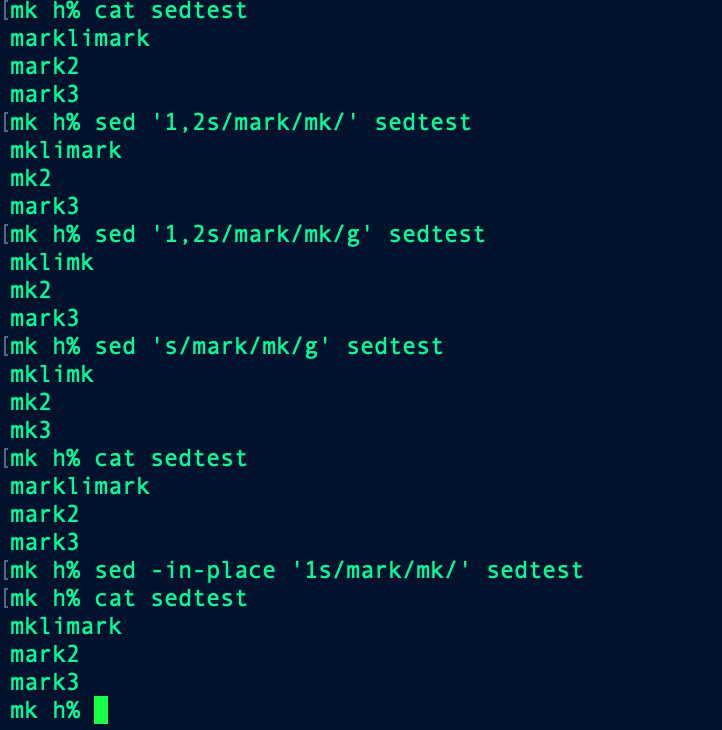
How To Use Sed To Find And Replace A String In A File s In Linux

Solved How To Use Sed To Replace Text With Special 9to5Answer
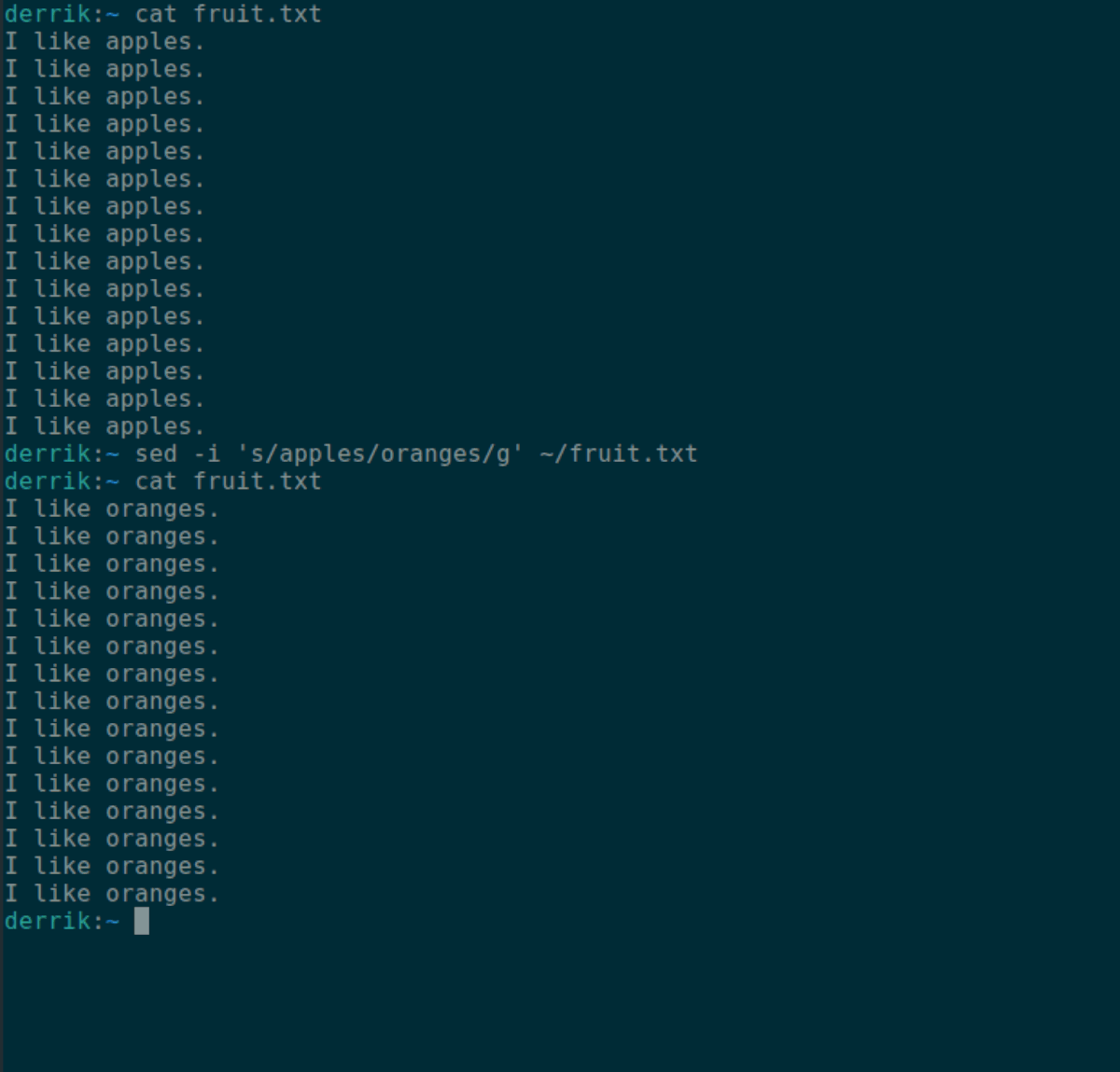
Linux Replace Text String In File Guide

How To Use Sed To Find And Replace Text In Files In Linux Unix Shell

Sed Command Linux Administator Data Stream How To Use Sed Command On

How to use Google Drive Want advanced Google Workspace features for your business Try Google Workspace today Google Drive helps you keep all your files together You can upload

May 31 2025 nbsp 0183 32 Kindly try to log into and access your Microsoft account switching between Outlook Webmail Outlook client app or Outlook mobile app from a different device using

Dec 6 2024 nbsp 0183 32 You can use Copilot to create or draft in the blank lines on the template with the content quot something in the PPT quot You can right click on the blank line where you want to insert

Feb 10 2025 nbsp 0183 32 Hello I m using Teams in my company When I join to meeting teams says to me Teams needs permission to use this device and nobody can hear me When I go to privacy

If you use Gmail you already have a Google Account With a Google Account you have access to Google products at no charge like Drive Docs Calendar and more
[desc-11] [desc-12]
[desc-13]