Use Ours Vs Use Theirs Gitlab Sign In GitLab Gitlab Ours Vs Theirs In The English Grammar LanGeek One Billion Plastic Lip Balm Tubes Head To Landfill EVERY YEAR Maemae Possessive Pronouns The Pronoun School Lead Official Gemini Apps Help Center where you can find tips and tutorials on using Gemini Apps and other answers to frequently asked questions
Open Incognito mode Important When you use an Incognito window you can browse more privately You can switch between Incognito tabs and regular Chrome tabs On your computer Official Google Play Help Center where you can find tips and tutorials on using Google Play and other answers to frequently asked questions
Possessive Pronouns The Pronoun School Lead FAQ Glass Whiteboard Possessive Pronouns Pronouns Mine Yours His Hers Ours Theirs Possessive Pronouns His Hers English ESL Worksheets Pdf Doc Theirs vs ours 2 Choose Something Better Grammar Lesson 26 Our Ours Their Theirs YouTube Pin On Ao Gitlab Vs Github Top 10 Differences Between Github And Gitlab Images Difference Between My Mine Your Yours Our Ours Their Theirs
Use Ours Vs Use Theirs Gitlab
 Use Ours Vs Use Theirs Gitlab
https://git.pg3.io/uploads/-/system/appearance/header_logo/1/ours.png
Official Google Translate Help Center where you can find tips and tutorials on using Google Translate and other answers to frequently asked questions
Templates are pre-designed documents or files that can be used for different purposes. They can save effort and time by providing a ready-made format and design for producing various type of content. Templates can be used for personal or professional jobs, such as resumes, invites, flyers, newsletters, reports, presentations, and more.
Use Ours Vs Use Theirs Gitlab

Possessive Pronouns In English Grammar Woodward English
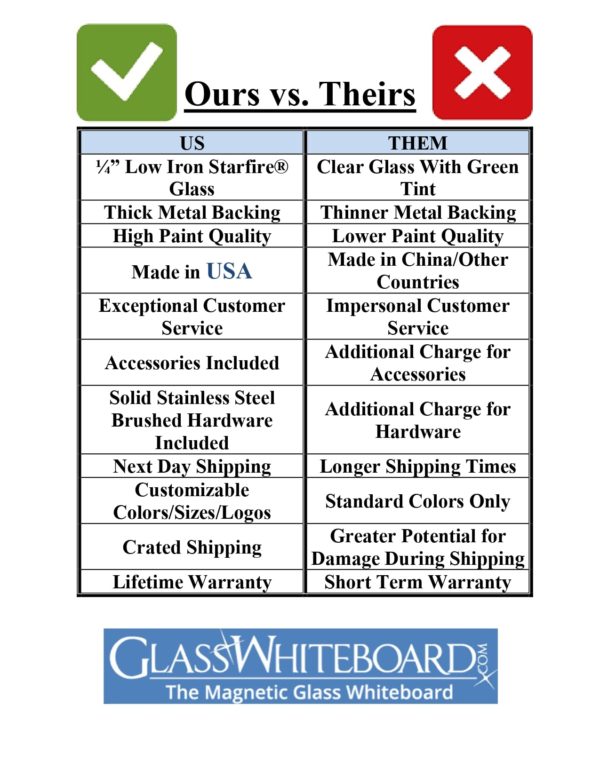
FAQ Glass Whiteboard

Possessive Pronouns Pronouns Mine Yours His Hers Ours Theirs

Possessive Pronouns His Hers English ESL Worksheets Pdf Doc

Grammar Lesson 26 Our Ours Their Theirs YouTube

Pin On Ao
If you can t find the app in your list of all apps Turn off your device and turn it on again Then look for the app If you re using a Chromebook make sure you ve followed these steps to get the

Official Google Chrome Help Center where you can find tips and tutorials on using Google Chrome and other answers to frequently asked questions
Important To keep yourself and others safe stay aware of your surroundings when you use directions on Google Maps When in doubt follow actual traffic regulations and confirm signage

If you use an account through your work school or other group these steps might not work Check with your administrator for help To recover an account for a child under 13 or the

On your computer open Google Maps On the map right click the place or area A pop up window appears At the top you can find your latitude and longitude in decimal format To copy
[desc-11] [desc-12]
[desc-13]