Update Data In Tableau The Data School Tableau Tip How To Add Data Last Updated Date Time Tableau Data Analyst Certification Exam Preparation Focus On Specific Tableau Software Data Visualization And Analytics Simwell Add Edit And Save Data In Tableau Infotopics Apps For Tableau 3 Ways To Normalize Data In Tableau Playfair Tableau REST API Help Update Data in Published Live to Hyper Data Sources You can modify insert update upsert replace and delete data in a published data source that has a live to Hyper connection The origin of data for a live to Hyper connection is a Hyper or Parquet file database
Tableau Cloud Help Manage Data Refresh Data on Tableau Cloud You can manually refresh data as well as schedule data refreshes Other articles in this section Schedule Refreshes on Tableau Cloud Refresh Data Using Saved Credentials Start a Refresh Task Manually Manage Refresh Tasks Automatically Suspend Extract Refreshes for Inactive Workbooks With Tableau 2020 1 parameters will update automatically With just a few clicks authors can now link a data source field to the parameter s list of values and Tableau will pull the most up to date field values every time someone opens the workbook
3 Ways To Normalize Data In Tableau Playfair In This Series Of Tableau Certification Questions For Tableau Desktop Calculations In Tableau A Road To Tableau Desktop Specialist Towards AI A Step By Step Guide For Data Visualization Using Tableau Tendig Preparing And Cleaning Survey Data For Tableau Best Practice How To Insert Image In Tableau Worksheet Printable Wo Vrogue co Prepare Your Data For Tableau A Practical Guide To The Tableau Data Tableau Data Management Add On Simplified How To Refresh Tableau Data Source Automatically In Excel
Update Data In Tableau
 Update Data In Tableau
https://www.thedataschool.co.uk/content/images/2022/05/image-38.png
How to update the underlying data in a Tableau Server workbook that uses a live connection to a Microsoft Excel file data source Environment Tableau Desktop Tableau Server Answer In Tableau Desktop right click on the data source in the Data Pane and select Edit Data Source
Templates are pre-designed documents or files that can be used for numerous functions. They can conserve time and effort by offering a ready-made format and layout for creating different kinds of content. Templates can be utilized for individual or expert jobs, such as resumes, invitations, leaflets, newsletters, reports, discussions, and more.
Update Data In Tableau

Visualize Data From Azure Data Explorer In Tableau Azure Data

In This Series Of Tableau Certification Questions For Tableau Desktop

Calculations In Tableau A Road To Tableau Desktop Specialist Towards AI
A Step By Step Guide For Data Visualization Using Tableau Tendig
How To Insert Image In Tableau Worksheet Printable Wo Vrogue co
Prepare Your Data For Tableau A Practical Guide To The Tableau Data

To manually update data while you interact with a view such as performing several actions at once without updating between each one click the refresh icon on the toolbar When you refresh data Tableau Server and Tableau Cloud clear any cache and retrieve the latest information from the data source

To update the published data source do the following In Tableau Desktop right click control click on a Mac the data source in the Data pane Select Tableau Data Server and choose one of the following options Edit Server and Site Path

When the original data changes you can refresh the extract using Desktop by selecting a data source on the Data menu and then selecting Extract Refresh
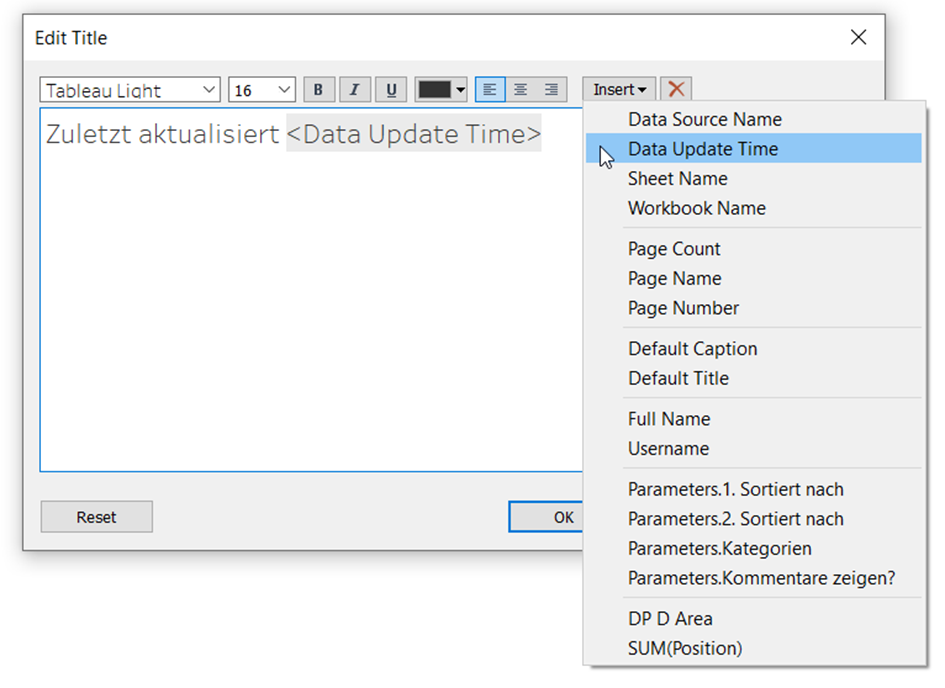
Option 1 Add the time stamp to the top of the view in the title Open the workbook that contains the dashboard in Tableau Desktop and then navigate to the sheet for which you want to display the time of the last data refresh Select Worksheet Show Title Double click the title to open the Edit Title box

The data table updates with the data from the new data source Navigate the Data Grid Within the Data Source page you are provided with options to analyze and visualize your data One of these options is sorting which enables you to arrange your data in a structured manner
I should mention I m using the latest version of Tableau Server currently running on a local host instance I have verified that I can update my data structure and then click on the refresh symbol at the top of the view within Tableau Server and see that data refresh instantly However I m trying to get this to happen automatically With the new Tableau version of 2021 2 REST API 3 12 was introduced it had multiple new features like You can now modify insert update upsert replace and delete data in a published data
Step 2 Update the Data Source Next update your data source to include the Refresh parameter To do this click on the Edit Data Source and then include the parameter as a comment inside a custom SQL code block Refreshing data in Tableau after making changes in the database