Uninstall Pip Package Linux How To Uninstall PIP Packages In Windows PIP Python Yoo The Best How To Uninstall Python Package Library Using PIP YouTube Python How To Uninstall All Packages Using PIP Fariz Fadian Pip Install Install And Remove Python Packages FavTuts How To Install Python Pandas With Pip Command PythonTect Web Description Options Examples Usage 182 pip uninstall options lt package gt pip uninstall options r lt requirements file gt Description 182 Uninstall packages pip is able to uninstall most installed packages Known exceptions are
Web 7 Answers Sorted by 61 Ubuntu Oneiric and I expect newer versions too install pip packages to usr local lib python2 7 dist packages and apt packages to usr lib python2 7 dist packages So just check the former directory and sudo pip uninstall every package you find there Share Improve this answer answered Feb 22 Web Feb 10 2024 nbsp 0183 32 Contents Install pip pip pip2 and pip3 Install packages pip install Install packages from local or GitHub Update packages pip install upgrade Update pip itself Uninstall packages pip uninstall Check details of installed packages pip show List installed packages pip list pip freeze Check dependencies pip check Install pip
How To Install Python Pandas With Pip Command PythonTect How To Install PIP Python Package Manager In Linux LinuxTect How Do I Uninstall All Pip Packages How To Remove All Packages Installed By PIP In Python Tech CookBook PIP Uninstall All Python Packages In Windows See A Full Guide How To Uninstall Pytorch Conda Pip Pycharm Uninstall Miniconda Completely Delft Stack How To Upgrade PIP Package Fix Cannot Uninstall PyYAML It Is A Distutils Installed Project When
Uninstall Pip Package Linux
 Uninstall Pip Package Linux
https://i.ytimg.com/vi/vCD9_0hyILc/maxresdefault.jpg
Web Dec 31 2019 nbsp 0183 32 Open a terminal window sudo su pip uninstall lt packagename gt How to Uninstall Package Dependencies with Pip When you install a package with pip it also installs all of the dependencies the package requires Unfortunately pip does not uninstall dependencies when you uninstall the original package
Templates are pre-designed files or files that can be used for numerous purposes. They can conserve effort and time by supplying a ready-made format and design for creating different sort of material. Templates can be utilized for personal or expert tasks, such as resumes, invites, leaflets, newsletters, reports, presentations, and more.
Uninstall Pip Package Linux

Python pip Uninstall Command Tutorial PythonTect

How To Install PIP Python Package Manager In Linux LinuxTect

How Do I Uninstall All Pip Packages
How To Remove All Packages Installed By PIP In Python Tech CookBook
How To Uninstall Pytorch Conda Pip Pycharm

Uninstall Miniconda Completely Delft Stack

Web First you should remove all the packages you installed with easy install using see uninstall easy install m PackageName This includes pip if you installed it using easy install pip

Web Jun 28 2012 nbsp 0183 32 pip freeze gt packages txt amp amp pip uninstall y r packages txt amp amp del packages txt The first part pip freeze gt packages txt creates a text file with list of packages installed using pip along with the version number The second part pip uninstall y r packages txt deletes all the packages installed without asking for a confirmation prompt

Web Oct 29 2015 nbsp 0183 32 pip install user somepackage installs to HOME local and uninstalling it does work using pip uninstall somepackage This is true whether or not somepackage is also installed system wide at the same time If the package is installed at both places only the local one will be uninstalled

Web Mar 9 2024 nbsp 0183 32 Steps Other Sections Tips and Warnings Related Articles References Co authored by Matt Ham and Hannah Dillon Last Updated March 9 2024 Fact Checked Are you trying to use Pip to uninstall a Python package Thankfully whether you re on Windows macOS or Unix Linux this is a simple task

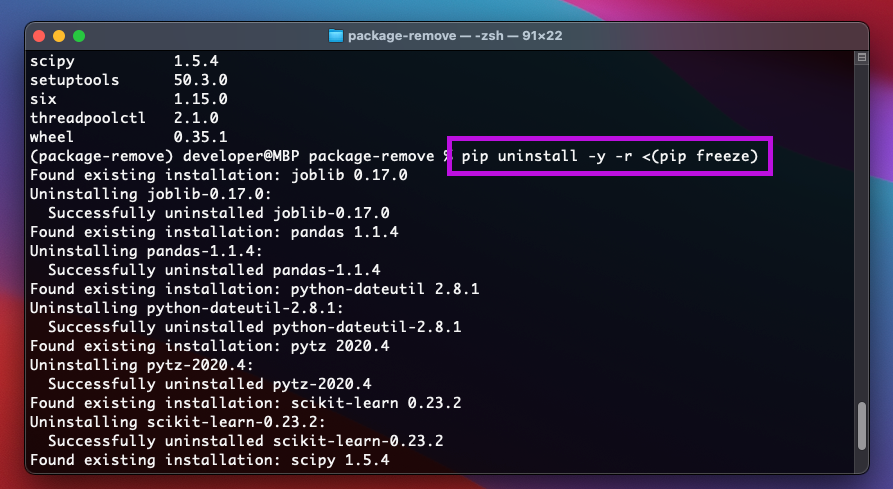
Web Apr 9 2024 nbsp 0183 32 Use the pip uninstall y r lt pip freeze command to remove all packages installed by pip The command uses pip freeze to get a list of the installed packages and uninstalls them without asking for confirmation shell Optionally save the packages that are to be removed pip freeze gt to remove txt
Web Oct 14 2019 nbsp 0183 32 To completely remove and reinstall pip and pip3 in all currently supported versions of Ubuntu open the terminal and type sudo apt purge python pip python3 pip sudo apt install python pip python3 pip pip uninstall user pip pip3 uninstall Web Feb 24 2017 nbsp 0183 32 In order to remove it type sudo apt get remove python pip python dev If you re not sure which switch to use you can add the help switch to almost if not every Linux command to get details about the command Example
Web Jan 23 2014 nbsp 0183 32 Unfortunately you d need to manually create the deleted folders or copy it from a different installation and then try pip uninstall you may also try pip install the package again and then pip uninstall Amyth Jan 23 2014 at 12 24 4 Answers Sorted by 73 packages installed using pip can be uninstalled completely using