Uninstall Exe Command Line Options Control exe Windows Process What Is It Peregrination Interpreta Proprietar Where Is Control Panel Exe In Windows 10 Planuri Tips And Tricks How To Repair The Windows Store Error Code 0x80073CFE MiniTool Partition Wizard Skatezilla s DCS Updater Utility GUI Flight Sims Mudspike Forums Like the others said you will need to figure out what the command line options for silent uninstall for your particular application is They
The equivalent Windows Installer command line option is x Parameter Package msi ProductCode uninstall patch Uninstall update Microsoft Windows 10 Logo command prompt app in Windows search run as admin option wmic command WMIC command line product get name command
Skatezilla s DCS Updater Utility GUI Flight Sims Mudspike Forums Upgrading Windows 10 Build With Setup exe Command Line Switches Windows OS Hub Uninstall Apps Via Command Prompt Cmd Or Powershell In Windows 11 Technos Using Windows File Recovery Tool WINFR On Windows 10 Windows OS Hub Dedicated Auto Updater Multiplayer Server Administration ED Forums How To Uninstall Foxit PhantomPDF From Command Line With Administrator Help Center Foxit How To Uninstall Foxit PDF Editor From Command Line With Administrator Help Center Foxit Help I Can t Get Into My Server After New Patch Anyone Knows How To Fix It Valheim Auto Update DCS Server Via Bat File Automated Multiplayer Server Administration ED Forums
Uninstall Exe Command Line Options
 Uninstall Exe Command Line Options
https://www.file.net/img/screenshot/taskman-control-exe.png
There s also reference documentation for WMIC on microsoft UninstallString do echo B findstr c MsiExec exe nul
Templates are pre-designed documents or files that can be utilized for different purposes. They can save time and effort by providing a ready-made format and design for developing different kinds of material. Templates can be used for personal or expert tasks, such as resumes, invites, flyers, newsletters, reports, presentations, and more.
Uninstall Exe Command Line Options

Previous Version Installation Problems ED Forums
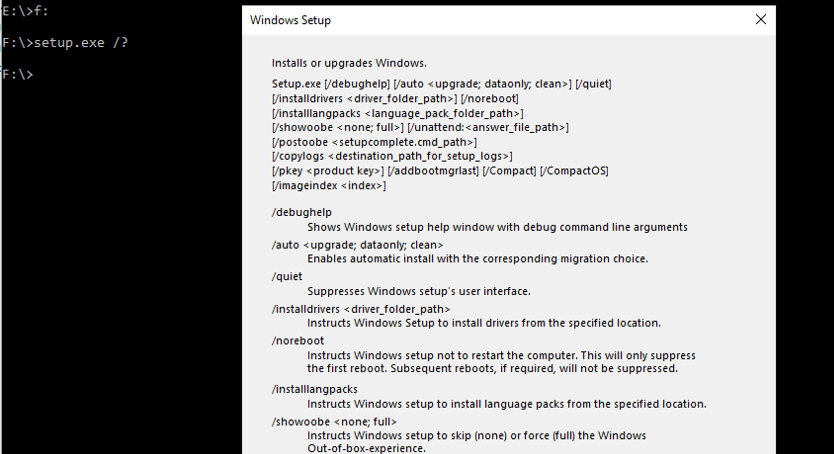
Upgrading Windows 10 Build With Setup exe Command Line Switches Windows OS Hub

Uninstall Apps Via Command Prompt Cmd Or Powershell In Windows 11 Technos

Using Windows File Recovery Tool WINFR On Windows 10 Windows OS Hub

How To Uninstall Foxit PhantomPDF From Command Line With Administrator Help Center Foxit

How To Uninstall Foxit PDF Editor From Command Line With Administrator Help Center Foxit

Press the Windows key and type Command Prompt A Click the Yes button on the prompt that appears In an elevated Command Prompt type wmic

In command prompt open the path of exe located and execute xxxx exe uninstall Share
Hi all I have created 2 cmd files 1 to install a exe and the other to uninstall the exe The install works but the uninstall is failing
Uninstall exe uninstalls a program from the command line i e without going through the Add Remove Programs control panel
To uninstall a program or app via Command Prompt you ll first need to run Command Prompt as an administrator In the Windows Search box type
The uninstaller program unins exe accepts optional command line parameters These can be useful to system administrators and to other programs calling The executable program that interprets commands is TuCmd exe The program is part of the Ultimate edition package available only after purchase The program
I also understand that we can uninstall software on user s PC if we WinRar installs via exe file and it s uninstall command line