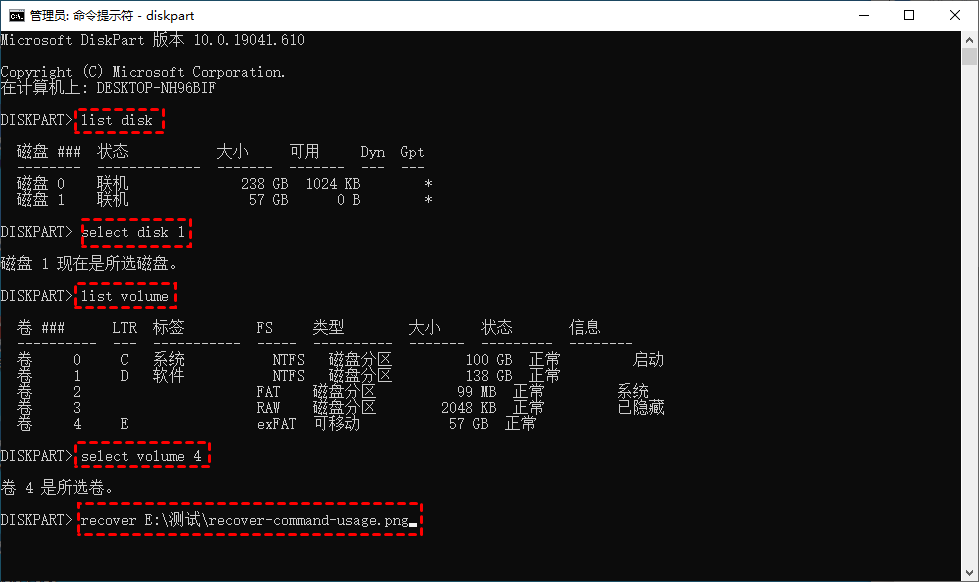
Ubuntu Recover Command Line How To Get Out Of Root In Linux OS Today Cerec Lab Herofbeijing Top 20 Best Linux Data Recovery Tools To Recover Deleted Corrupted Files DigitalOcean More Linux Musings Arcane Science Lab Sap SDMMFI 51CTO SAP Web 1 Start Live Ubuntu Rescue Remix CD give command to boot then when it boots into terminal check your HDs by command Code sudo fdisk l Realize what HD is main and which is secondary and what partition to check for files and into which to recover them linux ext3 or Windows NTFS Mine was Linux Have enough room on it
Web Booting into recovery mode See also If your system fails to boot for whatever reason it may be useful to boot it into recovery mode This mode just loads some basic services and drops you into command line mode You are then logged in as root the superuser and can repair your system using command line tools Web Jan 19 2012 nbsp 0183 32 If HISTFILE is not set to that location you can set it with the following export HISTFILE bash history The following will reload the history file into your history buffer history r If this does not resolve your issue the quot HISTORY quot section of the bash manpage may give more clues as to why your history is not working as expected
Sap SDMMFI 51CTO SAP Recover Serve V2ray Internet Gratis BENISNOUS Rman Recovery RMAN 03002 RMAN 06053 RMAN 06025 51CTO rman 03002 Rman 06091 How To Fix DISM Error 2 Unable To Access The Image Qiling DevOps SysAdmins Can I Recover Command Line Deleted File On Ubuntu 4 Solutions Recover Deleted Files In Ubuntu Linux With Examples How To Format A Disk Drive With Ubuntu Disk Utility How To Start GNOME Desktop From Command Line In Debian
Ubuntu Recover Command Line
 Ubuntu Recover Command Line
https://frameboxxindore.com/wp-content/uploads/2019/06/how-to-get-out-of-root-in-linux.jpg
Web Jan 18 2012 nbsp 0183 32 Key is to stop using the filesystem ASAP i e stop using your computer soon and run the recovery from a live CD If you have the regular ubuntu installation CD you should be OK It will be a rather lengthy process You should have had a backup and then you could use it Very probably your files are lost for ever
Pre-crafted templates offer a time-saving solution for developing a varied range of documents and files. These pre-designed formats and designs can be utilized for numerous individual and professional jobs, consisting of resumes, invites, flyers, newsletters, reports, presentations, and more, streamlining the content production process.
Ubuntu Recover Command Line

Solved Can I Recover Command Line Deleted File On 9to5Answer
Recover

Serve V2ray Internet Gratis BENISNOUS

Rman Recovery RMAN 03002 RMAN 06053 RMAN 06025 51CTO rman 03002 Rman 06091
DevOps SysAdmins Can I Recover Command Line Deleted File On Ubuntu 4 Solutions
Recover Deleted Files In Ubuntu Linux With Examples

Web Dec 11 2016 nbsp 0183 32 You can use dconf reset f Running this command will reset among other things the apps pinned to the Unity launcher or Ubuntu Dock panel applets and or indicators monitor resolution and interface scaling keyboard shortcuts fonts GTK and icon theme window button placement launcher behaviour and so on
Web Apr 24 2023 nbsp 0183 32 Booting into Recovery mode This section will explore two ways to boot into Recovery Mode in Ubuntu the GUI and the command line methods Your choice between these methods will depend on personal preferences comfort level
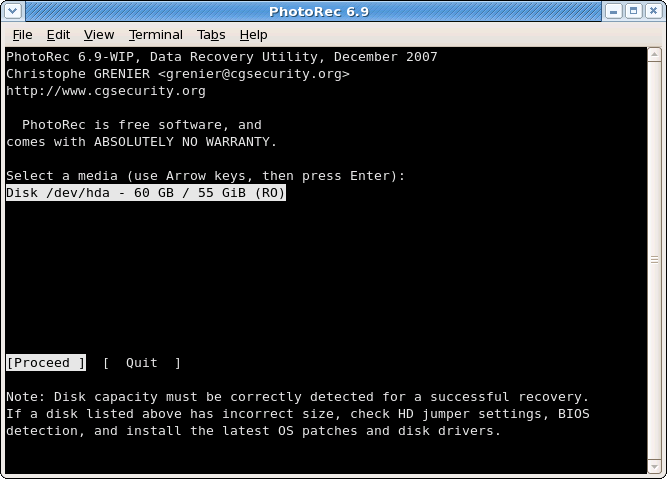
Web Jul 31 2019 nbsp 0183 32 Using Systemback via Command line 1 To launch Systemback in command line mode run the following command in terminal sudo systemback cli You will see 2 Select a restore point Use the letter on the left of the corresponding restore point to select it For instance in 3 Now it will show

Web May 9 2020 nbsp 0183 32 Open the timeshift application via top left Activities menu Upon opening the timeshift application you will be greeted with a wizard to help you schedule your backups Here you have two options First is to use the rsync as a main backup tool or take an advantage of an inherent BRTFS built in file system features

Web Jul 30 2019 nbsp 0183 32 Go take a look for yourself The code running the menu must already exist somewhere within an Ubuntu file system Use locate to find it locate recovery mode lib recovery mode lib recovery mode l10n sh lib recovery mode options lib recovery mode recovery menu lib recovery mode options apt snapshots lib recovery
Web Jun 30 2010 nbsp 0183 32 4 Answers Sorted by 9 If you are worried you might do this in the future you could create an alias for the rm command and have it link to a script This script would take the command line argument and move that file to Recycle or whatever You could then create a cron job to empty the trash every month or so Web Sep 20 2015 nbsp 0183 32 1 Answer Sorted by 23 Before you start It s always a good idea to work from a copy of your deleted data so copy your entire disk before you begin If you cannot boot from a Live USB DVD before you begin
Web Apr 9 2017 nbsp 0183 32 Some people suggest su umount home grep a A800 B800 target dev sda2 strings gt recovered file These lines assume that your file was in the home filesystem home was mounted on the partition dev sda2 and target is a key phrase that is likely to be unique to the overwritten file The option a handles all binary files as text