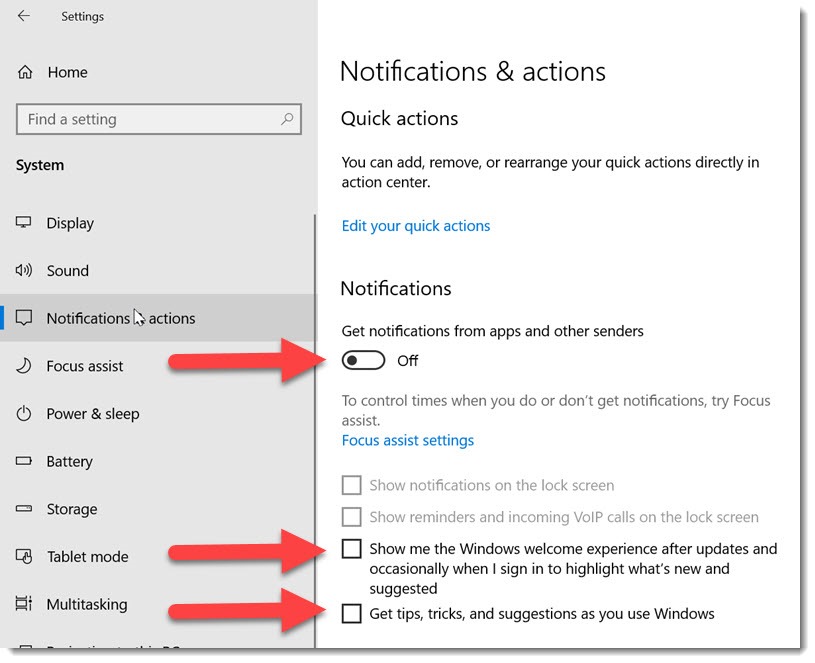
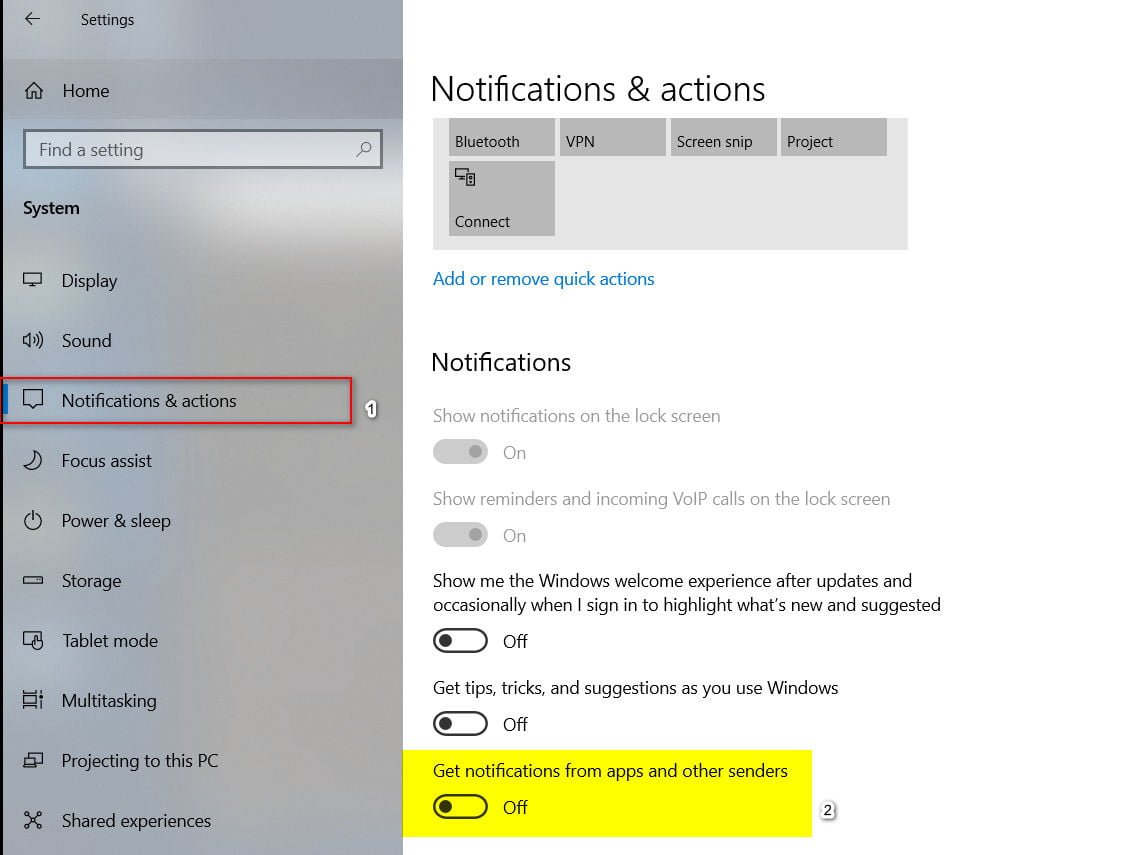
Turn Off Notifications Windows 10 How To Turn Off Notifications In Windows 10 Tutorial Disable Annoying Notifications YouTube How To Turn Off Windows 10 Push Notification Pop ups How To Turn Off Notifications In Windows 10 How To Turn Off Notifications In Windows 10 Javatpoint How To Turn Off Notifications In Windows 10 Javatpoint Web Sep 10 2016 nbsp 0183 32 1 Open Settings and click tap on the System icon 2 Do step 3 off or step 4 on below for what you would like to do 3 To Turn Off Notifications from Apps and Other Senders This will turn off showing notifications in the Action Center and notification banners for all apps
Web 1 To disable individual app notifications open the Settings app by pressing the keyboard shortcut Win I Alternatively click on the Notifications icon and then click on the Settings button 2 Go to System gt Notifications and Actions in the Settings app 3 Web You can turn off notifications in Windows 10 in two ways Hollis Johnson Business Insider To turn off notifications on a Windows 10 computer you ll need to open your system s
How To Turn Off Notifications In Windows 10 Javatpoint How To Turn Off Notifications In Windows 10 Teams Turn Off Notifications Windows 10 Forums How To Disable App Notifications On Windows 10 Apps For Windows 10 Piccollage Turn Off Notification Historydiki How To Turn Off Notifications On Windows 10 Turn On Or Off Notifications From Mail App In Windows 10 Tutorials How To Customize Your Windows 10 Notifications Windows Central How To Turn Off Notifications Windows 10 Temporary Gerafm
Turn Off Notifications Windows 10
 Turn Off Notifications Windows 10
https://i.ytimg.com/vi/NbB1_G78wwA/maxresdefault.jpg
Web Sep 6 2020 nbsp 0183 32 Turn notifications on off in Action Center Choose whether to play a sound or not for the app notifications Select the number of notifications to show in the Action Center 1 3 5 or 20 Choose the priority of notifications which app s notifications should show before the other apps
Templates are pre-designed documents or files that can be used for numerous purposes. They can save effort and time by supplying a ready-made format and layout for creating various sort of material. Templates can be utilized for personal or expert jobs, such as resumes, invites, flyers, newsletters, reports, discussions, and more.
Turn Off Notifications Windows 10
Turn Off Notifications In Windows 10 Chrome Bruceb Consulting
How To Turn Off Notifications In Windows 10

Teams Turn Off Notifications Windows 10 Forums

How To Disable App Notifications On Windows 10 Apps For Windows 10

How To Turn Off Notifications On Windows 10
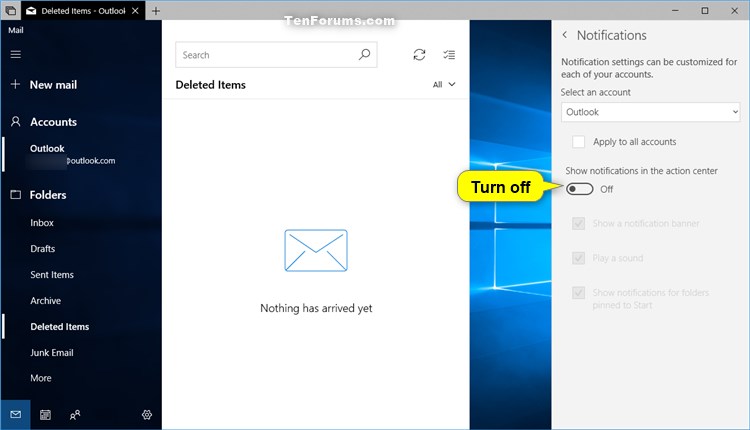
Turn On Or Off Notifications From Mail App In Windows 10 Tutorials

Web You can change your notification settings at any time from the Settings app Select Start then select Settings Go to System gt Notifications Turn notifications banners and sounds on or off for some or all notification senders To see all options expand the notifications area

Web Nov 5 2021 nbsp 0183 32 How to Turn off All Notifications Select Start in the bottom left hand corner of your desktop Click Settings looks like a gear Click System From the sidebar select Notifications amp actions Underneath Notifications toggle

Web Feb 24 2020 nbsp 0183 32 To disable notifications from a particular app in the Windows 10 enter Settings gt System gt Notifications amp actions gt Show me the apps I get notifications from and turn off the toggle

Web Add or remove quick settings Select or press and hold the battery network or volume icon to open the quick settings panel Select the Edit quick settings icon Select the Add button to add a quick setting or press the pin icon on the quick

Web Mar 19 2021 nbsp 0183 32 Step 1 Open the Windows Settings menu by pressing the Windows Key I or search for settings in the Windows Search Step 2 Click Notifications amp Actions in the left hand menu This will take you to a screen providing access to all the Step 3 If you want to change the Quick Actions or all
[desc-11] [desc-12]
[desc-13]