Turn Off Enhanced Security Adobe Reader How To Send Documents And Information With Enhanced Security Adobe Acrobat And Adobe Reader Enhanced Security FAQ How To Get Adobe Reader To Save In Samer Location Lasopaperu 2 Best Ways To Disable IE Enhanced Security On Windows Server Solved How To Change Indesign Composer Adobe Community 10919382 Nov 8 2021 nbsp 0183 32 I have a Microsoft Surface Pro 7 Windows 10 64 bit Apparently the option to turn off adaptive brightness within the settings isn t working Others are saying that I have to
Jun 8 2023 nbsp 0183 32 Hey thanks for the quick reply Yes i have tried all those options from this forum I have a all the gesture options in my control panel but do not have an option to turn off the Feb 17 2020 nbsp 0183 32 13 Select dot which encryption mode to use and click tap on Next see screenshot below If you did step 1 above to set a default encryption method and cipher
Solved How To Change Indesign Composer Adobe Community 10919382 How To Disable Or Enable Enhanced Audio In Windows 11 Gear Up Windows Save And Log To Abacus Adobe Plugin Server 2016 Internet Explorer Disable Enhanced Security Botsmertq Disabling I E Enhanced Security Configuration Windows 2016 Windows How To Turn Off Internet Explorer Enhanced Security Configuration Conetix Turn Off Internet Explorer Enhanced Security Configuration In Windows How Can I Turn Off Internet Explorer Enhanced Security Configuration Apache Web Page And Security Optimization In Linux System
Turn Off Enhanced Security Adobe Reader
 Turn Off Enhanced Security Adobe Reader
https://blog.adobe.com/en/publish/2021/11/23/media_184086af663c6410d01fb923d7f579dc155557821.jpeg?width=2000&format=webply&optimize=medium
Oct 28 2021 nbsp 0183 32 2 In the Settings tab check turn on or uncheck turn off the Start OneDrive automatically when I sign in to Windows box under the General section and click tap on OK
Pre-crafted templates use a time-saving option for developing a varied variety of files and files. These pre-designed formats and designs can be used for various personal and expert projects, including resumes, invitations, leaflets, newsletters, reports, presentations, and more, enhancing the content creation process.
Turn Off Enhanced Security Adobe Reader
Best VZ Workshop Manual Page 5 Just Commodores
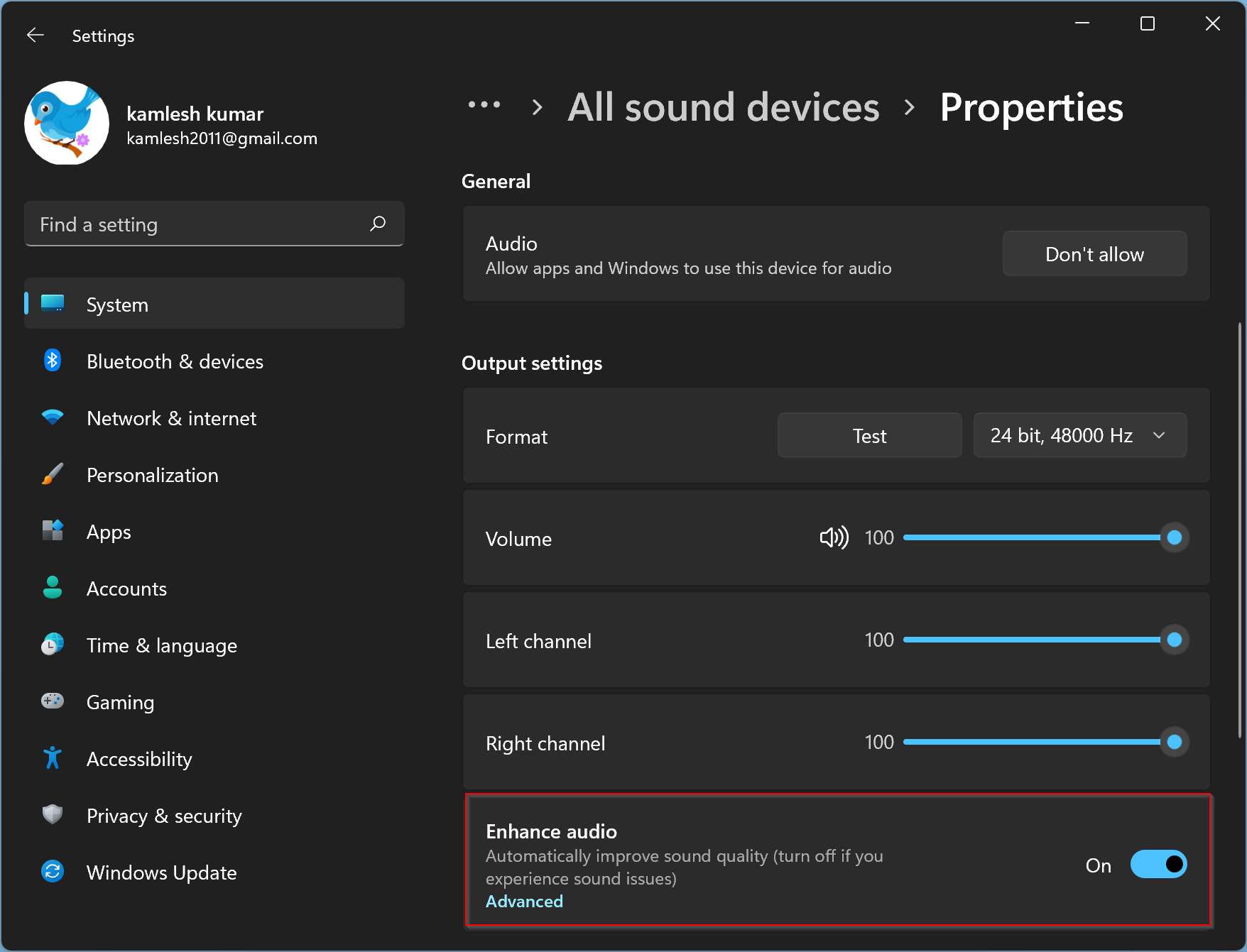
How To Disable Or Enable Enhanced Audio In Windows 11 Gear Up Windows

Save And Log To Abacus Adobe Plugin

Server 2016 Internet Explorer Disable Enhanced Security Botsmertq

How To Turn Off Internet Explorer Enhanced Security Configuration Conetix

Turn Off Internet Explorer Enhanced Security Configuration In Windows

Jul 3 2021 nbsp 0183 32 How to Turn Windows Features On or Off in Windows 10 Some programs and features included with Windows such as Internet Information Services must be turned on

Aug 11 2023 nbsp 0183 32 Uninstalling Windows Media Player will have it no longer available to turn on or off and will free up around 57 4 MB of space on the Windows drive This tutorial will show you how

Mar 29 2021 nbsp 0183 32 When you turn off app notifications you will not be able to turn on or off notifications and notification banners for individual apps A Click tap on Notifications amp actions

Jun 22 2020 nbsp 0183 32 This tutorial will show you how to turn on or off Microsoft Defender SmartScreen for apps and files from the web for all users in Windows 10 You must be signed in as an

Oct 6 2020 nbsp 0183 32 3 Turn on default or off Microsoft Defender Firewall for what you want and click tap on Yes when prompted by UAC to approve see screenshots below 4 Check or
[desc-11] [desc-12]
[desc-13]