Tortoise Git Show Revision Number GitKraken Vs TortoiseGit Which Is The Best Git GUI For Developers Why Tortoise Git Is The Best Git GUI How To Interpret Tortoise Git Revision Graph Stack Overflow Migrating From Svn To Git Does Not Include All Revisions Stack Overflow Using Git With Visual Studio Code Fadhs Web Feb 16 2020 nbsp 0183 32 Ini possibly according to tortoisegit docs tortoisegit tgit dug showlog html In the lower left there are the checkboxes All branches and Show whole project Use these to override the branch resp a file folder filter and show the log for the whole repository
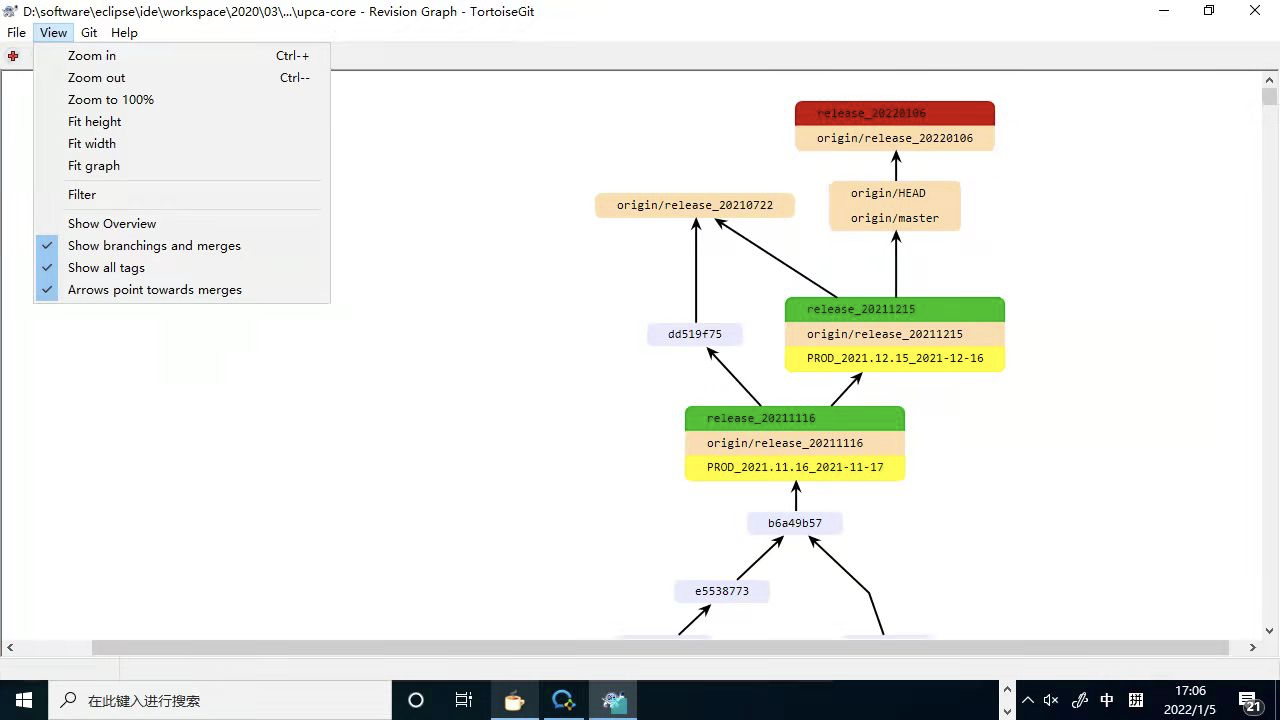
Web This command analyses the revision history and attempts to create a direct graph showing the points at tag branch and other reference Important In order to generate the graph TortoiseGit must fetch all log messages from the repository root Just show commits which have some reference point to 2 14 1 Revision Graph Nodes Web The Revision Log Dialog There are several places from where you can show the Log dialog From the explorer context menu using TortoiseGit Show log From various TortoiseGit dialogs where you can select a commit oftentimes using a button From various TortoiseGit dialogs where commit entries or files are shown using the context
Using Git With Visual Studio Code Fadhs Git svn Git Utilitaire De Ligne De Commande Git show StackLima How To Git svn Clone The Last N Revisions From A Subversion Repository Solved Create Dynamic Assembly Version Including Date And Random 2 14 Revision Graphs TortoiseGit Documentation Goldilocks Operations Manual Process Street Solved How Do I Show The SVN Revision Number In Git 9to5Answer How To Check Git Commit History Of A Particular Line In Eclipse W3 Spot
Tortoise Git Show Revision Number
 Tortoise Git Show Revision Number
https://www.gitkraken.com/wp-content/uploads/2021/05/gitkraken-vs-tortoisegit.png
Web DESCRIPTION Many Git commands take revision parameters as arguments Depending on the command they denote a specific commit or for commands which walk the revision graph such as git log 1 all commits which are reachable from that commit For commands that walk the revision graph one can also specify a range of revisions
Pre-crafted templates offer a time-saving solution for producing a varied range of documents and files. These pre-designed formats and designs can be utilized for numerous personal and expert tasks, consisting of resumes, invitations, flyers, newsletters, reports, discussions, and more, simplifying the content development procedure.
Tortoise Git Show Revision Number
git revision Graph Secondworld
Git svn
Git Utilitaire De Ligne De Commande Git show StackLima

How To Git svn Clone The Last N Revisions From A Subversion Repository
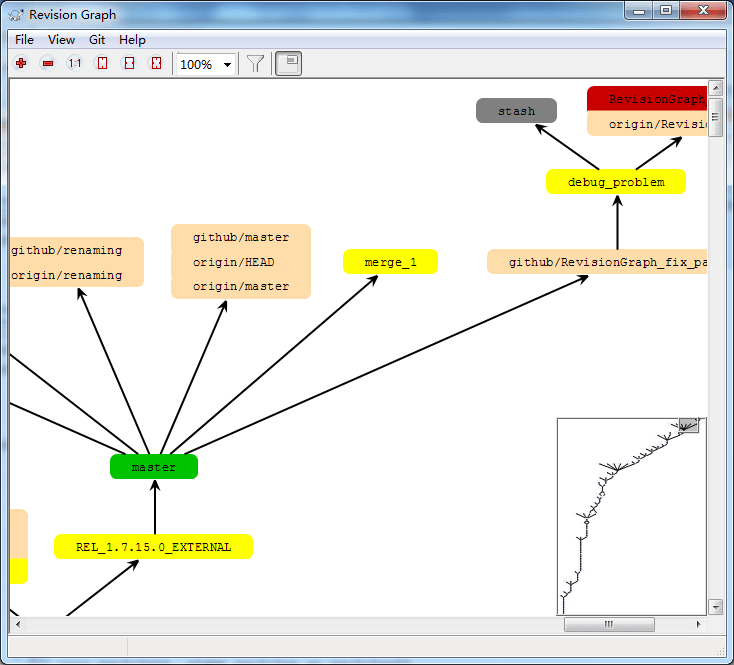
2 14 Revision Graphs TortoiseGit Documentation

Goldilocks Operations Manual Process Street
Web Sep 18 2008 nbsp 0183 32 7 Answers Sorted by 145 Right click on the working directory in windows explorer and select quot Properties quot Not TortoiseSVN gt Properties You will see the Properties dialog which will have a tab called quot Subversion quot Click on it and you will see the version number and other info edited Jun 18 2013 at 8 01 Stiefel 2 734 3 31 44

Web Oct 14 2016 nbsp 0183 32 1 Answer Sorted by 1 Go to TortoiseGit settings gt General gt Dialogs 1 and enable quot Display branch revision number quot After enabling the revision number is shown in each commit message in log dialog

Web That s when you need to use TortoiseGit Revision Graph This command analyses the revision history and attempts to create a direct graph showing the points at tag branch and other reference

Web Display branch revision number Displays for every selected commit a so called quot branch revision number quot in the commit message field of the Log Dialog The branch revision number is calculated by calling git rev list count first parent SHA1 and represents the number of commits between the beginning of time and the selected commit This

Web Invoking the Revision Log Dialog Figure 2 27 The Revision Log Dialog There are several places from where you can show the Log dialog From the explorer context menu using TortoiseGit Show log From various TortoiseGit dialogs where you can select a commit oftentimes using a button
Web Difference between two previous revisions If you want to see the difference between two revisions which are already committed use the Log dialog and select the two revisions you want to compare using the usual Ctrl modifier Then select Compare revisions from the context menu cf the section called Log Dialog Web Revision Graph Nodes Each revision graph node represents a revision in the repository where something changed in the tree you are looking at Different types of node can be distinguished by shape and colour The shapes are fixed but colours can be set using TortoiseSVN Settings Added or copied items
Web 7 1 Git Tools Revision Selection By now you ve learned most of the day to day commands and workflows that you need to manage or maintain a Git repository for your source code control You ve accomplished the basic tasks of tracking and committing files and you ve harnessed the power of the staging area and lightweight topic branching