Test Internet Speed Cmd How To Check Your Internet Speed Using Run Command On Windows 11 10 YouTube Check Your Internet Speed Using Command Prompt YouTube How To Check Internet Speed In Cmd Windows 10 11 Check Speedtest Via Cmd Speedtest exe YouTube How To Increase Internet Speed Using CMD Command Prompt Fix How To Check Internet Speed With Cmd Command Web Aug 25 2022 nbsp 0183 32 Screenshot of running the Fast CLI from command line Speedtest using the speed test CLI npm This solution works on any system where npm is available including Windows Mac and Linux Install via npm npm install location global speed test Run the speed test speed test
Web May 30 2019 nbsp 0183 32 Running the command speed test will perform a speed test via your terminal and present a textual result as shown below speed test Ping 34 ms Download 11 9 Mbps Upload 12 Mbps The program tests your internet connection speed and ping using speedtest and displays the result in the terminal itself If you want a more Web Aug 21 2023 nbsp 0183 32 The ping command sends packets of data to a specific IP address on a network and then lets you know how long it took to transmit that data and get a response It s a handy tool that you can use to quickly test various points of
How To Check Internet Speed With Cmd Command How To Check Internet Speed Via Terminal On MacOS Monterey Hongkiat How To Increase Internet Speed Using CMD Command Prompt Fix How To Double Your Internet Speed Using CMD 100 Working YouTube How To Test Internet Speed Via CMD On Windows Easytutoriel How To Check Upload And Download Speed Using CMD YouTube How To Boost Internet Speed Using CMD 2021 ItsDailyTech Testing Your Internet Speed From The Command Line On Windows Linux Or Mac Double Your Internet Speed Using Cmd In Windows Working
Test Internet Speed Cmd
 Test Internet Speed Cmd
https://i.ytimg.com/vi/HVc4W2KJIxU/maxresdefault.jpg
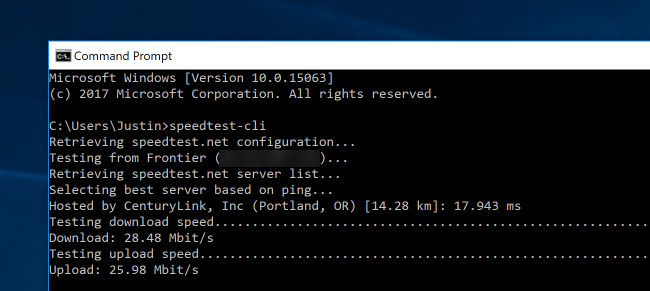
Web Dec 23 2020 nbsp 0183 32 Running speedtest cli Testing your internet speed using the command line is the same on all platforms All you need to do is to type speedtest and hit the Enter key I hope you found this post helpful Thanks for reading
Templates are pre-designed documents or files that can be utilized for various functions. They can save time and effort by offering a ready-made format and layout for developing different kinds of content. Templates can be used for individual or professional jobs, such as resumes, invites, leaflets, newsletters, reports, discussions, and more.
Test Internet Speed Cmd
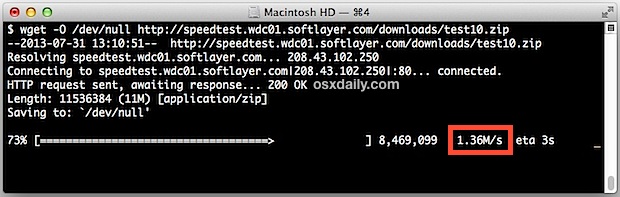
Lan Speed Test Mac Os Terminal Passaspecials
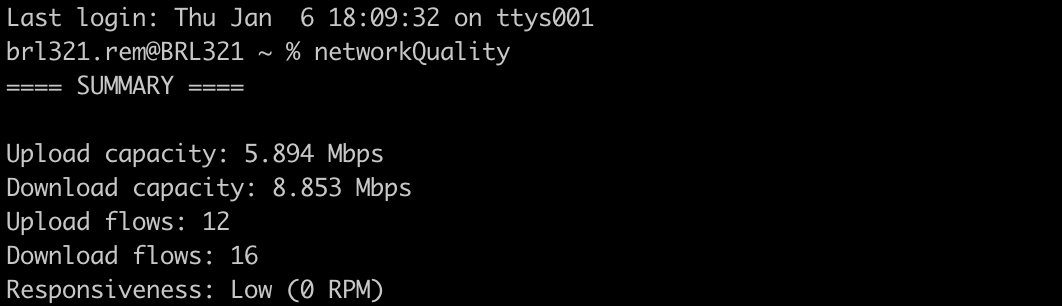
How To Check Internet Speed Via Terminal On MacOS Monterey Hongkiat
How To Increase Internet Speed Using CMD Command Prompt Fix

How To Double Your Internet Speed Using CMD 100 Working YouTube

How To Check Upload And Download Speed Using CMD YouTube

How To Boost Internet Speed Using CMD 2021 ItsDailyTech

Web May 2 2022 nbsp 0183 32 1 How to check the internet connection in CMD 2 How to traceroute in CMD tracert command to troubleshoot network and internet problems 3 How can I see all the network adapters on my computer using CMD 4 How to check your network connection in CMD 5 How to renew the IP address of your network adapter 6

Web Apr 11 2013 nbsp 0183 32 Test Internet Connection Speed Using Ping Command 1 Open command prompt If you are new to command prompt then first check out my post on different ways to open a 2 Once you see the cmd or terminal window try the following command

Web Jan 24 2020 nbsp 0183 32 3 handy command line internet speed tests Speedtest Speedtest is an old favorite It s implemented in Python packaged in Apt and also available with pip Fast Fast is a service provided by Netflix The command returns your Internet download speed iPerf It s also available for Mac

Web May 13 2022 nbsp 0183 32 How to speed up internet using cmd 1 Check internet speed using cmd pings to default gateway You can check your internet connection speed by sending ping 2 IP release and renew If you are using a WiFi connection you may experience a temporary speed boost by typing in 3 Flushdns Our
Web Jan 26 2023 nbsp 0183 32 Control Panel Command Prompt PowerShell On Windows 10 the network adapter is an essential component that offers the means to connect to the network and internet using a wired or wireless
Web Jun 25 2019 nbsp 0183 32 Install node js on your system with default settings Now open the Command Prompt and type in the following command and hit Enter npm install g speed test This command will download and install the speed test package from npm Now to test your internet speed type speed test in the Command Prompt and hit Enter Web Measure internet connection performance metrics like download upload latency and packet loss natively without relying on a web browser Test the internet connection of your Linux desktop a remote server or even lower powered devices such as the Raspberry Pi 174 with the Speedtest Server Network
Web Aug 26 2021 nbsp 0183 32 So you want to check you internet speed in command prompt well it can be done using speedtest CLI Its a free tool that lets you measure internet connection performance metrics like