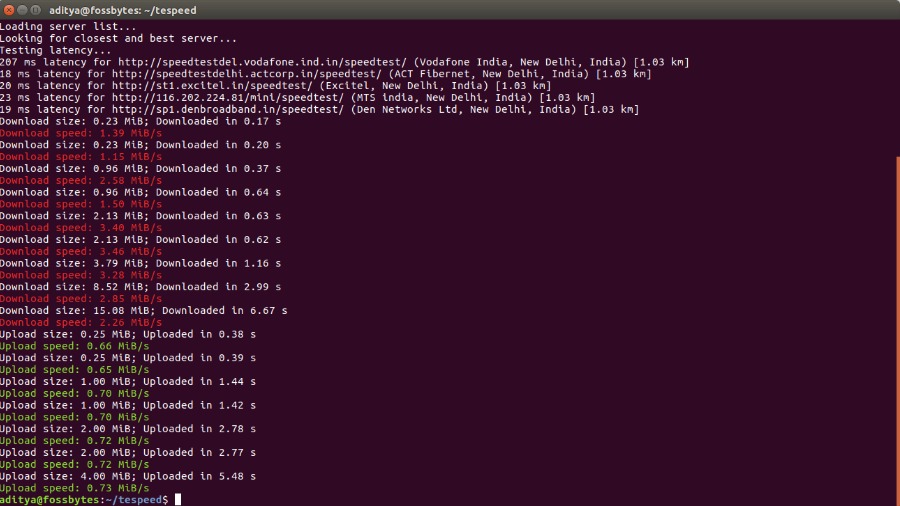
Test Internet In Cmd Network Speed Test Cmd How To Run A Ping Test In Cmd For Broadband Speed Test YouTube CMD Tricks Insert Image In CMD CMD Batch File Test Best Tools To Test Internet Speed On Windows 10 Broadband Internet Speed Up Using CMD It Works 1000 YouTube Speedtest CLI brings the trusted technology and global server network behind Speedtest to the command line Built for software developers system administrators and computer enthusiasts alike Speedtest CLI is the first official Linux native Speedtest application backed by Ookla With Speedtest CLI you can easily
Check internet speed using cmd pings to default gateway You can check your internet connection speed by sending ping packets to your default gateway To know your default gateway you can Three open source tools that enable you to check your internet and network speeds at the command line are Speedtest Fast and iPerf Speedtest Speedtest is an old favorite It s implemented in Python packaged in Apt and also available with pip You can use it as a command line tool or within a Python script Install it with
Broadband Internet Speed Up Using CMD It Works 1000 YouTube Internet Speed Test How To Use Ping On Cmd To Stress Test A Server YouTube How To Check Internet Speed Using Cmd YouTube Speed Up Internet Using CMD Command Prompt Internet Speed Test Original WiFi Analyzer For Android APK Download How To Double Your Internet Speed Using CMD 100 Working YouTube Internet Speed Test Fiber Test For Android APK Download Internet Speed Test Original WiFi Analyzer For Android APK Download
Test Internet In Cmd
 Test Internet In Cmd
https://fossbytes.com/wp-content/uploads/2016/12/speedtest-linux-2.jpg
Search for Command Prompt and click the top result to open the console Type the following command to determine the connection speed for all the Ethernet and Wi Fi adapters and press Enter wmic
Pre-crafted templates provide a time-saving solution for developing a varied series of files and files. These pre-designed formats and designs can be made use of for numerous personal and expert jobs, consisting of resumes, invites, leaflets, newsletters, reports, discussions, and more, simplifying the content creation procedure.
Test Internet In Cmd

How To Create Wi Fi Hotspot To Share Your Internet In CMD No Apps YouTube

Internet Speed Test
How To Use Ping On Cmd To Stress Test A Server YouTube

How To Check Internet Speed Using Cmd YouTube

Internet Speed Test Original WiFi Analyzer For Android APK Download
How To Double Your Internet Speed Using CMD 100 Working YouTube
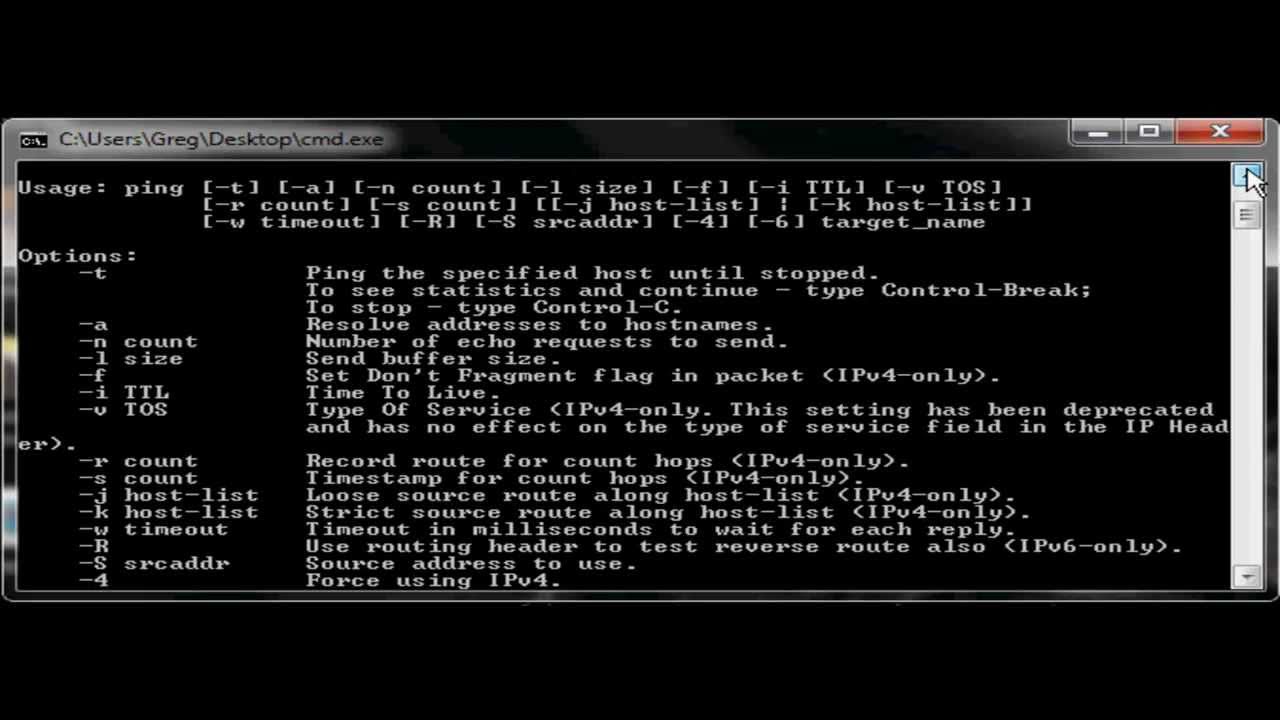
The ping command allows you to check if you can connect to a hostname or an IP address and provide a basic measurement of the latency or lag between your connection and the remote device To

Just run one command sudo apt install speedtest cli The command might differ somewhat on other Linux distributions so check your distro s package manager and look for a package named speedtest cli Installing speedtest cli on macOS Using Homebrew
You can test whether your computer can reach another device like your router on your local network or whether it can reach a device on the Internet This can help you determine if a network problem is somewhere on your local network or somewhere beyond

Step 1 Open the Start Menu Before we can use ping we need to open Windows Command Prompt To do so right click the start button in the bottom left corner of the screen Ask Question Comment Step 2 Search for Command Prompt Once the start menu is open click in the Search programs and files box and type Command Prompt
1 Open command prompt If you are new to command prompt then first check out my post on different ways to open a command prompt To open the terminal on mac type in the terminal in the spotlight while Linux user can use the shortcut ctrl alt T 2 Once you see the cmd or terminal window try the following command a ping localhost
This command helps us to quickly see all the network cards installed in the computer both physical and virtual and the configuration of each of them Very useful for example to know the IP of our computer very easily To use this command we must simply type the following ipconfig Testing your internet speed using the command line is the same on all platforms All you need to do is to type speedtest and hit the Enter key I hope you found this post helpful In this quick post I will be sharing a simple trick to test your internet speed through the command Tagged with linux windows mac productivity
Using this option will ping the target until you force it to stop by using Ctrl C a This ping command option will resolve if possible the hostname of an IP address target n count This option sets the number of ICMP Echo Requests to send from 1 to 4294967295 The ping command will send 4 by default if n isn t used